What is data transformation and why does it matter?
Businesses generate and exchange more data than ever before due to the amount of applications and systems deployed to run operations. Yet the data that exists in one system is rarely in a format another system can understand. This is why data transformation is important. It ensures that information can move smoothly between applications, support accurate analysis, and enable efficient process automation. Without it, data becomes siloed, inconsistent, and far less valuable.
Understanding data transformation
Data transformation is the process of converting data from its original structure or format into a new one so it can be used effectively by different systems. This can involve something as simple as changing a date format or as complex as restructuring an entire dataset from XML into JSON for an API integration.
Transformation might include renaming fields, validating values, normalising product information, reshaping hierarchical structures, enriching records with additional lookups, or aggregating data for reporting.
The goal is always the same: to produce data that is accurate, consistent, and ready for use, whether by another system, a business process, or an analytical tool.
Examples:
- Converting XML into JSON
- Changing date formats (e.g. MM/DD/YYYY into YYYY-MM-DD)
- Normalising product names (iPhone14, IPHONE 14, iPhone 14)
- Aggregating numbers (e.g. total sales per region)
- Mapping source fields to destination fields in an API or database
Why data transformation is so important
Modern businesses operate using a mix of platforms, such as CRMs, ERPs, eCommerce systems, warehouse management systems, marketing platforms, and countless cloud applications. Each system has its own data model and preferred formats. For these systems to work together, sharing customers, products, transactions, or financial data, transformation is essential.
Beyond enabling interoperability, data transformation is crucial for maintaining data quality. Cleaning and standardising information reduces errors, improves decision-making, and makes analytics more reliable.
It also helps ensure regulatory compliance in industries where calculations, formatting, and validation rules must be followed precisely. And because transformation processes can be automated, they remove the need for manual data manipulation, saving time and reducing human error.
As a result, data transformation ensures the data is:
- Compatible: Different applications use different formats (XML, CSV, JSON). Transformation allows them to communicate.
- Accurate / high quality: Cleaning, standardising, validating, and enriching data prevents downstream errors.
- Usable for analysis: Business intelligence (BI) tools require structured, normalised data.
- Efficient: Automated transformation removes manual spreadsheet cleaning and reduces errors.
- Compliant: Proper formatting is often required to meet regulatory or reporting requirements (finance, healthcare, etc.).
Where data transformation is used
Data transformation plays a central role in almost every integration or reporting scenario. ERPs and CRMs often require it to synchronise customer or order data. eCommerce platforms use it to exchange inventory and pricing with back-office systems or third-party logistics (3PL) services.
Database migrations rely on transformation to adapt structures to new schemas. APIs frequently expect specific formats that require mapping and restructuring. Even analytics and AI tools depend on well-transformed data to deliver accurate insights.
Common examples
- ERPs (Acumatica, Epicor, Microsoft Dynamics, Sage Intacct, SAP Business One, SYSPRO)
- CRMs (Salesforce, HubSpot, SugarCRM)
- eCommerce platforms (Magento, Shopify, WooCommerce)
- Databases (SQL Server, Oracle, MySQL, PostgreSQL)
- APIs (REST, SOAP, GraphQL)
- HR/Payroll systems
- Marketing automation tools
- Cloud services (AWS, Azure, Google Cloud)
- Legacy systems that use older formats like EDI, fixed-width files
Essentially, any system that consumes data from a different source benefits from transformation. In many cases, it is the unseen engine that allows business processes to operate smoothly.
What data transformation typically involves
Data transformation touches many aspects of how information is prepared and shaped, and modern transformation and integration systems generally perform a number of core functions behind the scenes.
Mapping and restructuring
One of the most fundamental is mapping and restructuring. Whenever data flows between two different systems, the fields rarely match one-to-one. A CRM might call a field ‘CustomerName’ while an ERP expects ‘ClientFullName’, and an eCommerce platform might store first name and last name separately.
Mapping aligns these differences, ensuring that each piece of information finds its proper place in the destination. For example, successful CRM integration depends on one thing above anything else: clean, consistent, and accurately structured data.
Beyond simple field matching, mapping also reshapes the structure of the data. Hierarchical information that arrives nested in multiple layers, such as orders containing items, options, and attributes, may need to be flattened into a table-like structure for processing or reporting.
Conversely, flat files and datasets sometimes must be reorganised into nested layouts to satisfy modern APIs. Even pivoting and unpivoting data, tasks once reserved for spreadsheets or SQL scripts, now form part of the structural transformation process.
Conversion
Another essential capability is conversion, which focuses on changing the data itself into the correct type or format.
Systems often disagree on how to represent values: numbers may appear as strings, dates come in dozens of regional formats, and booleans can be expressed as ‘true’, ‘1’, ‘yes’, or any number of custom variations.
Transformation tools harmonise these differences so that the receiving system not only understands the data, but can also process it safely. In addition to converting data types, transformation frequently involves converting entire documents, such as changing a CSV export into XML for a legacy application, or reshaping XML into JSON so it can be submitted to a REST API.
With digital ecosystems relying increasingly on structured data exchange, format conversion has become a core requirement rather than a niche feature.
Data cleansing
Closely tied to conversion is the process of data cleaning, which prepares raw information to be reliable and usable.
Real-world datasets are messy. Duplicate records appear when customers sign up with different email addresses. Product names vary slightly from one source to another. Values may be missing, inconsistent, or simply wrong.
Cleaning routines help fix these issues by identifying and removing duplicates, standardising differences in capitalisation or spelling, normalising values to match the rules of the target system, and handling null or invalid entries.
This step often has a greater impact on the quality of downstream operations than any other part of the transformation pipeline, because clean data ultimately means fewer errors, fewer exceptions, and more accurate reporting.
Enrichment
Once the data is clean and consistent, it can be enriched to add additional value. Enrichment might involve performing lookups, pulling in related information from a database, for example, to attach a customer’s credit rating or a product’s supplier code to an inbound order.
It can also involve deriving new fields such as tax amounts, profit margins, or categorisation tags. These calculations and enhancements allow organisations to use the transformed data not just for immediate operational needs, but also for deeper business insights and automation.
Validation
Data also needs to be validated before it is sent into another system or included in a report. Validation routines act as a final gatekeeper, ensuring that the information meets predefined rules or schemas.
For example, a product price might need to fall within a certain range; an email address must match an expected pattern; a JSON document may need to conform to a schema before an API will accept it. If the data fails validation, the transformation process can catch and correct the issue or flag it for remediation, preventing corrupted or incomplete information from spreading across the business.
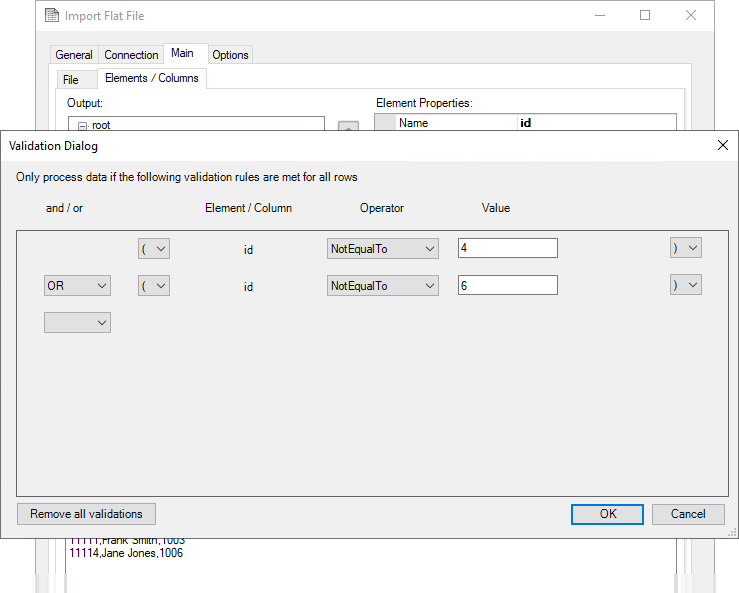
Image: BPA Platform’s Import Flat File Tool enable users to create one or more logical expression rules to filter data contained in the input file(s) at task run time, enabling validation.
Aggregation
In many use cases, transformation also includes aggregation, especially when preparing data for AI, analytics, dashboards, or summaries. Aggregation takes large volumes of detailed information and condenses it into meaningful metrics: total sales per region, average order value, monthly inventory levels, or statistical calculations that reveal trends or anomalies. By grouping and summarising data, aggregation turns raw transactions into actionable knowledge.
Security
Finally, as organisations grow more aware of security and privacy responsibilities, security-related transformations have become common. These may involve masking sensitive fields, such as hiding a portion of a credit card number; encrypting data before it leaves a secure environment; or hashing values so they can be compared without revealing the original contents.
These techniques ensure that data is protected throughout the transformation pipeline and that only authorised systems or users can access sensitive information.
Taken together, these transformation capabilities breathe life into raw data, turning it into a trustworthy, structured, and secure asset that can be shared across platforms, analysed in depth, and used to drive better business outcomes.
How data transformation is performed
Data transformation can occur in a variety of ways depending on the systems involved, the volume of data, and the needs of the business.
In traditional data engineering environments, one of the most familiar approaches is ETL (Extract, Transform, Load). In an ETL workflow, data is first pulled from the source, then transformed within an intermediary environment, and finally loaded into its destination. This approach allows businesses to perform the bulk of their transformation work before the data ever touches the target system, ensuring it is fully prepared, validated, and ready for analysis or integration.
In recent years, however, ELT (Extract, Load, Transform) has gained popularity, particularly with the rise of modern data warehouses. In an ELT setup, the raw data is loaded directly into the target system first. Only after it arrives do teams perform the necessary transformations, often exploiting the processing power and scalability of the warehouse platform itself. This model is especially effective for large datasets and flexible analytical environments where raw data needs to be available quickly.
Not all transformation happens in large, scheduled workflows. In many modern applications, especially those involving APIs and iPaaS solutions, transformation occurs in real time. When a customer submits an order on an eCommerce website, for example, the system may instantly reshape that order data so it can be accepted by an ERP system or forwarded to a CRM for follow-up.
Webhooks, event-driven architectures, and integration tools often rely on these instantaneous transformations to keep business processes running smoothly without any delay.
Other scenarios take a more deliberate, scheduled approach. Batch transformation is common when businesses must process substantial volumes of data at predictable intervals, for instance, when exporting nightly inventory updates, synchronising thousands of records at once, or performing end-of-day financial reporting.
Batch processing allows businesses to perform complex transformations without interrupting live systems, making it well-suited for larger or more resource-intensive workflows.
Of course, transformation is not always automated. Many teams still rely on manual or semi-manual methods, such as cleaning data in Excel, applying formulas in Google Sheets, or preparing tables in Power BI before creating dashboards. While not as scalable as automated approaches, these techniques offer flexibility, accessibility, and quick problem-solving capabilities for smaller datasets or one-off tasks.
Developers often take a programmatic approach, writing custom scripts and transformation logic in languages such as Python, Java, SQL, or JavaScript. These methods provide fine-grained control and are powerful when performing highly specialised transformations or integrating with bespoke systems. They can handle intricate calculations, complex validations, or transformations that require advanced logic.
At the same time, integration and business process automation platforms have opened transformation capabilities to a much broader audience. Solutions like Codeless Platforms’ BPA Platform allow users to configure transformations through drag-and-drop interfaces rather than writing code.
These platforms automate many of the steps involved in mapping, converting, and validating data, making transformation faster to build, easier to maintain, and more accessible to non-developers. For many businesses, this approach offers the ideal balance between power and simplicity, supporting both real-time and batch workflows with minimal technical overhead.
We’ll delve deeper into BPA Platform’s data transformation capabilities a bit later.
Using staging databases in data transformation
A staging database plays a crucial, although sometimes invisible, role in many data transformation architectures. It acts as the safe, controlled ‘middle ground’ between raw source data and the refined, transformed data that will ultimately be loaded into a target system.
To understand where staging fits in, it helps to think of data movement as a journey: extraction from the source, preparation and transformation, and final delivery into the destination. The staging database sits in the middle of that journey, providing space and structure for the transformation work to happen.
What is a staging database?
A staging database (or staging area) is a temporary, intermediary storage environment where raw data is loaded exactly as it was extracted from the source system. There’s no requirement for the data to match the structure, constraints, or rules of the destination. The staging database is deliberately flexible, accommodating imperfect or partial data without causing errors.
Why a staging database exists
When systems exchange data directly, a number of problems can arise: the source system might deliver inconsistent values; transformations might be too complex to perform in memory; or the target system might reject data that doesn’t meet strict validation requirements. A staging database addresses these challenges by providing a place to land the data first, inspect it, transform it, and only then load it forward.
Where staging fits in the data transformation process
Before transformation: landing raw data
In many transformation workflows, extraction happens first, and the raw data is deposited into the staging database in its original form. This ensures that no matter what happens during transformation, the untouched source data is preserved. It also allows teams to re-run transformations without querying the source systems repeatedly, which is a huge benefit for performance and stability.
During transformation: preparing and refining
Once in staging, the data can be cleaned, validated, merged, split, normalised, or enriched before being moved to the final destination. This is often where the heavy lifting happens. Because the staging environment is isolated, you can perform operations that might be too time-consuming or risky to do directly in production systems.
Transformations that commonly occur in staging include:
- Standardising values
- Removing duplicates
- Converting data types
- Restructuring or pivoting tables
- Performing multi-step calculations
- Joining multiple source datasets
- Validating data quality
This is also where auditors or analysts can inspect intermediate results if needed.
After transformation: loading into the destination
Once the data has been fully transformed and passes all validation checks, it can be safely loaded into its final target, often an ERP system, CRM, API endpoint, data warehouse, or operational database.
Staging ensures that only clean, structured, and validated data reaches critical systems.
Staging databases in real-time vs. batch processes
- Batch processes (nightly, hourly, daily) almost always use staging because they handle larger volumes of data and multi-step workflows.
- Real-time integrations (APIs, webhooks) may skip a traditional staging database, although some platforms write incoming data to temporary tables or queues, which effectively act as a lightweight staging area.
In modern architectures, technologies like Kafka, message queues, and cloud data lakes sometimes serve as ‘staging layers’ in a streaming context.
Benefits of using a staging database in transformations
Using a staging database offers several practical advantages that can significantly improve the reliability and efficiency of data transformation processes. Because it sits between the source and the destination, the staging area provides a controlled environment where raw data can be preserved, inspected, and manipulated without risk to production systems.
This middle layer makes complex transformations more manageable and transparent, ultimately simplifying integrations and strengthening the overall data pipeline.
- Reliability and data safety
If transformation steps fail, you still have the raw data untouched in staging. You don’t need to re-pull from source systems. - Performance
Complex queries and transformations can be resource-intensive. Running them in a dedicated staging environment prevents load on production systems. - Flexibility for complex multi-step transformations
Some transformations require multiple passes or comparisons across datasets. A staging area allows for this without affecting either the source or target. - Transparency and auditing
Data teams can inspect intermediate states, troubleshoot anomalies, or track lineage. - Simplifies integrations
When integrating disparate systems, a staging database acts as a neutral “common ground” where data from many sources can be consolidated before being mapped onward.
Staging databases and integration platforms
Although integration platforms often perform transformations in-memory within tasks (especially for real-time workflows), a staging database can still play a valuable role in BPA-driven integrations. Many organisations use a staging SQL Server or MySQL database to store:
- Raw imports from eCommerce platforms
- Unvalidated ERP data
- Intermediate datasets created by BPA tasks
- Records awaiting approval or enrichment
- Snapshots of third-party API database
BPA tasks can:
- Extract data from source systems
- Insert it into a staging database
- Run SQL transformations, stored procedures, or Recordset Transformations
- Push the refined data into the final system
This combination, BPA automation plus a staging layer, gives businesses both agility and robustness.
Data transformation in Codeless Platforms’ BPA Platform
Codeless Platforms’ BPA Platform delivers a powerful, drag and drop approach to data transformation, designed especially for integrating business systems. It provides a range of tools that allow users to reshape, clean, and map data without needing to write lots of code, although scripting options remain available for advanced developers.
How BPA Platform typically performs a transformation
A typical transformation workflow usually follows these steps:
- 1. Retrieve data using a tool or connector (database query, API call, import tool)
- 2. Store in staging database so that the BPA Platform engine can prep the data and compare records to determine which system needs updating:
- a. Transform data using various formatting tools (Format Tool, Recordset Transformation)
- b. Clean / normalise (remove duplicates, standardise differences, normalise values, and handling null or invalid entries)
- c. Validate (e.g. required fields, predefined rules or schemas)
- 3. Map output to target system format using graphical user interface (data mapper)
- 4. Send data (database write, API call, file output, etc.)
Retrieving data
BPA Platform uses a variety of tools to retrieve data from various sources, including databases, legacy systems, cloud applications, web services etc.
Database Query (ODBC) Tool
The Database Query (ODBC) Tool allows the extraction of specific information sets from relational database systems that utilise Microsoft SQL Server, Oracle, MySQL etc. The majority of ERP systems, as well as other software products, support ODBC, making it an extremely efficient and cost-effective method for reading and writing data between databases.
Database Query (OLE DB) Tool
The Database Query (OLE DB) Tool allows the extraction of specific information sets from SQL-based data sources and relational databases (MySQL, MS-SQL, Oracle etc.), as well as non-SQL-based data, such as directory services, XML spreadsheets, emails on MS Exchange Server etc.
Call Stored Procedure (OLE DB) Tool
The Call Stored Procedure (OLE DB) Tool executes database stored procedures and functions to provide read, write, and automated data processing. If a procedure generates a recordset, the task step can return this to other steps for further processing. Conversely, the task step can consume a recordset to enable multiple procedure calls or execute a single procedure.
Import Flat File Tool
The Import Flat File Tool imports a delimited or fixed-width file from disk into BPA Platform, extracts the file content including any file properties, then outputs it as either a recordset or as XML.
Import XML Document Tool
The Import XML Document Tool imports an XML document to be used and processed by other task steps. To validate the XML documents at runtime, you can either import an XML schema file (XSD), inferred from an existing XML document, or manually constructed.
Transforming data
BPA Platform’s Formatting Tools are central to the platform’s transformation capabilities. It allows users to map data into XML, JSON, CSV, or other structured outputs, and it can apply XSLT transformations to convert complex hierarchies.
The Transform Data Tool
The Transform Data Tool is a format tool that enables a new structure to be created from an existing XML or recordset data source. The output generated by this tool is ready for use in a destination system which consumes or requires XML.
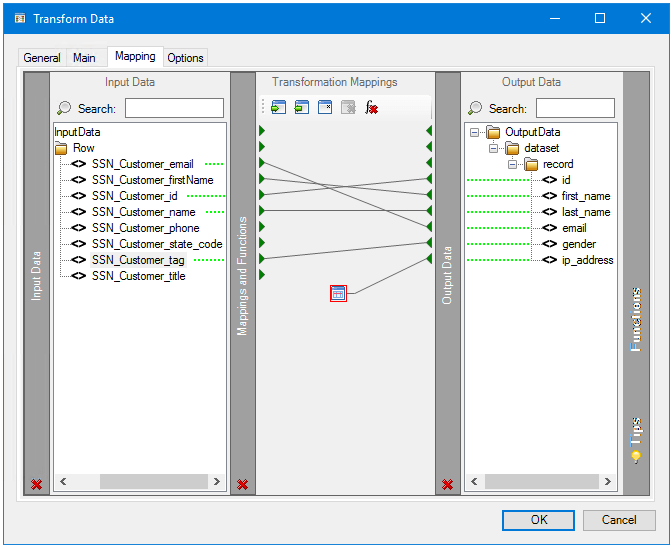
Image: The Mapping tab uses the Data Transformation Layer (DTL) to define links between the input XML or recordset data and the new XML output structure generated at runtime.
Format as Flat File Tool
The Format as Flat File Tool takes a BPA Platform recordset and converts it into a flat file to be used by another task step or external program. The flat file output can be delimited or fixed width. You can also choose whether the flat file contains data for single or multiple record types.
Format as HTML Pro Tool
The Format as HTML Pro Tool is used to create a task step that produces single or multiple HTML documents. You can choose to create the HTML template from scratch or import a pre-existing template. Recordsets and other task step properties can also be used to populate the HTML template to produce dynamic content documents. These documents can then be consumed and then delivered by Output or Execute task steps.
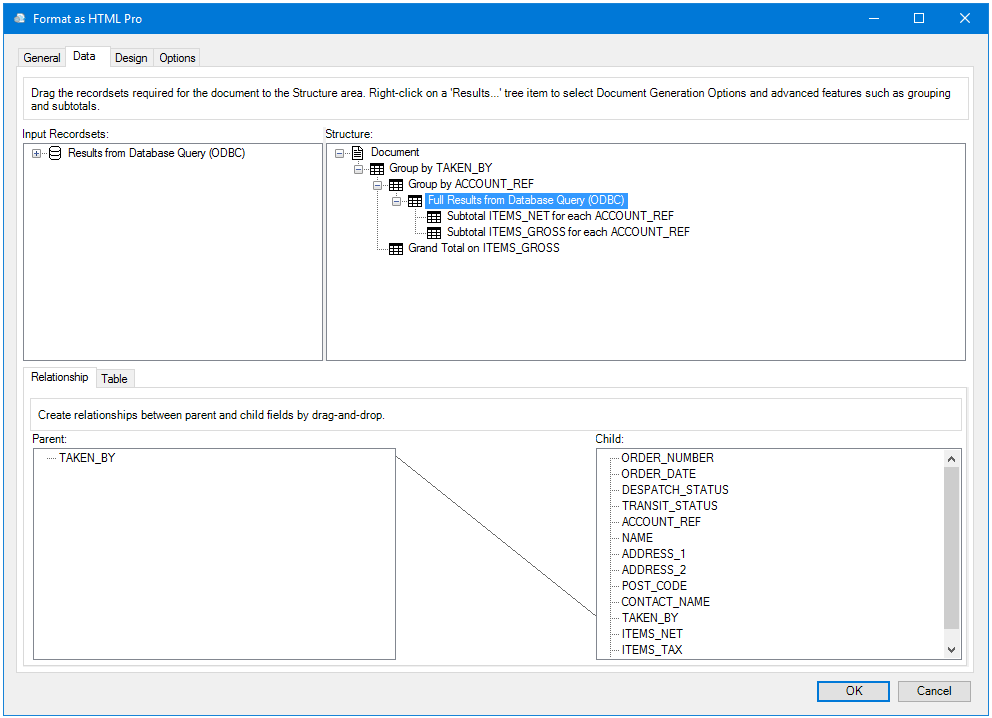
Image: You use the Data tab to specify and manipulate the data sources included in your HTML document.
Format as HTML Tool
The Format as HTML Tool is used to create a task step that produces single or multiple HTML documents. You can choose to create the HTML template from scratch or import a pre-existing template. Recordsets and other task step properties can also be used to populate the HTML template to produce dynamic content documents. These documents can then be consumed and then delivered by Output or Execute task steps.
Format as Text Tool
The Format as Text Tool creates single or multiple text documents, using information provided by Input tools such as the Database Query (ODBC) tool. It requires no global settings. If required, you can produce dynamic documents such as, alerts and notifications, or data formats such as .CSV for spreadsheets or uploading to other systems. Drag-and-drop recordset columns, variables, and properties from the Task Browser to achieve this.
Recordset transformation
BPA Platform’s recordset transformation tools can convert recordsets from databases or connectors, enabling users to aggregate, or reshape datasets.
Convert Recordset to XML Tool
The Convert Recordset to XML Tool allows the conversion of one or more flat-structure BPA Platform recordsets into a hierarchical XML structure. This way, it is used to provide ‘translation services’ between the standard BPA Platform tools, such as Database Query (ODBC), and advanced BPA Platform tools that accept XML as their input.
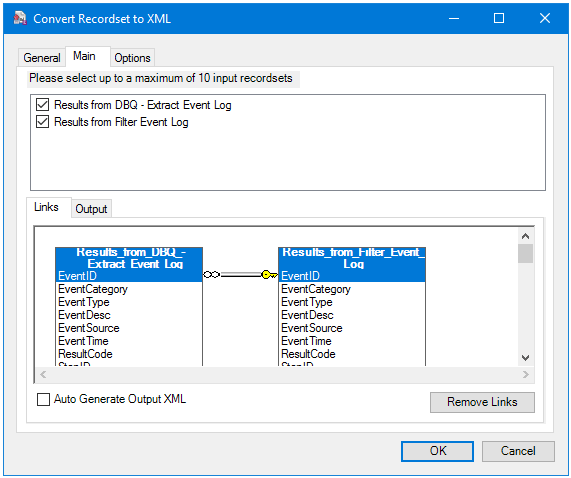
Image: Use the Main tab to convert relevant recordset data to the required XML structure.
Convert XML to Recordset Tool
The Convert XML to Recordset Tool is used to convert XML data into a flat-format BPA Platform recordset, allowing the data to be used by recordset-only consuming tools. This could then be used to power alerts via fax, email, or SMS, create reports, power a workflow, perform FTP transfer, and so on.
Data mapping
BPA Platform provides a drag-and-drop interface for mapping fields, performing expressions, and applying logic such as conditional rules, concatenation, lookups, and calculations. The Object Designer allows you to easily map out and control fields, objects and operations thanks to its graphical user interface.
This is achieved by the following functions in BPA Platform:
Tasks and Steps: These provide the ability to build flexible automation processes with logical building blocks, using a drag and drop UI. Tasks are the primary entity in BPA Platform. They represent all, or a part of, a distinct business process, and can partially or completely replace a manual process. Multiple interrelated steps are included inside a Task. Using visual modelling techniques, the steps are dragged and dropped, and then linked to form part of a process.
Tools: As well as the tools above, BPA Platform has numerous tools to manipulate data. These are used to create steps within a task, providing the functional building blocks that interface with common technologies, systems, and applications.
This video explains the relationship between Tasks, Steps and Tools and how they can be used to create automated processes, as well as the differences and functions of each element
Output tools
Call Stored Procedure (OLE DB) Tool
The Call Stored Procedure (OLE DB) Tool executes database stored procedures and functions to provide read, write, and automated data processing.
Send Email (SMTP) Tool
The Send Email (SMTP) Tool sends messages to any SMTP compliant mail server. This tool is capable of sending multiple messages in either text or HTML formats, incorporating data from Input and Format steps to any number of recipients.
Transfer File (FTP) Tool
The Transfer File (FTP) Tool is used to create a Task Step that uploads or downloads one or more files to and from one or more FTP Servers. This is a powerful tool which can be used, for example, in the automated publishing of key information to Intranet / Internet sites.
Send Text Message Tool
The Send Text Message Tool is used to create and send data-driven, personalised text messages to employees, customers, prospects, suppliers, and so on. Sending can be automated to guarantee the timing of the text messages.
Connectors and templated solutions
Dedicated connectors and templated solutions for various systems and applications, such as Epicor, Sage Intacct, SAP Business One, SYSPRO, Salesforce, Dynamics 365 CRM, HubSpot, Shopify, Magento, and others, include retrieval, formatting and mapping tools by default. This makes it simpler and quicker to connect business systems and automate data transformation.
Codeless Platforms’ connectors and solutions enable users to seamlessly integrate with SQL Server, ODBC, OLEDB, web services and third-party APIs, as well as a variety of protocols, including XML, CSV, JSON, HTTP, SMTP, OAuth and more.
Why BPA Platform is strong for data transformation
BPA Platform’s capabilities make it particularly well-suited for ERP, CRM, and eCommerce integrations where data models can be complex.
The system not only transforms data into the formats required by different applications, but also orchestrates entire workflows, retrieving data from one system, transforming it as needed, and sending it to another through connectors, APIs, or database operations.
- Connectors for major business systems reduce mapping complexity
- Used widely for ERP/CRM/eCommerce integrations
- Drag and drop GUI: Many transformations can be done without scripting
- Supports complex hierarchical data (important for ERPs and APIs)
- Event-driven or scheduled processing
- Reusability: Transformations can be packaged into tasks and reused
- Monitoring and error handling built in
Request a guided demo of BPA Platform
The key approach to meaningful data
Data transformation is fundamental to business with multiple business systems, whether on-premises or in the cloud. It ensures that information flows smoothly across these applications, supports accurate reporting, and enables automation at scale.
As businesses continue to adopt even more systems and cloud services, the ability to transform data reliably becomes increasingly critical.
Solutions like Codeless Platforms’ BPA Platform make these tasks more accessible by providing intuitive, drag and drop capabilities that allow businesses to clean, restructure, and connect their data without complex development work.
Whether you are integrating systems, preparing data for analytics, or automating routine operations, transformation is the key step that makes meaningful data usage possible.
For more information on how BPA Platform’s tools can help with your enterprise application integration project, download the brochure below or call us on +44(0) 330 99 88 700.