What is iPaaS?
iPaaS (Integration Platform as a Service), is a cloud-based platform that enables organisations to connect applications, automate business processes and workflows, and seamlessly synchronise data across systems. BPA Platform provides a suite of tools and services that simplify the process of integrating applications, data, and processes, whether they are on-premises or in the cloud. iPaaS removes the need for extensive coding and infrastructure management, allowing businesses to build and deploy integrations quickly and efficiently.
As a fully managed service, iPaaS delivers a cost-effective and standardised way to connect these disparate applications, systems and services without having to purchase, deploy and manage typical enterprise middleware solutions on site.
Pre-built connectors, business rules and processes are included within iPaaS technology to make enterprise application integration and cloud integration extremely easy to deploy, deliver business continuity, help reduce costs and remove the need for constant maintenance.
Article Summary
As businesses adopt more cloud applications and digital systems, connecting data and processes across platforms has become increasingly important. Integration Platform as a Service (iPaaS) provides a scalable way to connect applications, automate workflows, and simplify integration between cloud and on-premises systems.
This guide explores:
- What iPaaS is and how it compares with PaaS, SaaS, ESB, middleware, and custom integrations.
- How iPaaS works, including architecture, capabilities, and integration approaches.
- Key use cases, from ERP, CRM, eCommerce, and B2B integration to data management and hybrid cloud connectivity.
- Integration capabilities and use cases, explaining how iPaaS supports cloud, hybrid, and on-premises integrations.
- The benefits of iPaaS, including faster deployment, reduced complexity, improved automation, and scalable digital transformation.
- Key considerations when evaluating an integration platform, including scalability, usability, connectivity, security, automation, and support for future business needs.
Discover how iPaaS helps organisations create connected, efficient, and future-ready technology ecosystems.
iPaaS vs PaaS vs SaaS
There are numerous ‘as a service’ offerings available, all of which are cloud-based. iPaaS should not be confused with PaaS, which is a completely different type of platform.
What is PaaS?
Platform as a service (PaaS) provides organisations and developers with an environment to build and roll out cloud-based applications and services. A PaaS is hosted by a provider meaning that organisations do not have to incur the costs of the hardware, hosting, software and tools.
Common PaaS characteristics include:
- Cloud-based user interface
- Tools and services to develop, test, deploy, host and maintain applications
- Multi-tenancy architecture
- Ability to assign user roles and permissions
- Define and customise workflows
- Automated data backup
- Built-in data validation
- Securely hosted
As they are both hosted, cloud-based platforms, iPaaS and PaaS are a perfect fit. Once an application has been built, iPaaS cloud integration can easily and cost effectively provide the tools and business processes for developers to integrate their applications with any other application, system or service that they require. Once integrated, they can then easily create the data workflows to fully incorporate the new application into an organisation.
What is SaaS?
Obviously, iPaaS works similarly with any SaaS (software as a service) application.
SaaS applications are hosted and provided by a cloud service provider and operate on a pay-as-you-go basis, with users accessing the application over the internet. This makes SaaS applications very appealing to organisations as they don’t have to pay for the hardware, storage, maintenance or upgrades, meaning they save time, money and resources.
Common SaaS features include:
- Subscription-based license model
- Hosted and maintained by vendor
- Multi-tenancy model
- Easy customisation
- Scaled up or down on demand
- Automatic updates
- Accessible from multiple devices
With SaaS applications being cloud-based and hosted by a third-party provider, iPaaS can easily integrate SaaS applications and streamline data flows with on-premises and legacy systems, as well as any other web service or business application required.
Why are businesses turning to iPaaS?
The visibility of data generated throughout an organisation is essential for efficiency and exploiting new opportunities or recognising threats. At enterprise level this is even more critical.
Whereas businesses used to rely upon one single system to operate, the plethora of software that is now available means that different departments tend to adopt applications and software that are specific to their requirements and tasks that they need to perform.
Whilst these apps and software can improve the efficiency for a department more and more data is being generated and stored in disparate locations creating data silos. This can cause issues regarding sales and accounting processes, prevents an organisation having a true, holistic view of company data, can create inefficiencies between departments, as well as increases the risk of data errors.
This scenario is enhanced further when, for example, an organisation buys another business which is using completely different software, or the business includes multiple subsidiary organisations in different locations. The potential for data loss or disjointed information is vastly increased.
Cloud adoption
Cloud is also completely changing the way that organisations operate and conduct business. With many implementing digital transformation strategies to stay competitive, it has significantly affected the approach that businesses take with software, with many increasingly adopting and using cloud-based software and services.
In many organisations these days it is not uncommon to find that they are using a mixture of ‘as a service’ platforms and solutions, including:
- Software as a service (SaaS) solutions: Microsoft Office 365, Salesforce, HubSpot, Zendesk etc.
- Public clouds: Amazon Web Services, Microsoft Azure, Google Cloud etc.
- Platform as a service (PaaS): an environment for developers and companies to create, host and deploy applications
- Infrastructure as a service (IaaS): storage, server and networking resources
These cloud solutions are cost effective, provide scalability and flexibility, and are easy to roll out and adopt. In fact, IT departments are often not involved with their purchase and installation, with individuals or other departments able to easily deploy them once approved by management. This has been widely accepted at the ‘Consumerisation of the Enterprise.
These apps and cloud solutions are constantly evolving and being updated, with alternative, competing solutions appearing regularly. In a cloud environment this makes it extremely easy to chop and change between these applications, services and systems. However, this further exacerbates the potential for data silos and the issue of managing the variety, volume and sources of data in an efficient way.
The integration of all these business applications, services and systems, whether on-premises, in private clouds or in multiple public clouds, is essential. Organisations therefore need to have an agile, scalable, yet cost effective method to keep up with these demands.
In keeping with this move to these ‘as a service’ solutions and the increasing dependency on cloud, iPaaS provides a flexible, cost effective route to integrating the various systems in place and synchronising the data between them. It is an integral component for any organisation’s business process automation strategy and future business strategies.
Multi-cloud environments and their integration must be fully managed in order to synchronise, store and have the ability to analyse the data wherever it is located within the business. iPaaS enables organisations to improve the consistency and flow of data throughout the company at relatively little expense or effort.
iPaaS software: The technology behind modern application integration
iPaaS software (Integration Platform as a Service) provides organisations with a central platform for connecting applications, automating workflows and managing data exchange between systems.
As businesses adopt more applications across departments, integration has become increasingly complex. ERP systems, CRM platforms, eCommerce solutions, finance applications and cloud services often operate independently, creating data silos and manual processes.
iPaaS software helps overcome these challenges by providing a structured way to connect systems through pre-built connectors, APIs and automated workflows. Instead of creating separate integrations between every application, organisations can manage connections through a single integration layer.
A typical iPaaS platform enables businesses to:
- Connect cloud and on-premises applications
- Automate repetitive business processes
- Synchronise data between systems
- Transform information between different formats
- Monitor integration performance
- Manage errors and exceptions
Modern iPaaS solutions are designed to support both technical and business requirements, allowing IT teams to maintain control while enabling faster automation across the organisation.
For companies looking to improve operational efficiency, iPaaS software provides a scalable alternative to disconnected systems and manual data management.
Video: What is iPaaS?
How does iPaaS work?
iPaaS is a dedicated cloud integration platform hosted by a third-party provider in a public or private cloud. The platform will include a range of solutions, pre-built connectors and automation tools that can connect any application, service or database. This creates a central ecosystem for businesses to view, control and modify all data workflows, as well as the infrastructure of the business.
As the iPaaS provider is responsible for all maintenance, upgrades, security and reliability of the platform, a company purchasing an iPaaS platform only has to concentrate on the configurations, mappings and business processes that they want to automate, enabling the business to focus on its core business activities.
When an organisation expands and grows, having an iPaaS integration platform means that it can easily add and connect new systems or services, as well as request further functionality and support for custom application features without incurring extravagant costs.
iPaaS architecture: How integration platforms are structured
Understanding iPaaS architecture helps explain how integration platforms connect applications, manage data and automate business processes.
At a high level, an iPaaS architecture acts as a central integration layer between different systems. Instead of each application connecting directly to every other application, the iPaaS manages communication through a controlled and scalable framework.
A typical iPaaS architecture includes several core components:
- Connectors: Provide communication between the integration platform and applications such as ERP systems, CRM platforms, databases and cloud services.
- Integration workflows: Define how data moves between systems and when automated processes should run.
- Data transformation: Converts and structures information so it can be understood by different applications.
- Business rules: Apply logic to determine how data should be processed.
- Monitoring and management: Provides visibility into integration performance, errors and activity.
This architecture allows organisations to create reliable integrations without managing a collection of disconnected custom solutions.
Whether connecting cloud applications, supporting hybrid environments or extending existing on-premises systems, iPaaS architecture provides the foundation for modern application integration.
Read more: iPaaS Architecture: A Complete Guide for IT Leaders and Operations Teams
iPaaS vs custom integration
When organisations begin exploring what is iPaaS, one of the most common questions is how it differs from traditional custom integration approaches.
Custom integrations involve building connections between applications using bespoke code. This approach can be effective when a business has highly specific requirements, but it often requires specialist development skills and ongoing maintenance. As organisations add more applications, custom integrations can become increasingly difficult to manage, creating a complex network of connections that is costly to update and troubleshoot.
An iPaaS (Integration Platform as a Service) provides a more structured approach by offering a central platform for connecting applications, automating workflows and managing data exchanges. Instead of building separate integrations for every system, businesses can use pre-built connectors, visual workflows and reusable integration processes.
The key difference is that iPaaS provides a scalable integration framework, while custom integrations are typically designed for individual requirements.
When comparing iPaaS and custom integration, organisations should consider:
- The number of applications that need to be connected
- The complexity of business processes
- Internal development resources
- Long-term maintenance requirements
- Future integration needs
For many businesses, iPaaS provides a faster and more manageable way to connect systems while still allowing flexibility for more specialised integration requirements.
Read more: iPaaS vs Custom Integration: Which Approach Delivers Better Business Agility?
iPaaS vs ESB
First making an appearance between 1998 and 2002, an Enterprise Service Bus (ESB) is a bus-like architecture – a communication system that transfers data between components inside a computer, or between computers – that helps integrate diverse applications and services in an enterprise. An ESB usually incorporates a messaging engine, data integration and routing capabilities, web services, and analytics capabilities.
For large organisations, an ESB was an essential investment for connecting applications and transferring data. It was ideal for integrating on-premises legacy systems and applications in a highly complex service-oriented architecture (SOA) – which is related to the idea of an Application Programming Interface (API). An API can be thought of as the service, and the SOA the architecture that allows the service to operate.
Despite being an integral middleware integration solution for many organisations, ESBs are now becoming cumbersome and heavyweight, lacking the agility and flexibility that this new cloud era demands; and this is where iPaaS surpasses it.
Whereas an ESB is adept at handling an enterprise’s complex on-premises internal systems and architecture, it cannot support multi-tenancy – the ability to run on a single service and connect with third-parties, partners and SaaS solutions – which iPaaS does.
Additionally, an ESB is a large, time-consuming investment, especially compared to the lightweight, flexibility and ease of deploying an iPaaS platform. ESB also tends to be to slow, requires high configuration and maintenance, and really isn’t geared up to integrate cloud solutions.
ESB vs iPaaS
What are the differences between an ESB and iPaaS?
ESB vs iPaaS
What are the differences between an ESB and iPaaS?
iPaaS vs middleware
Although iPaaS and middleware are both used to connect applications, they have evolved from different technology approaches.
Traditional middleware typically refers to software installed within an organisation’s infrastructure that enables communication between applications. It has historically been used in enterprise environments to connect internal systems and support complex application architectures.
iPaaS extends this concept by providing a more flexible, cloud-enabled approach to integration. Modern iPaaS platforms are designed to connect cloud applications, APIs, databases and on-premises systems through a managed integration environment.
While middleware remains valuable for some enterprise scenarios, many organisations choose iPaaS because it provides greater flexibility as application ecosystems continue to expand.
Speak to an integration architect
iPaaS capabilities and functionality
iPaaS provides a fully managed, multi-instance or multi-tenant solution that can connect and integrate a variety of applications, data and processes in real time and in practically any combination across all operating environments, whether on-premises or in the cloud. This helps organisations future-proof business systems and processes, deliver data consistency and increase company performance and ROI.
Cloud-to-cloud integration
One of the main reasons that organisations are looking for a cloud-based integration platform is the rise in individuals and departments adopting Software as a Service (SaaS) applications to perform specific tasks. They are usually cost effective, easy to install and provide the flexibility that businesses require. In fact, SaaS will probably be the default environment in the future for many organisations, if it isn’t already. iPaaS cloud integration is therefore essential in this scenario, helping to connect disparate cloud-based applications and synchronise all the data held within.
On-premises to cloud integration (hybrid cloud integration)
Despite the rise in SaaS adoption, many organisations will still want on-premises software or be reliant on older, legacy systems, especially if they have significantly invested in their deployment and development. The advantage that enterprise iPaaS technology has is that it can easily connect these systems as well, providing the ability to create a hybrid cloud integration environment.
This means that data held within cloud-based applications can be shared with on-premises software, and vice versa. This not only provides data consistency across the organisation, but it can also extend the lifespan of legacy systems and increase their functionality. It also creates an environment that makes it easy for organisations to transition between on-premises and cloud software, which is key in this era of digital transformation.
On-premises to on-premises integration
Even though cloud integration is the driving force for iPaaS, on-premises to on-premises integration is still a fundamental requirement for many organisations. As you’d might expect, iPaaS software is fully capable of proving this as well, and can be a flexible, cost effective alternative to regular data integration solutions.
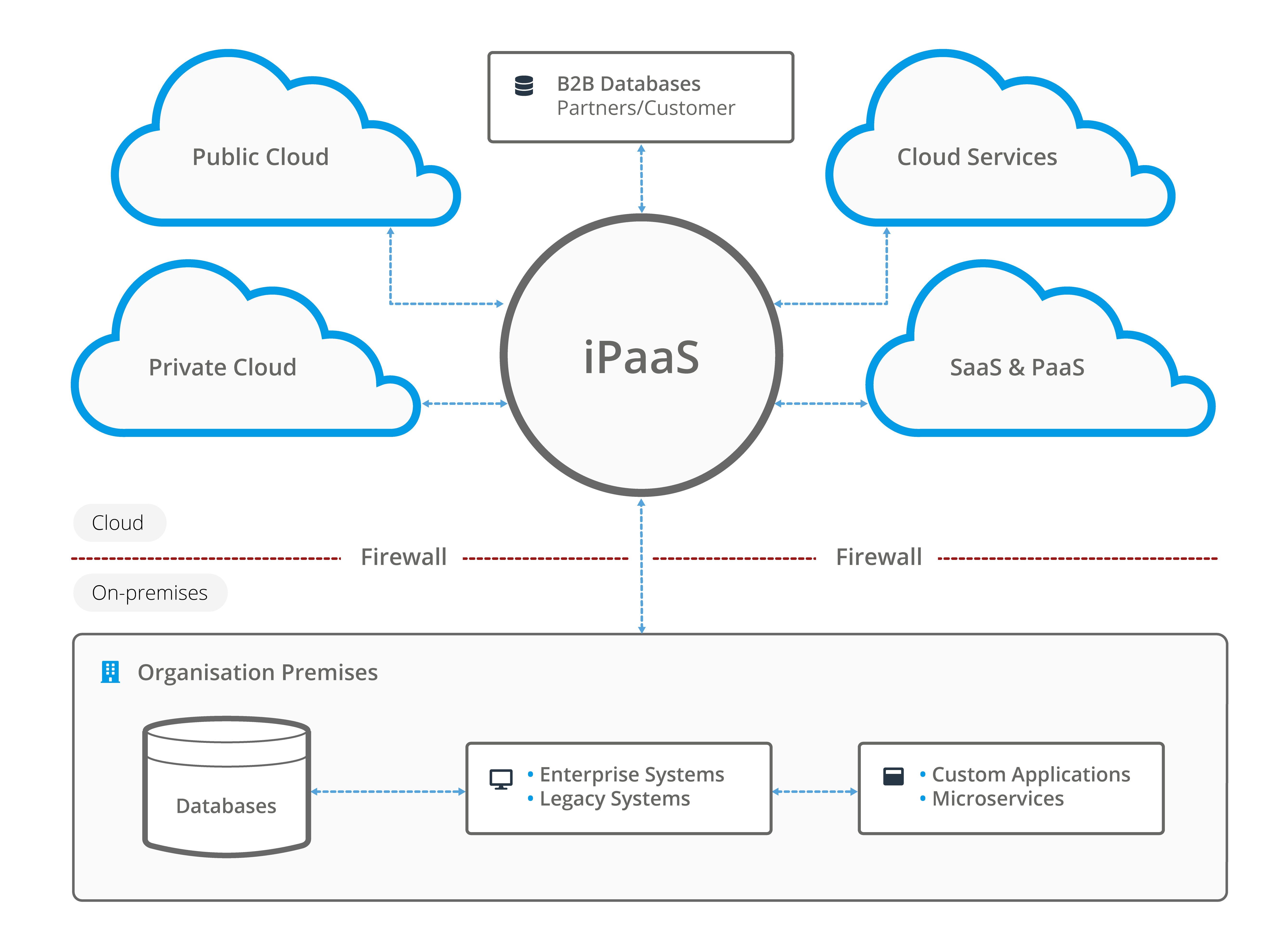
Image: A typical scenario using iPaaS to integrate on-premises with cloud-based applications and services
Cloud vs hybrid integration: Choosing the right approach
As organisations modernise their technology environments, they often need to decide between fully cloud-based integration and hybrid integration approaches.
Cloud Integration
Cloud integration connects cloud applications through a hosted integration platform. It is particularly useful for organisations that have adopted SaaS applications and want a faster, lower-maintenance way to connect systems.
Benefits include:
- Faster deployment
- Reduced infrastructure requirements
- Automatic platform updates
- Easier scalability
Cloud integration is commonly used for connecting applications such as CRM platforms, cloud finance systems and online marketplaces.
Hybrid Integration
Hybrid integration connects cloud applications with on-premises systems, allowing organisations to modernise without replacing existing technology investments.
Many businesses operate hybrid environments because their ERP, databases or operational systems remain hosted internally while newer applications are delivered through the cloud.
Benefits include:
- Support for legacy systems
- Greater deployment flexibility
- Gradual digital transformation
- Connection between modern and traditional applications
For many organisations, hybrid integration provides the most practical path towards a connected technology environment.
iPaaS hosting: Where does an integration platform run?
iPaaS hosting refers to how and where an integration platform is operated and managed. Unlike traditional integration solutions that often require businesses to maintain their own infrastructure, many iPaaS platforms are hosted and managed by the provider or an IT provider.
The hosting model affects factors such as security, scalability, maintenance and deployment flexibility.
Common approaches include:
- Vendor-hosted cloud environments: The provider manages infrastructure, updates and availability.
- Partner-managed: An IT partner hosts, manages, and supports the platform on behalf of the customer.
- Private cloud environments: Organisations receive dedicated hosting for additional control.
- On-premises hosting: The platform runs within the organisation’s own infrastructure.
When evaluating iPaaS hosting options, businesses should consider:
- Data security requirements
- Compliance obligations
- System performance
- Integration complexity
- Existing IT infrastructure
The right hosting approach ensures the integration platform aligns with both technical requirements and business objectives.
Read more: Understanding iPaaS Hosting Approaches: Vendor-Hosted, Partner-Managed, and Self-Hosted
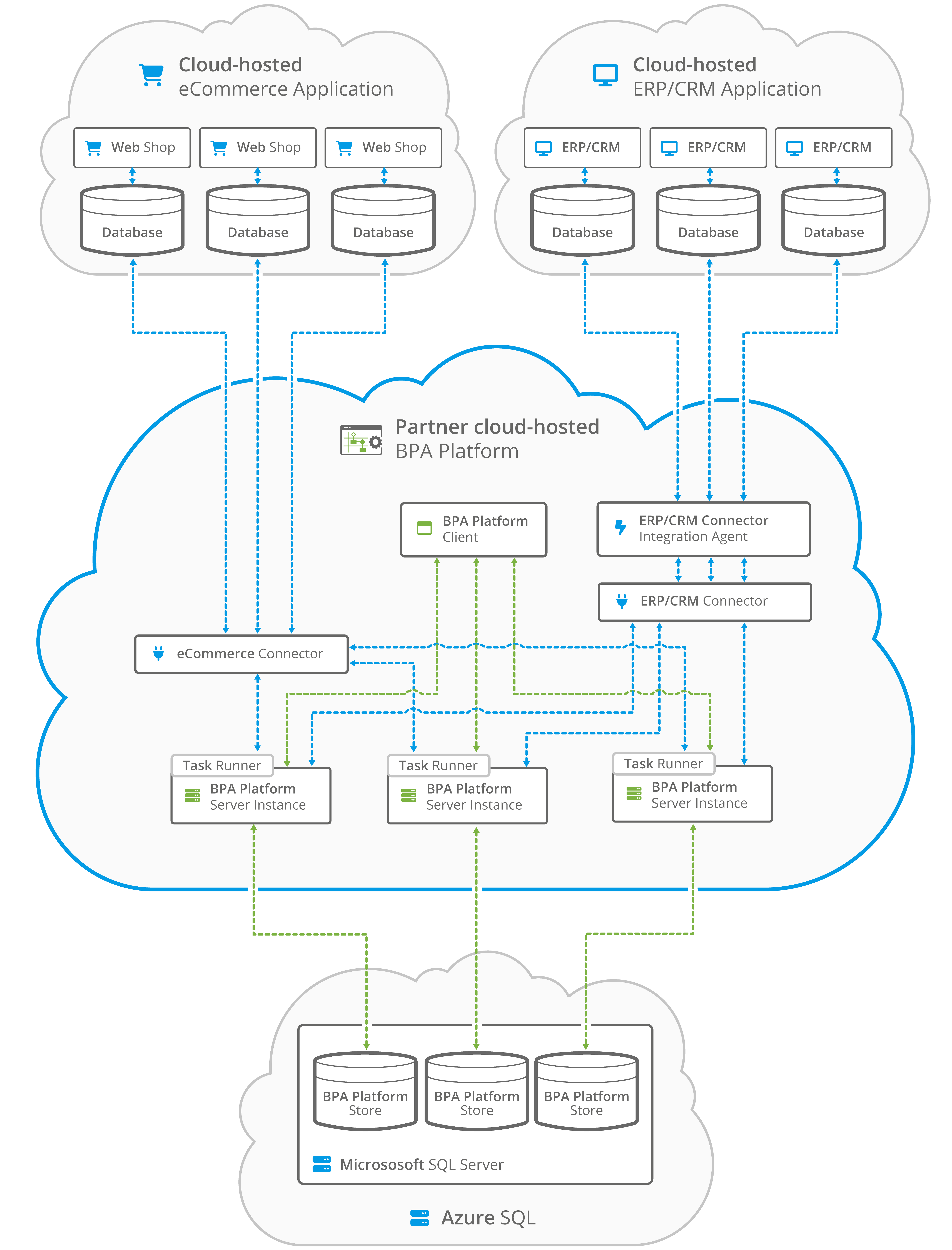
Image: iPaaS deployment in a partner cloud-hosted deployment
Embedded iPaaS: Bringing integration capabilities into your own product
Embedded iPaaS allows software providers, technology partners and SaaS companies to include integration capabilities directly within their own applications. Rather than building an integration framework from scratch, organisations can embed an existing iPaaS platform and offer connectivity as part of their own solution.
This approach is becoming increasingly important as customers expect software products to connect easily with the wider technology ecosystem they use.
White label iPaaS
A white label iPaaS enables organisations to provide integration capabilities under their own brand. The underlying integration technology is provided by a third party, but the customer experience appears as part of the organisation’s own product offering.
This allows software companies to expand their product capabilities without investing heavily in building and maintaining their own integration infrastructure.
iPaaS for SaaS companies
For SaaS providers, integrations are often a critical factor in customer adoption and retention. Customers expect applications to connect with their existing business systems, from CRM and ERP platforms to finance and eCommerce tools.
An embedded iPaaS enables SaaS companies to offer:
- Pre-built integrations
- Faster customer onboarding
- Reduced development effort
- More scalable connectivity options
iPaaS for ERP partners
ERP partners often need to connect their solutions with surrounding business applications such as CRM systems, warehouse platforms, eCommerce channels and finance tools.
Using an embedded iPaaS allows ERP providers and implementation partners to deliver integration capabilities alongside their ERP services without creating bespoke integrations for every customer.
Benefits of embedded iPaaS
Embedded integration provides several advantages:
- Faster time to market
- Reduced development and maintenance costs
- Improved customer experience
- Additional product value
- New integration-based revenue opportunities
Integration as a service for partners
Integration as a service allows technology providers and partners to offer connectivity as part of their wider solution portfolio.
Rather than treating integration as a separate technical challenge, partners can provide customers with a complete solution that combines software, automation and connected workflows.
This is particularly valuable in industries where customers rely on multiple applications and need systems to work together seamlessly.
Read more: What is Embedded iPaaS? – Powerful Integration Solution for Software Vendors and OEMs
iPaaS examples and use cases
iPaaS provides a stable and flexible cloud-based integration platform for creating, deploying, scaling, and managing integration scenarios across multiple business systems, applications and data sources, whether on-premises or in the cloud. Common iPaaS examples include:
Application to application integration
Using a range of APIs or pre-built connectors, iPaaS can easily connect disparate applications and data stores in multitenancy environments to create automated data flows.
- ERP integration: Access Dimensions, Acumatica, Epicor, Exact, Microsoft Dynamics, NetSuite, Oracle, Sage, SAP Business One, SAP Business ByDesign, Syspro etc.
- eCommerce integration: Big Commerce, EKM, Linnworks, Magento, PrestaShop, Shopify, Shopware, Volo, Volusion, WooCommerce etc.
- CRM Integration: Agile CRM, ConnectWise, Infor, Maximizer CRM, Sage CRM, Salesforce, Sugar CRM etc.
- Accounting integration: Creditsafe, KashFlow, Sage 50, SAP Concur, Xero, Zoho Books
- Marketplace integration: Amazon, eBay, OnBuy, Wayfair etc.
- Marketing integration: CommuniGator, dotdigital, Eventbrite, HubSpot, Mailchimp, Marketo, Mozenda, Spotler etc.
- Warehouse management integration: Dexterity, Transalis OpenEDI, .WMS etc.
- Courier services integration: DHL, DPD, FedEx, Hermes, Interlink Express, MetaPack, ParcelBroker, Parcelforce, ShipStation, SmartFreight, TNT, UPS etc.
- Database integration: custom databases, legacy systems etc.
- Payment system integration: Digital River, GoCardless, PayPal, Sage Pay, Stripe, Worldpay etc.
- Data warehousing integration: from legacy on-premises systems to cloud data warehousing
- Government services: Companies House, EORI, Land Registry, VIES VAT etc.
Multitenancy cloud integration
Connect, manage and synchronise multiple public cloud systems and services with other cloud products and services, offered by SaaS and PaaS providers, to improve the flow of data that exists in multiple locations and in potentially different formats.
B2B integration
Increase the speed of onboarding customers and partners by integrating with their business systems, no matter where they are located or the business systems they use. Data transfers can be fully automated in a secure environment to improve efficiencies and streamline customer service.
Microservices integration
Integrate and manage complex microservices to ensure consistency of data across the organisation. Benefit from using reusable pre-built connectors to generate and produce APIs quickly to support microservices environments.
Platform integration
Integrate a full range of platforms, whether on-premises or in public or private clouds, including technology platforms (Amazon Web Services, Microsoft Azure), marketplaces (Amazon, eBay, OnBuy) eCommerce platforms (Magento, Shopify, WooCommerce), marketing platforms (HubSpot), utility platforms, on-demand service platforms, content distribution platforms, database platforms, application platforms, storage platforms or web platforms.
Data management
Convert, transform and synchronise data from multiple systems and locations. The source data can be comprised of any object that can carry data, such as CSV files, record sets, XML and JSON documents, variables, formulas, functions or constants.
iPaaS solutions: Supporting different business integration needs
iPaaS solutions are used across many business functions because organisations rarely rely on a single application. Different departments require systems to exchange information accurately and efficiently.
ERP integration platform
An ERP integration platform connects enterprise resource planning systems with other applications, helping organisations automate processes such as order management, inventory updates and financial workflows.
Common connections include:
- CRM systems
- eCommerce platforms
- Warehouse systems
- Supplier applications
CRM integration platform
A CRM integration platform ensures customer information is consistent across sales, service and operational systems.
Examples include synchronising:
- Customer records
- Orders
- Communication history
- Account information
eCommerce integration platform
An eCommerce integration platform connects online sales channels with back-office systems.
Typical workflows include:
- Order creation
- Stock updates
- Customer synchronisation
- Automated fulfilment processes
EDI integration platform
An EDI integration platform automates the exchange of electronic documents between trading partners.
Common EDI processes include:
- Purchase orders
- Invoices
- Shipping notices
- Supplier communications
Supply chain integration
Supply chain integration connects suppliers, manufacturers, logistics providers and internal systems to improve visibility and coordination.
Benefits include:
- Better inventory visibility
- Faster order processing
- Improved supplier collaboration
Warehouse system integration
Warehouse integration connects warehouse management systems with ERP, eCommerce and logistics platforms.
This helps automate:
- Stock movements
- Picking processes
- Shipment updates
- Inventory management
Finance system integration
Finance integration connects accounting platforms with operational systems to automate processes such as invoicing, payments and reporting.
HR system integration
HR system integration connects employee platforms with payroll, identity management and business applications to streamline onboarding and administration.
Request a guided demo of BPA Platform
The Benefits and advantages of iPaaS
The main purpose of iPaaS is to simplify how applications communicate, helping organisations create more connected and automated business processes.
Without integration, information often becomes trapped in individual systems. Employees may need to manually transfer customer details, update orders across multiple platforms or reconcile data between applications. These disconnected processes create inefficiencies, increase the risk of errors and make it harder for teams to access accurate information.
iPaaS helps solve these challenges by creating a central integration layer between systems.
Key benefits include:
- Reduced costs: iPaaS technology is usually cheaper than middleware solutions and works on a subscription basis, therefore removing sometimes expensive upfront costs.
- Rapid deployment: Remove the need for bespoke development and coding – simply subscribe and start integrating applications, loading data, automating business processes, migrating users, and incorporating the application into the organisation.
- Reduced resources: Reduce the amount of time and number of personnel concentrating on system integration and data migration.
- Better results: Gain immediate access to powerful integration and automation tools.
- Improved scalability: Easily add new applications and tweak business processes as the business grows.
- Flexibility and scope: Ability to deploy in cloud, hybrid or on-premises environments.
- Centralised management: Once central ecosystem to manage integrations, processes and workflows.
- Data visibility: iPaaS can provide better visibility and management of data flows via real-time integration.
- Future-proofed: iPaaS provides an environment that can expand the lifespan of legacy systems and protect future upgrade paths.
- Improved decision making: With access to real-time data across an organisation, employees and management can make better decisions to help improve efficiencies.
- Enhanced security: Responsibility lies with the vendor, plus additional monitoring, threat detection and observation tools can easily be applied.
- ROI: iPaaS can help businesses drive company revenue and go to market quicker.
For IT teams, iPaaS reduces integration complexity. For business teams, it creates smoother processes and faster access to reliable information.
Read more: 7 Benefits of iPaaS
When should you use iPaaS?
Organisations should consider using iPaaS when they need a more efficient way to connect applications, automate processes or manage growing integration complexity.
Common signs that a business may benefit from iPaaS include:
- Multiple applications containing disconnected data
- Increasing reliance on cloud software
- Manual data entry between systems
- Difficulty maintaining custom integrations
- Limited visibility into data flows
- Need to automate repetitive workflows
iPaaS is particularly valuable when businesses are expanding their technology landscape and need systems to work together reliably.
For example, a growing organisation may need its ERP system to communicate with its CRM, eCommerce platform, warehouse system and finance applications. Rather than creating separate connections for each system, an iPaaS provides a central platform for managing these workflows.
Ultimately, iPaaS is most valuable when integration becomes a business priority rather than just an IT challenge. It enables organisations to improve efficiency, increase automation and create a more connected digital environment.
iPaaS best practices – what to look for
An iPaaS platform must be able to offer the full mix of integration scenarios, including on-premises-to-cloud (public or private), private cloud-to-public cloud, and public cloud-to-public cloud integration; application-to-application and business-to-business integration. It may also include mobile app integration and Internet of Things (IoT) integration.
Other essential criteria to look out for include:
Flexible integration: A competent and powerful iPaaS suite must be able to recognise and integrate with a wide range of application programming interfaces (APIs), including the ability to integrate with legacy systems.
Data management: The ability to handle all data – from reading and writing to converting different file formats, such as XML, JSON etc. Data should also be processed in real time, and the platform should be able to handle batch data.
Powerful tools: Proven array of pre-built connectors and business process automation tools
Ease of use: Intuitive design and user experience (UX) for both applying integration and managing business processes.
Support: iPaaS should be able to support protocols such as HTTP, FTP, Open Data Protocol and Advanced Messaging Queuing Protocol.
Security: Powerful authentication, access control, data encryption and single sign-on integrations.
Best iPaaS tools: What capabilities should you look for?
As more organisations adopt cloud applications alongside existing business systems, the number of available iPaaS tools has increased. However, choosing the right integration platform requires understanding which capabilities are most important for your organisation.
A suitable iPaaS solution should do more than simply connect applications. It should provide the ability to automate processes, transform data, monitor integrations and support different deployment environments.
When evaluating iPaaS tools, key capabilities to consider include:
- Application and system connectors
- API integration support
- Workflow automation
- Data mapping and transformation
- Error handling and monitoring
- Security and governance controls
- Cloud, hybrid and on-premises deployment options
Different organisations will have different integration requirements. A business connecting SaaS applications may prioritise cloud connectivity, while an organisation with an ERP-led environment may require stronger support for legacy systems and hybrid integration.
Understanding your existing technology landscape and future business goals is essential when selecting an iPaaS platform.
How BPA Platform supports modern integration
Codeless Platforms’ iPaaS is developed specifically for channel partners and enterprise customers to create and manage data integration and automation as a service to internal and external customers.
Cloud, hybrid or on-premises
Create new ways of working and deploy integrations in cloud, hybrid and on-premises environments.
Centrally managed
Working from one, centralised ecosystem enables employees and management to gain full control over all aspects of integration, business process automation and data control.
Tool capabilities
BPA Platform’s iPaaS tool capabilities include:
- Visual interface: Drag and drop integration between cloud-based and on-premises systems and applications so that system integration steps are visually represented within a wider automated process
- Application connectors: Connect ERP, CRM, finance, eCommerce, HR and other business applications using pre-built connectors and standard integration methods, reducing development time.
- API integration: Integrate modern applications and services through REST and SOAP APIs, enabling secure, real-time data exchange across your technology landscape.
- Workflow automation: Automate end-to-end business processes by triggering actions, approvals and notifications based on predefined business events and rules.
- Data transformation: Innovative transformation functions that can be dragged onto the mapping area to change the data between inputs and outputs.
- Document processing: Automatically capture, route and process business documents such as invoices, purchase orders and shipping notices, reducing manual administration.
- Business rules: Apply configurable logic to validate data, make decisions and control how information flows between systems, ensuring consistent and accurate processes.
- Monitoring and alerting: Monitor integrations from a central dashboard with real-time alerts, transaction logging and exception handling to quickly identify and resolve issues before they impact operations.
- RESTful web service integration by removing the need for bespoke development
- SOAP web services integration
- Support OData and SData services
Multiple deployment models
BPA Platform is designed to support multiple deployment models, enabling customers and partners to choose the hosting approach that best aligns with their business and IT strategy, including:
- Codeless Platforms Private Cloud
- Codeless Platforms Public Cloud
- Partner Hosted
- Customer Hosted Private Cloud
- Customer Hosted On-Premises
Multi-instance architecture
An isolated database and infrastructure for each user, providing better availability, scalability and security.
Robust data security
Stay protected with all the required features you need to connect to any environment securely and reliably.
Rather than forcing organisations towards a single deployment model, BPA Platform allows businesses to integrate existing ERP investments alongside modern cloud applications, enabling phased digital transformation with reduced operational risk.
For organisations using ERP systems such as Acumatica, Epicor, Microsoft Dynamics, SAP, Sage, Syspro, and other line-of-business applications, this flexibility is particularly valuable.
For more information on how iPaaS can help your business, download the brochure below or call us on +44(0) 330 99 88 700.