
Choosing between real-time and batch CRM integration is one of the most important architectural decisions organisations face when connecting CRM with ERP, marketing, finance, eCommerce, and service systems. This guide explains both approaches, their pros/cons, hybrid patterns, and a practical decision framework.
Article Summary
- Real-time CRM integration delivers immediate updates using webhooks, event APIs, and queues; best for sales, service and operational workflows.
- Batch CRM integration moves large datasets on a schedule using ETL, bulk APIs, or CSV pipelines; best for high-volume data synchronisation.
- Near-real-time (1–30 seconds) offers a cost-effective middle ground.
- Webhooks outperform polling for responsiveness and API efficiency.
- Event-driven patterns scale better than request-driven ones.
- Hybrid is the most common real-world solution.
- Use the decision framework (Section 9) to select the right model.
Real-Time vs Batch CRM Integration: Introduction
Choosing the right data movement strategy for CRM integrations determines performance, data accuracy, cost, and reliability. Get the decision wrong and you risk delays, synchronisation conflicts, user frustration, and increasing API costs. Get it right and you achieve fast, reliable and scalable data flow across your systems.
Practical example: These timing decisions matter most in finance-led workflows like CRM to ERP Order-to-Cash automation, where delays can affect invoicing speed, cash application visibility, and Days Sales Outstanding (DSO). See CRM to ERP Order to Cash Integration for the end-to-end stages, KPI targets, and common failure modes.
This guide breaks down the architectures behind real-time and batch CRM integrations, when to use each, how hybrid models operate, and the operational considerations for developers and solution architects.
If you need a refresher on how CRM integration works at a foundational level before comparing real-time and batch models, see our overview: What is CRM integration?.
1. What Is Real-Time CRM Integration?
Real-time CRM integration means that data is sent, processed, and updated immediately after an event occurs, typically within milliseconds or seconds. Instead of waiting for a scheduled synchronisation, events in your CRM trigger outbound communication to another system.
If you’d like a deeper introduction to how real-time integration works across different systems and use cases, see What is real-time integration?, which explains the principles behind event-driven data movement and immediate system updates.
How Real-Time Integration Works
- Webhooks: Immediate outbound calls triggered by CRM events (new lead created, case updated, opportunity changed).
- Event-driven architecture: Systems publish events that downstream systems consume via queues or streams; ideal when you need reliability, decoupling and replay. See Event-driven CRM integration (webhooks, queues and streams).
- Direct API Calls: REST or SOAP calls to push or fetch data instantly.
- Choosing between REST, SOAP, and GraphQL for CRM data access has real implications for rate limits, reliability, and governance – see CRM API integration – REST vs SOAP vs GraphQL.
- Streaming / Event APIs: Continuous push of change events.
- Message Queues: Smooth bursts and provide reliability.
Not sure whether to trigger updates using webhooks or direct API calls? See our guide: Webhook vs API for CRM Integration.
Strengths of Real-Time Integration
- Instant updates: Sales, support, and operations see live data.
- Faster processes: Lead scoring, routing, and approvals execute immediately.
- Lower data discrepancy risk: Reduced chance of stale or out-of-date information.
- Best for operational systems: Product availability, pricing, and support status.
Challenges of Real-Time Integration
- API rate limits: Real-time calls can quickly consume API quotas.
- Architectural complexity: Requires retry logic, idempotency, monitoring, and queues.
- Higher infrastructure cost: Always-on and scalable components add cost.
- Downtime sensitivity: If downstream APIs are unavailable you must queue and replay events.
Real-Time CRM Integration: Example Workflow
- A customer submits a form.
- CRM receives the new lead.
- A webhook fires instantly.
- Integration platform enriches the lead and routes it to the correct sales team.
Time to complete: < 1 second (typical).
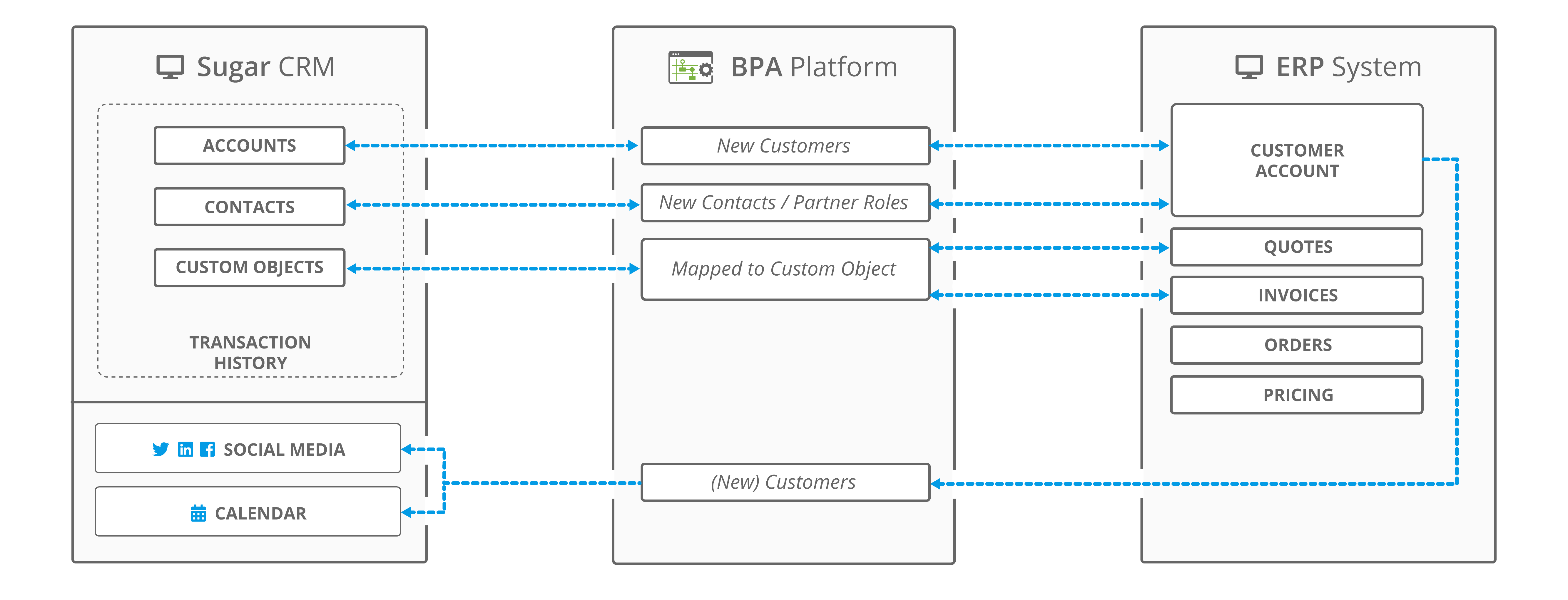
Figure: A high-level real-time CRM integration flow overview of SugarCRM touchpoints with an ERP system using BPA Platform.
For a deeper breakdown of the architectural patterns that underpin real-time workflows, including event-driven design and API orchestration, read CRM integration architecture and methods. If you’re planning a broader integration roadmap, see our guide to CRM integration strategy.
Webhooks vs Polling: Which Real-Time Trigger Model Should You Use?
Most real-time CRM integrations rely on either webhooks or polling to detect changes. Although both achieve event-driven behaviour, their architecture and performance characteristics differ significantly.
| Trigger Method | How It Works | Strengths | Limitations |
|---|---|---|---|
| Webhooks | CRM sends an outbound HTTP POST when a specific event occurs. |
|
|
| Polling | Integration platform checks the CRM periodically for changes (every 1–5 minutes). |
|
|
For a deeper trigger-level decision guide (including hybrid webhook + API enrichment patterns), see Webhook vs API for CRM Integration.
Many of the trade-offs between webhooks and polling relate directly to common integration obstacles such as rate limits, data consistency, and system availability. These are explored further in our CRM integration challenges troubleshooting guide.
Most modern CRM architectures prefer webhooks for operational use cases and reserve polling for systems that lack webhook support or where near-real-time behaviour is sufficient.
Near-Real-Time CRM Integration (1–30 seconds)
Near-real-time CRM integration provides updates within a short delay, typically 1 to 30 seconds. It is increasingly popular because it delivers most of the benefits of real-time integration while avoiding API spikes and infrastructure cost.
Common patterns include:
- Short-interval polling (e.g., every 5–15 seconds)
- Buffered event streaming with micro-delays
- Webhook → queue → delayed processor pipelines
Best for: High-volume updates, sales dashboards, service consoles, and operational systems where a few seconds of latency is acceptable.
Many organisations mistakenly choose full real-time when near-real-time is more cost-effective, simpler, and equally performant for their use case.
2. What Is Batch CRM Integration?
Batch CRM integration moves data at scheduled intervals (every 5 minutes, hourly, nightly). Data is extracted, transformed and loaded (ETL) in larger units rather than per-event.
How Batch Integration Works
- Scheduled jobs running on fixed intervals.
- Bulk APIs for large dataset imports (Salesforce Bulk API, HubSpot Bulk Import).
- Flat files/CSV loads for legacy systems and batch pipelines.
- ETL/ELT pipelines used to restructure and move data.
Batch processing often involves restructuring or cleansing large datasets before loading them into CRM or ERP systems. For practical guidance on designing transformations and mapping fields between systems, see our guide to CRM data mapping and transformation.
Strengths of Batch Integration
- Efficient for large datasets (millions of records).
- Lower API consumption by using bulk endpoints.
- Simpler architecture with fewer moving parts.
- Lower cost in many operational environments.
Challenges of Batch Integration
- Not instant: Updates are delayed based on schedule.
- Higher risk of conflicts: concurrent updates can create inconsistencies.
- Longer error recovery: failed batches may require full re-runs.
- Slow for user-facing operations: sales and support may see outdated info.
Batch CRM Integration: Example Workflow
- Scheduled job runs every hour and queries modified records.
- Data is transformed and validated.
- Bulk API loads data to the target system.
Time to complete: minutes to hours (depending on schedule and volume).
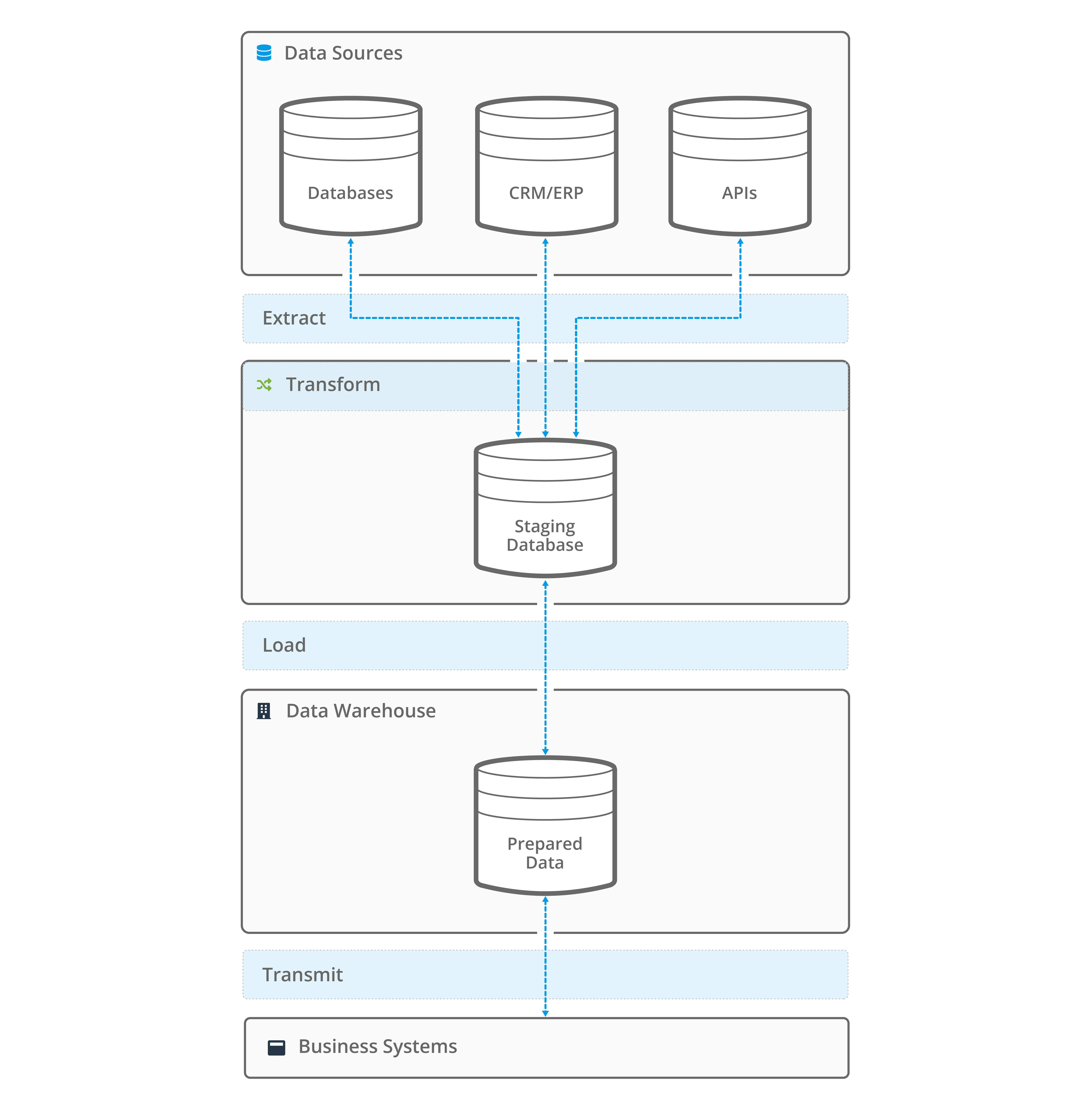
Figure: Batch integration flow
3. Real-Time vs Batch CRM Integration: Side-by-Side Comparison
| Feature | Real-Time Integration | Batch Integration |
|---|---|---|
| Speed | Instant (seconds) | Scheduled (minutes–hours) |
| API Usage | High (many small calls) | Low (bulk endpoints) |
| Best For | Sales ops, service, notifications, inventory | Analytics, warehousing, large datasets |
| Error Handling | Complex (retry, idempotency, queues) | Simpler (rerun batch) |
| Cost | Higher | Lower |
| Architecture | More complex | Simpler |
Event-Driven vs Request-Driven CRM Integration
Another important distinction in CRM architecture is event-driven versus request-driven data movement. Although often grouped with real-time versus batch, they solve different problems.
Event-Driven
- Systems publish events when data changes.
- Downstream systems react immediately or near-immediately.
- Examples: webhooks, streaming APIs, CDC feeds.
Request-Driven
- Systems request data on-demand or on a scheduled basis.
- Requires API polling or batch extraction.
- Examples: batch ETL, scheduled sync jobs.
Why this matters: Event-driven patterns reduce API load and increase responsiveness, while request-driven patterns provide control and predictability. Hybrid CRM architectures commonly use both. If you want the deeper architectural model behind event publishing, queues, retries and replay, read Event-driven CRM integration (webhooks, queues and streams).
4. When to Use Real-Time CRM Integration
Use real-time integration when immediacy is critical. Typical scenarios include:
- Lead assignment and sales routing: Prompt follow-up increases conversion.
- Customer service and case management: Agents need the latest interactions.
- Inventory and stock availability: Live inventory updates for ecommerce.
- Payment and subscription events: Immediate billing/entitlement updates.
- Customer-facing workflows: Anything the customer or front-line staff see.
Implementation notes: Design for API throttling, apply controlled retry/backoff patterns, and include reliable error-handling and recovery processes that prevent duplicates and allow failed transactions to be retried safely.
For more examples of real-world workflows that benefit from immediate updates, explore our CRM integration use cases.
5. When to Use Batch CRM Integration
Batch integration is ideal for heavy-volume, non-urgent operations. Typical scenarios include:
- Large-scale data synchronisation (thousands or millions of rows) to an ERP or a data lake.
- Nightly reconciliation for finance and accounting.
- Data warehousing and analytics ETL workloads.
- Historical migrations and bulk backfills.
- Low-priority updates such as marketing list refreshes.
Implementation notes: Use efficient change-handling techniques, checkpointing, and bulk or optimised endpoints to improve performance and recovery.
Batch processing is especially common when synchronising CRM with ERP systems for finance, product, and inventory operations. Learn more about methods and examples in our guide to ERP and CRM integration.
6. Hybrid CRM Integration (Most Common in Real-World Projects)
Most organisations combine both approaches; real-time where it matters and batch where it’s efficient.
Examples of hybrid patterns:
- Real-time for new leads and support cases; batch for catalogue or inventory snapshots.
- Real-time for customer updates that front-line staff need; batch for reporting and BI loads.
- Batch imports for bulk creation; real-time events for subsequent updates.
Hybrid architectures often deliver the strongest operational and commercial benefits by balancing immediacy with cost-efficiency. For a breakdown of the business gains achievable through integration, see the benefits of CRM integration.

Diagram: Hybrid CRM integration model combining a staging database for real-time events or batch processes.
7. Cost, Scalability and Operational Considerations
API Limits
Real-time approaches consume more API calls; carefully manage quotas and use bulk endpoints for heavy loads where possible.
Error Handling
Real-time requires:
- Retry logic with exponential backoff.
- Dead-letter queues for unrecoverable events.
- Idempotency keys to prevent duplicate processing.
- Event replay capability.
These mechanisms are core to event-driven CRM integration, where queues/streams help buffer bursts and support replay; see Event-driven CRM integration (webhooks, queues and streams).
Batch requires:
- Reliable methods for tracking which records need processing.
- Efficient filtering to minimise unnecessary data movement.
- Clear rerun and recovery strategies for handling failed batches.
Data Quality
Batch ETL offers more time for heavy transformations and validation; real-time prioritises speed and lightweight transformations.
Maintenance
Real-time systems need more active monitoring and observability, while batch systems are typically simpler to operate long-term.
Cost Modelling: Real-Time vs Batch
Cost is one of the biggest factors influencing integration strategy. Real-time and batch differ significantly in how they consume API, infrastructure, and development resources.
| Cost Area | Real-Time | Batch |
|---|---|---|
| API Usage | High: many small calls | Low: bulk endpoints |
| Infrastructure | Always-on queues, workers and monitoring | Schedulers + periodic processing |
| Development | More logic required (retry, replay, idempotency) | Simpler pipelines |
| Operational | Higher ongoing maintenance | Lower steady-state cost |
Summary: Real-time offers business agility but at a higher cost; batch is more economical for large volumes. A hybrid approach optimises cost-to-performance ratio. A hybrid model usually works best when you have a central integration layer managing monitoring, retries and governance. For the broader architecture comparison, see: Point-to-Point Vs Middleware CRM integration.
To understand how these cost differences translate into measurable financial outcomes, read our guide to calculating CRM integration ROI.
8. How Integration Platforms Support Both Models
Modern integration platforms like BPA Platform (iPaaS) provide the tools needed for both approaches:
- Event-driven triggers and webhook listeners
- Bulk schedulers and batch processors
- Low-code API orchestration
- Error handling, replay, and monitoring
- Prebuilt connectors to CRM, ERP, eCommerce, and analytics systems
Using an Integration Platform as a Service (iPaaS) lets you choose the right method per use case instead of forcing one approach everywhere.
9. Choosing the Right Approach: Decision Framework
Use this quick framework:
- Choose Real-Time if users require instant data, workflows need immediate triggers, or operational accuracy is critical.
- Choose Batch if you process very large volumes, prioritise cost-efficiency, or need heavy transformations for analytics.
- Choose Hybrid if you want the best balance between cost, reliability and performance.
If you’re evaluating integration tools or vendors, a guided BPA Platform demo can help you map your real-time, batch or hybrid requirements to a practical implementation approach and deployment model.
Checklist
- Does the use case require instant visibility? → Real-time
- Does the workflow move millions of records? → Batch
- Are API limits a concern? → Prefer batch or combined approach
- Is human-facing data required instantly? → Real-time
Whichever model you choose, it must be designed with security, access control, and safe data handling in mind. These considerations and best practices are explored in our article on CRM integration security.
10. Conclusion
Real-time and batch CRM integration are complementary. Real-time powers immediate workflows and customer experience improvements; batch handles volume-driven, analytical and reconciliation tasks. A hybrid approach is the pragmatic choice for most mid-size and enterprise environments.
Want help choosing the right integration approach? Request a guided demo of BPA Platform and we’ll walk through your real-time, batch, or hybrid use case.
Request a guided demo of BPA Platform