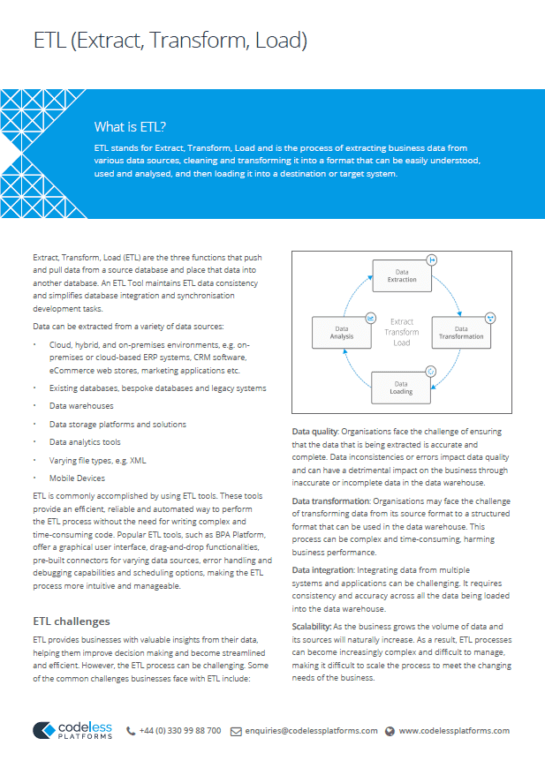
What is an ETL Tool?
An ETL tool is specialised software that automates the extraction of data from diverse sources, transforms it into a usable format, and efficiently loads it into a destination system such as a data warehouse or data lake. By simplifying and accelerating these essential data integration steps, ETL tools enable organisations to prepare their data for analysis, reporting, and business intelligence with greater consistency and reliability.
As companies deploy a growing array of systems from eCommerce platforms and ERPs to CRMs and marketing automation tools data often ends up trapped in silos, limiting visibility and hindering decision-making.
This fragmentation creates operational inefficiencies, increases costs, and can even damage customer experiences. The solution? Data integration. By combining information from diverse sources into a unified, reliable view, businesses gain the agility, insights, and competitive edge needed to thrive in data-driven environments.
ETL tools, such as those offered by Codeless Platforms’ BPA Platform, automate and simplify this process, enabling organisations to unlock the full value of their data.
This guide is authored by the integration specialists at Codeless Platforms, whose deep expertise in ETL and ELT solutions is reflected in the development of BPA Platform – an advanced, flexible tool designed for modern data integration challenges.
With a legacy spanning 25 years in enterprise software and business process automation, Codeless Platforms has established itself as a trusted provider of ETL tools and solutions that simplify and accelerate data workflows across a wide range of business systems.
Our experience is gained from thousands of successful ETL implementations, helping organisations from SMBs to global enterprises streamline their data integration, automate repetitive processes, and achieve scalable, reliable ETL and ELT outcomes.
Within this guide, you’ll find insights drawn from real-world use cases and client projects, highlighting the unique features and robust capabilities of ETL tools like BPA Platform. We share practical advice on what to look for in an ETL tool, from ease of use and visual workflow design to compatibility with diverse data sources and the ability to handle both ETL and ELT patterns.
These insights are shaped by our hands-on work with leading ERP, CRM, eCommerce, and a wide range of systems and platforms for varying industry specialisms, ensuring relevance and actionable guidance for your own data integration initiatives.
Throughout this ETL resource, you’ll discover additional materials developed by Codeless Platforms’ team of seasoned professionals including downloadable guides, datasheets, and whitepapers to support your journey toward seamless, efficient, and scalable data integration using best-in-class ETL and ELT tools.
What is the role of an ETL tool in data management?
An ETL tool is a purpose-built software solution that automates the process of extracting data from multiple sources such as databases, applications, and flat files, transforming it into a consistent, accurate format, and loading it into a target destination like a data warehouse, data lake, or business system. By handling these steps in a unified workflow, ETL tools remove manual data manipulation, reduce errors, and ensure that information is ready for analysis, reporting, and decision-making.
When understanding the ETL process in data integration and modern data management, ETL tools play a foundational role by:
- Simplifying data integration: They connect disparate systems including ERP, CRM, eCommerce platforms, on-premises and cloud services to enable seamless data flow across the organisation.
- Ensuring data quality: Through built-in validation, cleansing, and standardisation, ETL tools maintain high data integrity and consistency, which is essential for reliable analytics and compliance.
- Enabling automation: By automating repetitive tasks, ETL tools free up data teams to focus on strategic initiatives rather than manual data processing.
- Supporting business intelligence: ETL tools prepare data for advanced analytics, machine learning, and AI applications, helping businesses uncover actionable insights and drive growth.
For organisations leveraging tools like Codeless Platforms’ BPA Platform, the benefits extend beyond traditional ETL. These solutions offer flexible, visual workflows and the ability to handle both ETL and ELT patterns, making them adaptable to evolving data needs and modern cloud environments. Whether synchronising product data between eCommerce and ERP systems or consolidating customer information across multiple platforms, ETL tools are critical for efficient, scalable, and secure data management.
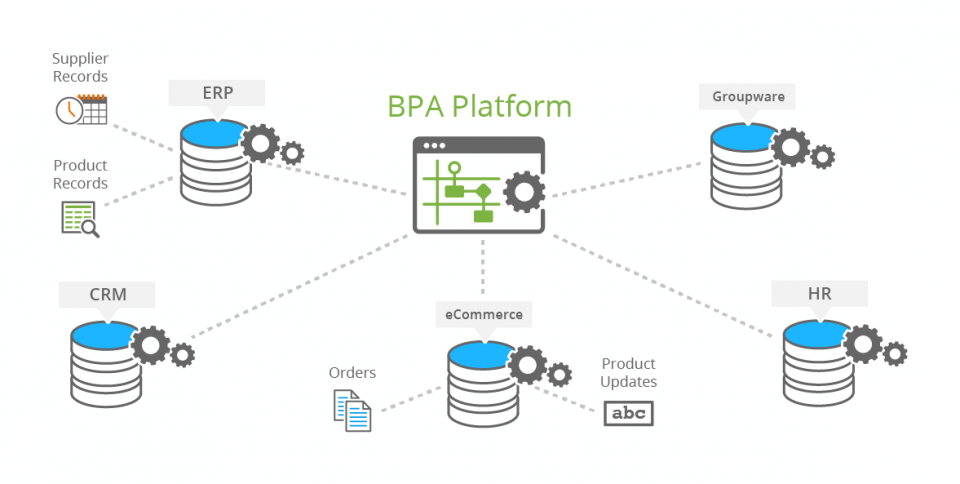
ETL Data Sources: An example of ETL data sources for the information that is processed into a target system.
Real-Time ETL: Can ETL tools handle real-time data?
Yes, modern ETL tools can handle real-time data through advanced features known as “real-time ETL” or “streaming ETL.” Unlike traditional batch ETL, which processes data at scheduled intervals, real-time ETL continuously ingests and transforms data as it is generated, ensuring that analytics and decision-making are based on the latest information.
Real-time ETL is ideal for use cases requiring up-to-the-minute insights, such as fraud detection, live dashboards, and dynamic customer interactions. These solutions are designed to handle high-velocity, high-volume data streams with minimal latency, supporting modern data-driven applications.
Codeless Platforms’ BPA Platform supports real-time data integration. The platform enables businesses to synchronise data across systems, applications, and services as soon as changes occur, removing time delays and ensuring that information is always current.
BPA Platform’s intuitive drag-and-drop tools allow for seamless integration of CRM, ERP, eCommerce, and other systems, providing real-time updates and notifications. This capability enables businesses to automate workflows, improve operational efficiency, and respond quickly to new information.
How ETL tools work
ETL tools automate the essential process of extracting data from a wide range of sources, transforming it into a consistent and usable format, and loading it into a target system such as a data warehouse, data mart, or data lake. This Extract, Transform, Load (ETL) process is the backbone of modern data integration, ensuring that organisations can rely on accurate, timely, and actionable data for business intelligence and decision-making.
Extract: The extraction phase and its importance
Data extraction in ETL is the first step in the ETL process, where ETL tools gather data from a variety of sources such as databases, files (like CSV or Excel), cloud storage, and web APIs.
This phase is crucial because it ensures that all relevant data is collected for further processing, setting the foundation for comprehensive and accurate data integration.
Transform: Data Transformation in ETL
During the transformation phase, raw data is converted into a consistent, clean, and usable format. Common activities such as data cleaning, standardising formats, filtering, joining data from different sources, aggregating values, and applying business rules are essential for ETL data transformation.
This step is vital for maintaining data quality, ensuring data consistency, and enabling reliable analysis.
Load: The loading process and its significance
The loading phase involves moving the transformed data into a target system such as a data warehouse, data mart, or data lake. This process can be done as a full load (replacing all data) or an incremental load (adding only new or updated data). Efficient data loading in ETL ensures that data is ready for analysis, reporting, and business intelligence, supporting timely and informed decision-making.
Here’s a detailed breakdown of the ETL process:
-
Extraction
- Source Connectivity: ETL tools connect to databases, flat files (like CSV or Excel), cloud storage, web APIs, and other data repositories.
- Data Retrieval: They extract data, handling various formats and structures.
- Filtering and Sampling: Data can be filtered or sampled during extraction to meet specific business requirements.
-
Transformation
- Data Cleaning: Errors, duplicates, and inconsistencies are removed to improve data quality.
- Standardisation: Data formats and values are standardised for consistency.
- Filtering and Joining: Data is filtered based on criteria and joined from multiple sources.
- Aggregation and Calculation: Values are aggregated, and new fields are calculated using business logic.
- Business Rules Application: Custom rules are applied to ensure data meets organisational standards.
-
Loading
- Target System Integration: Transformed data is loaded into data warehouses, data marts, or data lakes.
- Loading Methods: Options include full loads (replacing all data) and incremental loads (adding only new or updated data).
- Efficiency and Accuracy: ETL tools ensure data is loaded efficiently and accurately, ready for analysis.
Key functions of ETL tools
| Function | Description |
|---|---|
| Data Acquisition | Connects to and retrieves data from multiple, diverse sources. |
| Data Cleansing and Standardisation | Validates, cleans, and standardises data for high quality. |
| Data Integration | Combines data from various sources into a unified, consistent format. |
| Data Loading | Efficiently loads prepared data into target systems for reporting and analytics. |
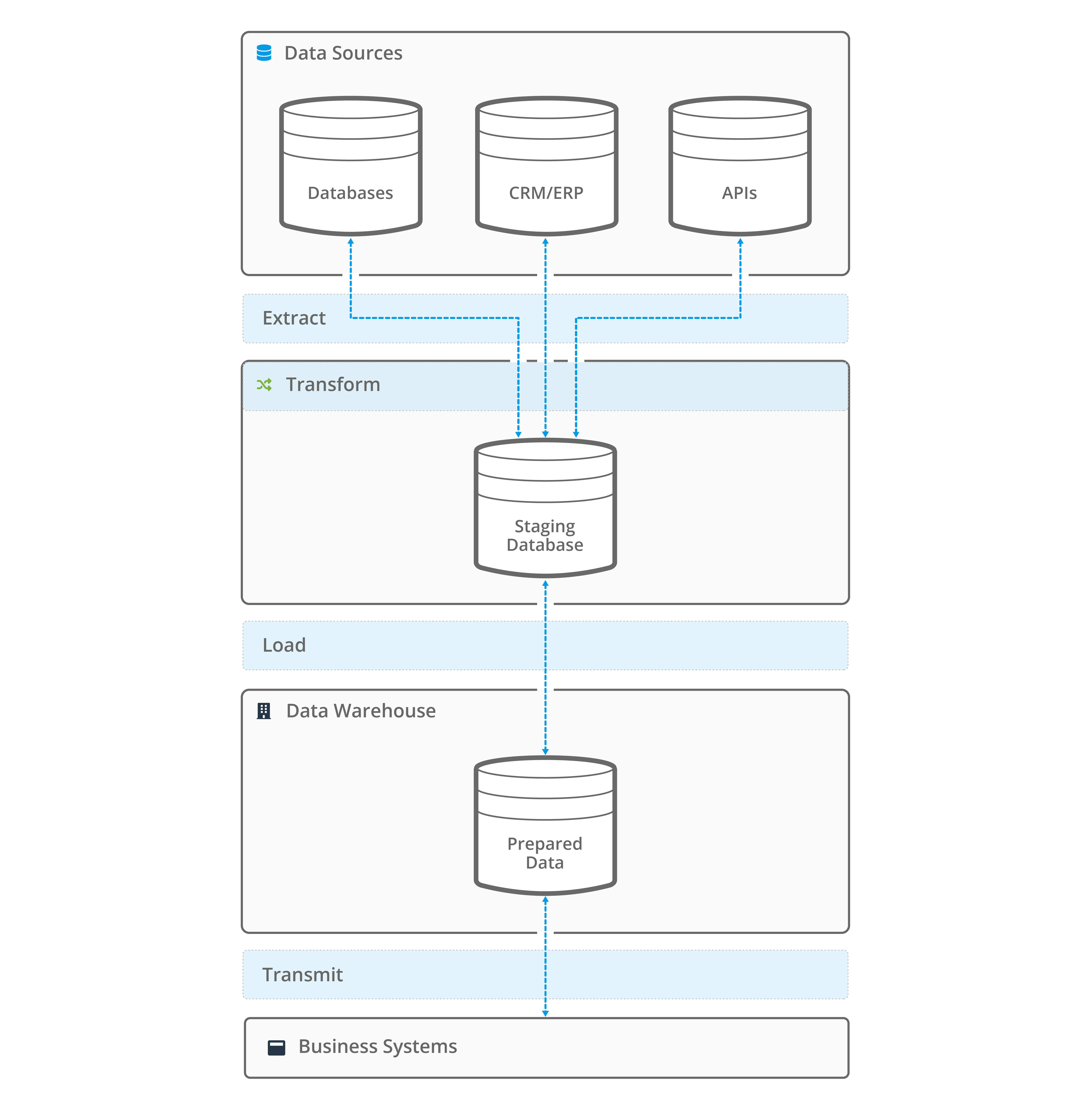
Image: Core ETL functions
Why use ETL software for data integration?
ETL software is designed to address the complexities of modern data environments by simplifying the collection, preparation, and delivery of data across business systems. By automating these essential workflows, organisations gain the ability to efficiently manage information from a wide range of sources and ensure it is ready for strategic use in analytics, reporting, and operational decision-making.
To ensure ETL implementations support long-term integration goals and avoid creating silos or duplicated logic, many organisations include them in a comprehensive, structured transformation roadmap, tying data processes to measurable business outcomes.
ETL Challenges: Common data integration pain points
Organisations frequently manage information across multiple databases, creating a key challenge for data integration and making it difficult to consolidate data for meaningful analysis, a problem often addressed with ETL software for data integration.
This fragmented approach can lead to data silos in business operations, which limit overall visibility into business performance and customer behaviour. Addressing poor data visibility solutions is essential for businesses looking for a unified view of their day-to-day processes.
Manual data handling and integration further exacerbate these issues, increasing the risk of data inconsistency in enterprise systems such as errors, duplicates, and mismatched records. These data inconsistencies can undermine decision-making and operational efficiency.
Additionally, traditional methods of connecting and processing data from different sources are often time-consuming, requiring significant manual effort and development time, highlighting the need to automate data integration with efficient ETL tools.
By leveraging ETL tools for business intelligence, organisations can overcome the challenges of multiple databases, break down data silos, and ensure consistent, reliable data for analytics and reporting.
Common data integration pain points
- Multiple Databases: Organisations often store data across different databases, making it difficult to consolidate information for analysis.
- Poor Data Visibility: Disparate systems can result in silos, limiting visibility into business performance and customer behaviour.
- Data Inconsistencies: Manual data handling and integration can lead to errors, duplicates, and inconsistencies.
- Time-Consuming Processes: Traditional data integration methods require significant manual effort and development time.

Image: Data integration challenges and common pain points.
ETL Tool Benefits: Key advantages for your business
ETL tools offer a range of advantages for organisations looking to streamline their data flows. One of the most significant ETL tool benefits is the ability to standardise and clean data, ensuring data consistency with ETL across all business systems, removing discrepancies and supporting reliable analytics.
By automating complex integration tasks, these solutions also help reduce development time with ETL, enabling teams to complete projects faster and with less manual coding.
Another key advantage is the cost savings from ETL automation, as fewer errors and less manual intervention translate into lower operational expenses. Improved data quality with ETL is achieved through built-in validation and cleansing features, which enhance the accuracy and reliability of information throughout the business.
Additionally, scalable ETL solutions enable businesses to adapt to growing data volumes and evolving needs, making it easier to expand operations without reworking integration processes. In summary, the ETL software advantages include not only improved data consistency and quality but also greater efficiency, flexibility, and cost-effectiveness for enterprises of all sizes.
Key benefits of ETL tools
- Data Consistency: ETL tools standardise and clean data, ensuring consistency across all systems.
- Reduced Development Time: Automation minimises manual coding and accelerates integration projects.
- Cost Savings: By reducing errors and manual effort, ETL tools lower operational costs.
- Improved Data Quality: Built-in validation and cleansing features enhance data accuracy and reliability.
- Scalability: ETL solutions can handle growing data volumes and evolving business needs.
ETL Use Cases: Real-world application with an ETL tool
The following examples highlight just a few of the many ETL use cases that can be achieved. They demonstrate how ETL software can help organisations automate workflows, improve data accuracy, and unlock new insights throughout their operations.
ETL tool use cases
| Use Case | Description |
|---|---|
| Data Warehousing | Consolidate data from multiple sources for reporting and analytics. |
| Business Intelligence | Prepare clean, reliable data for dashboards and insights. |
| Cloud Migration | Move and transform data to cloud-based data warehouses. |
| Data Migration | Transfer data between systems during upgrades or mergers. |
ETL for eCommerce ERP Integration:
ETL tools make it easy to synchronise critical business data, such as product details, inventory levels, and customer orders between eCommerce platforms and ERP systems.
This real-time data integration ensures that information is accurate and up-to-date across all channels, supporting seamless operations and better customer experiences.
Codeless Platforms’ BPA Platform has been implemented by companies like Sealskinz to automate the flow of orders, inventory, and customer data between their eCommerce site (Shopify) and ERP (SYSPRO).
According to Tim Petts, IT Manager at Sealskinz, “BPA Platform became our main middleware between the website and SYSPRO. That system has now been running for almost four years and it’s running very well. The integration between Shopify and SYSPRO was very successful. It made us realise the full potential of BPA Platform and how much you can do with it.”.
Another example is French Connection, which used BPA Platform to integrate multiple Shopify Plus eCommerce sites with their existing warehouse and customer service system, enabling real-time order and stock updates across global markets.
“The flexibility of the solution really highlighted the power of BPA Platform. The solution gives us the scope to continue to improve our business processes. We are already discussing the different ways we can further utilise BPA Platform in the future, including looking at replacing an existing event-driven automation and job scheduling tool; assisting with the implementation of delivery management software.”
Global Head of IT, French Connection.
Bulk Data Import with ETL:
Organisations leverage ETL for bulk data import to quickly and efficiently move large volumes of information from spreadsheets, databases, or cloud sources directly into their business systems.
This automation saves time, reduces errors, and allows teams to focus on value-added activities.
Codeless Platforms’ BPA Platform is often used for bulk product uploads vis CSV files, especially when commissioning a new eCommerce system or synchronising data with an ERP. BPA Platform dynamically extract, transforms, and loads data from CSV files, eliminating manual errors and import failures.
This process is important for scenarios where thousands of products need to be uploaded efficiently and where the risk of data errors is high. In one example, often performed by our reseller partners, is using BPA Platform to automate the transfer of dispatch notes and other business files, reducing manual processing time and improving accuracy for clients.
ETL for Data Migration:
When upgrading or consolidating systems, ETL for data migration streamlines the transfer of data from legacy platforms to modern environments. This process simplifies system transitions, minimises downtime, and ensures that vital business information remains accessible and secure.
BPA Platform is designed to support data migration tasks by automating the extraction, transformation and loading of data from legacy systems to new ones. This enables organisations to reduce manual intervention and ensure data integrity during system upgrades or consolidations.
Business Intelligence with ETL:
By consolidating and cleansing data from multiple sources, ETL tools enable business intelligence with ETL, allowing organisations to generate advanced analytics, interactive dashboards, and actionable reports.
ETL for reporting and analytics supports data-driven decision-making and helps businesses stay ahead of the competition.
Codeless Platforms’ BPA Platform has been used by global retailers like Graff Diamonds to automate data checking, reporting, and alerting across over 50 SAP Business One, EPOS, and SAP Concur entities.
This integration provides a complete overview of company operations, including sales, stock, and inventory, enabling improved analytics and decision-making.
Additionally, BPA Platform is recognised for supporting business intelligence at scale by automating ETL processes, and consolidating data into unified warehouses. This can aid BI tools to have consistent, high-quality data for analysis.
| Use Case | Description | Codeless Platforms Example |
|---|---|---|
| eCommerce ERP Integration | Synchronises product, inventory, and order data in real time between eCommerce and ERP systems. | Sealskinz and French Connection automated Shopify-ERP integrations for accurate, real-time updates. |
| Bulk Data Import | Quickly imports large data volumes from files, databases, or cloud sources. | Used for bulk product uploads via CSV and automated dispatch notes, reducing errors and manual work. |
| Data Migration | Streamlines moving data from legacy to modern systems with minimal downtime. | BPA Platform automates ETL for smooth system upgrades and consolidations. |
| Business Intelligence | Consolidates and cleanses data for analytics, dashboards, and reporting. | Graff Diamonds automated data checking and reporting across 50+ entities for better insights. |
ETL software helps organisations automate workflows, improve data accuracy, and unlock valuable business insights.
ETL Tool Features: What to look for in a data integration solution
Modern ETL tools streamline data integration by automating the collection, transformation, and delivery of data to target systems like data warehouses and lakes. Essential capabilities include versatile data extraction, powerful data transformation for quality and consistency, efficient loading mechanisms, automated scheduling, comprehensive error management, and the ability to scale with business needs.
How to choose an ETL tool
When selecting an ETL tool for your organisation, it’s important to identify features that support robust, scalable, and efficient data integration. Here are the core capabilities to prioritise:
-
Ease of Use:
Look for ETL tools with intuitive, user-friendly interfaces that simplify setup and management. Visual workflow builders allow users to design, monitor, and adjust data integration processes with drag-and-drop functionality, reducing the learning curve and speeding up project delivery.
-
Database Compatibility:
Effective ETL tools provide broad compatibility with a wide range of databases, file formats (such as CSV, Excel, and JSON), and web services. This flexibility ensures seamless connectivity to both legacy and modern systems, supporting comprehensive data integration across your organisation.
-
Data Transformation Capabilities:
Robust ETL solutions offer advanced mapping, data cleansing, and automation features. These capabilities enable users to standardise, enrich, and validate data, ensuring high-quality outputs for analytics, reporting, and business intelligence.
-
Scalability and Maintenance:
Choose ETL tools that are easy to maintain, configure, and adapt as your business grows. Scalable solutions handle increasing data volumes and evolving requirements, while straightforward maintenance processes minimise downtime and support ongoing optimisation of your data workflows.
ETL Tool features to look for
-
Versatile Data Extraction
- Why it matters: Connect to databases, cloud storage, APIs, and flat files.
-
Powerful Data Transformation
- Why it matters: Clean, standardise, and enrich data for accuracy and consistency.
-
Efficient Data Loading
- Why it matters: Quickly and reliably move data into target systems.
-
Automation & Scheduling
- Why it matters: Schedule and automate ETL workflows to save time and reduce errors.
-
Robust Error Handling & Monitoring
- Why it matters: Detect, alert, and resolve issues to ensure data integrity.
-
Scalability
- Why it matters: Handle growing data volumes and evolving business requirements.
ETL tool features at a glance
| Feature | Description |
|---|---|
| Data Extraction | Connects to multiple data sources (DBs, APIs, files, cloud) |
| Data Transformation | Cleans, standardises, and enriches data |
| Data Loading | Efficiently loads data into target systems |
| Automation & Scheduling | Automates and schedules ETL workflows |
| Error Handling & Monitoring | Detects and resolves errors, monitors process health |
| Scalability | Supports growing data volumes and business needs |
Additional considerations
- User-Friendly Interface: Look for intuitive design and visual workflow builders to speed up development.
- Support for ELT: Tools that support both ETL and ELT (Extract, Load, Transform) offer greater flexibility.
- Security & Compliance: Ensure the tool meets your industry’s security standards and regulatory requirements.
- Integration Capabilities: Check for pre-built connectors and APIs for popular business applications.
ETL Tool Example: Transforming and mapping CSV files for bulk product uploads
Scenario: Bulk product uploads for eCommerce
A frequent application of ETL tools is establishing a standardised import routine, especially for businesses preparing to launch or update an eCommerce store. When synchronising product data between an eCommerce platform and an ERP system, companies often need to import large volumes of product information, sometimes involving thousands or even tens of thousands of items. This data is typically managed using flat files like CSV (comma-separated values) or plain text, rather than real-time APIs.
This approach is particularly effective when:
- Minimal or irregular updates are needed for application data.
- No existing import routine is available for a specific dataset.
- Initial synchronisation or one-off bulk imports of large data volumes are required.
For example, during the launch of a new eCommerce site, bulk product uploads, often exceeding 10,000 products, are managed via CSV files. Without automation, this process is not only time-consuming but also prone to errors and inefficiencies.
Problem: Manual processing errors and data inconsistencies
Manual handling of CSV files for bulk uploads introduces several risks:
- Formatting errors such as misplaced or extra commas.
- Missing required fields leading to import failures.
- Data inconsistencies caused by human error during file editing.
- Risk of file corruption or lost formatting during manual corrections.
These issues frequently result in rejected imports, forcing employees to manually trace, edit, and re-import files. A process that is both costly and prone to further errors.
Solution: Automating and streamlining with ETL tools
ETL tools automate the entire process of extracting, transforming, and loading data from CSV files into the target system or database. Key features and benefits include:
- Dynamic Data Extraction: ETL tools efficiently extract data from CSV files, regardless of their size or complexity.
- Robust Data Transformation: Data is cleaned, standardised, and mapped to match the requirements of the target system, ensuring consistency and accuracy.
- Automated Data Loading: Transformed data is loaded into the destination database or application without manual intervention, reducing the risk of errors and import failures.
- Validation and Cleansing: Built-in validation checks and data cleansing features improve data quality and integrity.
- Scalability and Efficiency: ETL solutions handle large-scale data imports with ease, saving businesses significant time and operational costs.
By implementing an ETL tool, organisations can achieve repeatable, reliable, and efficient data integration workflows, especially for scenarios involving bulk product uploads and synchronisation between eCommerce and ERP systems.
Additional benefits and use cases
- Automating Flat File Imports: ETL tools are ideal for automating flat file imports, reducing manual effort and improving data accuracy.
- Supporting eCommerce Data Synchronisation: ETL solutions enable seamless synchronisation of product, inventory, and customer data across multiple platforms.
- Enabling Data Mapping and Cleansing: Advanced mapping and cleansing capabilities ensure that imported data is compatible with business rules and target system requirements.
ETL SQL Server Example: Importing product data with BPA Platforms’ Flat File Import Tool
Scenario: Automating product data import from CSV to SQL Server
Organisations often need to automate the import of large volumes of product data from CSV files into a staging SQL Server database.
In this scenario (shown in the video below), we use BPA Platform’s Flat File Import Tool to extract product data from a CSV file in the “awaiting processing” folder, process and validate the data, and load it into the database, finally moving the processed file to a “products processed” folder.
This workflow is ideal for eCommerce, data warehousing, and manufacturing, where initial synchronisation or regular bulk updates are required.
Learn about SQL: What is Structured Query Language?
Problem: Manual data import and file management challenges
Manual importing of CSV files into SQL Server is error-prone, inefficient, and difficult to scale. Common issues include:
- Data inconsistencies due to manual mapping and transformation
- Time-consuming processes for validation and file management
- Risk of processing incomplete or incorrect files
- Lack of automation for moving or archiving processed files
These challenges highlight the need for an automated, robust solution that ensures data quality, reduces manual effort, and supports scalable workflows.
Solution: Automated ETL workflow with BPA Platform
BPA Platform provides a comprehensive, step-by-step solution for automating the ETL process:
- Import Flat File Tool: Extracts product data from a CSV file in the “awaiting processing” folder, outputting data as XML.
- Decision Step: Validates if a file exists; terminates the task if not, reducing unnecessary processing.
- Transform Data Tool: Maps and transforms data fields (e.g., remapping SKU codes), ensuring compatibility with the target database.
- Convert XML to Recordset: Prepares the transformed data for database import.
- Stored Procedure Step: Loads the data into the SQL Server staging database using a stored procedure.
- File Management Tool: Moves the processed CSV file from “awaiting processing” to “products processed,” ensuring clear file management.
The Import Flat File Tool is valuable to many Business Process Automation scenarios.
Where data is held as a CSV, spreadsheet or as a more complex flat file database, this tool can extract data to be used as part of wider business processes, such as eCommerce or Data warehousing.
Used as part of a process with other BPA Platform Tools, it can be used to transform and map data to eCommerce and ERP systems and is particularly useful for the initial synchronisation of large volumes of data, such as product and manufacturing data sheets.
The Import Flat File Tool imports delimited or fixed-width files, extracting the file content and file properties and outputting it as either a recordset or XML. The columns in a recordset, or nodes and nested elements in an XML file, can be inferred from an imported example or created manually. Data validation can also be applied to only import required data.
In the following example, we will use the flat file import tool to extract example product data in CSV format, use a decision step to verify files exist, use the Transform Data Tool to loop and map the data, convert the XML to a recordset, send the data to the SQL staging database with the stored procedure tool and finally use the file management tool to move the processed file from the awaiting processing to products processed folder.
Chapter Title: Prerequisites
To complete this example, you will need a Staging Database and a configured connection.
You will also need BPA Platform with the following tools: import flat file, decision tool, run VBScript tool, convert XML to recordset, call stored procedure and the file management tool.
Chapter Title: Setting up the file location
On the desktop let’s set up two folders. Name the first awaiting processing and the second products processed. We need to drag our products list CSV to the awaiting processing folder. Notice the products and structure in the file. (Open the CSV to show an example).
The products’ Processed folder is where the file will be automatically moved to when the Task is run.
Chapter Title: The Import flat file tool
Open BPA platform, navigate to your task folder and then create a new task. Name it “CSV ETL”. Click Design tab.
Select Import flat file and drag the tool onto the design area.
In the general tab, in Path, click browse and select the awaiting processing folder. In the file, name type select the file or type “products” and add a wildcard (“*”) so it can pick up any incremented or dated versions. Add “.CSV” at the end.
In the main /file Tab, ensure XML is selected as this is required for the next step in the task. In root node name type “root”.
Select header row in file and then click browse, we are going to use an example CSV file which BPA Platform will use to configure the output structure. Locate our product CSV file and click open.
The file we are using is Comma delimited with a standard carriage return line feed end marker. Ensure these options are selected.
In the elements/columns tab, we can see the data structure. This can be used to change the values of each node and element. Let’s change the new node to Products. Within here you can specify the type of data and other element properties.
Click preview output. Then click ok.
Next, in the options tab, we will set all options to continue, to allow for the processing of all available files.
Ok to close this step.
Chapter Title: Transform Data
We will now transform the data so that the CSV input matches the expected output.
Drag in a transform data step from the browser… and in the general tab, in data source select use a recordset or XML from another step and select OutputXML from import flat file.
In the main tab, click replicate structure from input data source. we can see the output structure of the XML, lets change the output name of CSV_SKU_Code to ERP_SKU_Code.
OK, let’s go to the mapping tab. Expand the trees on both sides and here we can see the input XML on the left and Output XML on the right. Let’s drag the products node to products. BPA Platform will offer to automatically map child nodes at this point, click yes.
Notice the simple loop icon that appears between the two, this will ensure the step loops through all the products in the CSV file.
The CSV_SKU_Code will need to be manually mapped to ERP_SKU_CODE, as we wanted to remap the input and output on this.
Now let’s Click OK.
Chapter Title: The Decision Step
As part of good practice and to reduce unnecessary processing we will drag in a decision step. We will set this up to terminate the task if no files are found by proceeding to an empty run VB script step.
Let’s drag in a Run VB script step and name it END Task and click ok, then link these steps together.
Open the decision step and click on the transform data branch and click edit, name it “File exists”.
Click the script Tab and delete the word true. In the browser environment tab with scope set to Task turn down the import flat file tree and drag SuccessCount into the script window.
At the end, then type “> 0”. This sets the logic to take this route if a file exists. Now click Save and close.
Now click the End branch and click edit. Name it “No File” and in the script tab select else.
Now click Save and close for the branch and save and close for the step.
Chapter Title: Convert XML to recordset
Let’s drag in a convert XML to recordset step to align the output with the required format.
We can go straight to the main tab and ensure the data source is set to Task Step and in the drop-down click output XML from transform data.
In the output recordset configuration click all in select fields, then click ok, and then click yes to the warning dialogue as our requirements are within safe limits.
Chapter Title: Sending Data to the Staging Database with Stored Procedure step
We now need to pass the data to the staging database.
Ok let’s drag in a stored procedure OLEDB step.
In the general tab let’s name it send to staging DB.
Then, ensure use a recordset is selected, in the dropdown ensure results from convert XML to recordset are selected.
In the main tab, set your database connection to your pre-configured connection, browse to your required procedure and we are going to select SP product upsert. Then Click OK.
On the left you will see the parameters within the staging database and we will assign the fields we want to transfer by dragging the record sources from the browser.
Let’s drag in some fields to populate the database.
In addition to your chosen fields, you will need to set TC_SyncStatus with a value of ready by typing this manually.
And Allow _Insert with a value of 1. Click ok to close the step.
Chapter Title: The File Management Tool
The final step moves the processed CSV file from the Awaiting Processing Folder to the Products Processed folder.
Let’s drag in a file management step. In the general tab name it move processed files.
Browse to the file source path of the CSV file, which is the Awaiting Processing folder we made previously.
In the file, name browse for the file or type in the name of the CSV and add a wildcard to the filename in case it will be incremented or dated. And add .csv at the end.
In the Main tab, we can use this tool to Copy, rename delete or upload,
for our purposes ensure the move option is selected.
Set the destination path by browsing to the Products Processed folder we made earlier, and we will leave the other settings at their default values.
Click ok and save and close the task.
Chapter Title: ETL Testing the Task
Let’s link the remaining steps. Then click save and close.
In a real-world scenario, this file could be added by File Transfer Protocol (FTP) or via a network for example.
Our task could be set up with a scheduled step that runs at regular intervals, but for demonstration purposes, let’s run it by right-clicking and selecting queue now.
When the Task has been completed, let’s look at the folders on the desktop and we can see that the file has been moved to the Products Processed folder.
In Microsoft SQL Server management studio, in the Products Table, we can see that the contents of the CSV file have been transferred.
This example introduces the concepts and techniques of BPA Platform and its ETL capabilities. For full production examples, training and more please contact your account manager or visit www.codeless platforms.com.
Thanks for watching.
Key ETL Workflow Steps and Benefits
| Step | Description | Benefit |
|---|---|---|
| Import Flat File | Extracts product data from CSV, outputs as XML | Supports various file formats and data sources |
| Decision Step | Validates file existence, terminates task if no file found | Reduces unnecessary processing, improves logic |
| Transform Data | Maps and transforms data fields (e.g., SKU codes) | Ensures data consistency and compatibility |
| Convert XML to Recordset | Converts XML output to recordset for database import | Prepares data for efficient SQL Server loading |
| Stored Procedure Step | Loads data into the staging database using a stored procedure | Enables advanced data manipulation and control |
| File Management Tool | Moves processed file to “products processed” folder | Automates file management, reduces manual work |
Why this approach works
- Automates Repetitive Tasks: Reduces manual effort and minimises errors in data import and transformation.
- Ensures Data Quality: Validation and mapping steps guarantee only correct, required data is loaded into the database.
- Scalable and Reliable: Handles large datasets and complex workflows, supporting business growth and evolving data needs.
- Robust File Management: Automatically moves processed files, ensuring clear audit trails and reducing manual file handling.
- Flexible and Customisable: The workflow can be easily adapted for different data sources, formats, and business requirements.
Real-World Application
This ETL workflow is ideal for scenarios such as:
- Initial synchronisation of product catalogs in eCommerce or ERP systems
- Regular bulk updates of manufacturing or inventory data
- Automated data integration for business intelligence and reporting
In a real-world setting, the process can be scheduled to run at regular intervals or triggered by file uploads via FTP or network shares, further enhancing automation and efficiency.
Summary table: ETL SQL Server workflow with BPA Platform
| Step | Tool/Step Used | Purpose |
|---|---|---|
| Extract | Import Flat File Tool | Extract data from CSV/XML |
| Validate | Decision Step | Check if file exists, terminate if not |
| Transform | Transform Data Tool | Map and transform data fields |
| Prepare for DB | Convert XML to Recordset | Convert XML to recordset for SQL Server |
| Load | Stored Procedure Step | Load data into SQL Server database |
| File Management | File Management Tool | Move processed file to archive folder |
ETL vs. ELT: A brief comparison
ETL (Extract, Transform, Load) and ELT (Extract, Load, Transform) are both widely used data integration approaches, differing primarily in where and when data transformation occurs.
In ETL, data is transformed before being loaded into the target system, while ELT loads raw data first and performs transformations within the destination platform. This distinction is increasingly important as organisations adopt cloud-based solutions and handle ever-growing data volumes.
| Aspect | ETL (Extract, Transform, Load) | ELT (Extract, Load, Transform) |
|---|---|---|
| Definition | Data is extracted from sources, transformed (cleaned, standardised, enriched) outside the target system, then loaded into the destination. | Data is extracted from sources, loaded directly into the target system, and transformed within the destination platform. |
| Context / When to Use |
|
|
Learn more about ETL and ELT: ETL vs. ELT: The Key Differences
ETL Tool Selection Best Practices: How to choose and implement the right solution
Choosing the right ETL (Extract, Transform, Load) tool depends on several factors, including data volume, complexity, required transformation capabilities, scalability needs, and budget.
Codeless Platforms’ BPA Platform is a flexible solution that supports both ETL and ELT processes, enabling organisations to handle a wide range of data integration requirements across cloud, hybrid, and on-premises environments. With its low-code interface, extensive connectors, and scalable architecture, BPA Platform provides efficient data workflows tailored to your business needs.
Best practices for choosing and implementing ETL tools
Business Requirements
Selecting the right ETL tool starts with a clear understanding of your business needs. Align your choice with the specific data sources, integration patterns, and analytical requirements of your organisation. Consider whether you need real-time data updates, batch processing, or both, and ensure the tool supports your workflows and business processes.
- Identify key data sources: Databases, APIs, cloud storage, or flat files.
- Map required integration patterns: Batch, real-time, or hybrid.
- Match tool capabilities to business objectives: Reporting, analytics, or operational integration.
Scalability and performance
As your business grows, so will your data volumes and complexity. Choose a tool that can scale to meet future demands without sacrificing performance. Look for features such as distributed processing, workload management, and support for large data sets.
- Evaluate scalability: Can the tool handle increasing data volumes and users?
- Assess performance: Are data pipelines completed within required timeframes?
- Plan for growth: Does the tool support both current and future business needs?
Security and Compliance
Data protection and regulatory compliance are critical for any business. Ensure your ETL tool supports strong encryption, access controls, audit trails, and meets relevant industry standards such as GDPR, HIPAA, or CCPA.
- Data encryption: At rest and in transit.
- Role-based access control: Restrict access to sensitive data.
- Audit and compliance features: Track data lineage and usage.
Support and Documentation
Access to reliable support and clear documentation is essential for smooth implementation and ongoing maintenance. Choose tools from vendors that offer robust support options, including training, troubleshooting, and regular updates.
- Support channels: Email, phone, chat, or dedicated account managers.
- Documentation quality: Comprehensive guides, tutorials, and API references.
- Training resources: Webinars, online courses, and user communities.
Costs and Deployment Options
Consider both initial and ongoing costs, including licensing, infrastructure, and support. Evaluate deployment options such as on-premises, cloud, or hybrid models to find the best fit for your organisation.
- Pricing models: Subscription, consumption-based, or perpetual licenses.
- Deployment flexibility: On-premises, cloud, or hybrid.
- Total cost of ownership: Include setup, maintenance, and scaling costs.
Real-time Synchronisation
For scenarios requiring up-to-the-minute data, ensure your ETL tool supports real-time or near-real-time data processing. This capability is essential for applications like live dashboards, fraud detection, and IoT analytics.
- Streaming and event-driven architectures: Support for real-time data flows.
- Change data capture (CDC): Detect and propagate database changes instantly.
- Micro-batching: Process small batches at frequent intervals for near-real-time results.
Team Expertise
Assess the technical expertise of your team and choose a tool that matches their skills. User-friendly tools with visual interfaces are ideal for less technical teams, while advanced solutions may require specialised data engineering skills.
- Ease of use: Visual workflow builders, drag-and-drop interfaces.
- Technical requirements: Scripting, coding, or no-code options.
- Training needs: Consider onboarding and ongoing learning curves.
Choosing the right approach
| Approach | Description | Pros | Cons |
|---|---|---|---|
| All-in-One Platforms | Complete solution from a single vendor | Seamless integration, unified support | May lack flexibility for unique needs |
| Modular Stacks | Combine different tools for customisation | Highly flexible, best-of-breed solutions | Requires more technical expertise |
| Cloud-Native Solutions | Deep integration with cloud platforms | Cost-effective, scalable, easy deployment | Potential vendor lock-in |
Aligning your ETL tool selection with business needs, scalability, security, support, and team expertise ensures successful implementation and long-term value. Consider costs, deployment models, real-time capabilities, and the right architectural approach, whether all-in-one, modular, or cloud-native to support your organisation’s data integration goals.
ETL Integration Services: Streamlining Data Integration for Business Success
ETL integration services enable organisations to extract data from multiple sources, transform it into a consistent format, and efficiently load it into target systems such as data warehouses or databases. These services are essential for businesses looking to consolidate information from diverse platforms, including ERP, CRM, eCommerce, and cloud applications to achieve a unified data view for enhanced analytics and decision-making.
Why choose professional ETL integration services?
Codeless Platforms brings over 25 years of industry experience in delivering advanced ETL and data integration solutions. Our BPA Platform offers robust ETL and ELT capabilities, enabling organisations of all sizes to automate complex data workflows and connect disparate systems with ease.
Low-Code/No-Code Automation
BPA Platforms’ intuitive, drag-and-drop interface simplifies data extraction, transformation, and loading, making it accessible to both technical and non-technical users.
Scalable and Flexible Deployment
Supporting cloud, hybrid, and on-premises environments, BPA Platform adapts to your business needs, ensuring seamless integration across all your data sources.
Proven Track Record
With more than 7,500 successful implementations worldwide, Codeless Platforms is a trusted partner for enterprises looking for secure, efficient, and cost-effective ETL integration services.
Key benefits of ETL integration services
Improved Data Quality
Automated data validation and cleansing ensure consistent, reliable, and well-structured data for reporting and analytics.
Reduced Development Time and Costs
Eliminate the need for bespoke coding and manual data handling, accelerating project timelines and lowering operational expenses.
Enhanced Business Agility
Quickly adapt to changing business requirements and customer expectations with flexible, scalable data integration solutions.
End-to-End Digital Transformation
Our professional consultancy and technical support allow organisations to achieve comprehensive digital transformation, streamlining processes across departments and industries.
ETL integration services use cases
Consolidating Data from Multiple Sources
Achieve a single source of truth for business intelligence and analytics.
Automating Data Workflows
Reduce manual effort and minimise errors in data processing.
Supporting Cloud, Hybrid, and On-Premises Environments
Deploy ETL integration services wherever your data resides.
Why trust Codeless Platforms?
Market-Leading Technology
BPA Platform follows industry best practices, offering a visual data processing structure and compatibility with multiple database types, files, and web services.
Comprehensive Support
Our highly skilled team provides consultancy, professional services, and technical support to both end users and partners.
Customer-Driven Innovation
Our digital transformation blueprint is built on real-world project experience across a wide range of industries and business processes.
Get started with ETL integration services
Planning an ETL integration strategy can be complex, requiring the right people, processes, and technology. Codeless Platforms’ proven approach ensures a smooth, cost-effective implementation tailored to your unique business needs.
To discover how BPA Platform’s drag-and-drop ETL tool simplifies database integration and eliminates the need for complex, bespoke development, download the ETL datasheet below or call us on +44 (0)330 99 88 700.