Introduction: What is ETL?
ETL, stands for Extract, Transform, Load. It is a process that integrates data from various sources into a single, consistent data store. The process involves extracting data from source systems, transforming it into a usable format, and loading it into a target database or data warehouse.
ETL is the backbone of modern data integration, enabling organisations to move and prepare data for analysis. Whether you’re building a data warehouse or integrating disparate systems, understanding ETL and its alternatives like ELT is essential for efficient data management.
This practical ETL guide, crafted by the experts at Codeless Platforms, provides you with the information and resources you need to successfully implement extract, transform, and load processes within your organisation.
Drawing on 25 years of experience in enterprise software and business process automation, we offer a comprehensive definition of ETL, share real-use case studies and examples from our extensive client portfolio, and discuss the challenges and benefits encountered by both large and small organisations.
We highlight the key features and capabilities you should look for when evaluating ETL tools, as well as the knowledge, skills, and expertise required from an ETL vendor.
Our guide reflects the proven methods and best practices developed through decades of hands-on work with leading ERP, CRM, and data integration platforms.
Additional resources are available throughout this ETL guide, including a free Extract Transform Load PDF eBook, an ETL Datasheet, and specific ETL tool whitepaper, such as a detailed guide on importing a flat file into SQL Server using stored procedures. These materials are designed by Codeless Platforms’ team of seasoned professionals to help you achieve seamless, efficient, and scalable data integration.
How ETL Works: The Process Explained
ETL definition
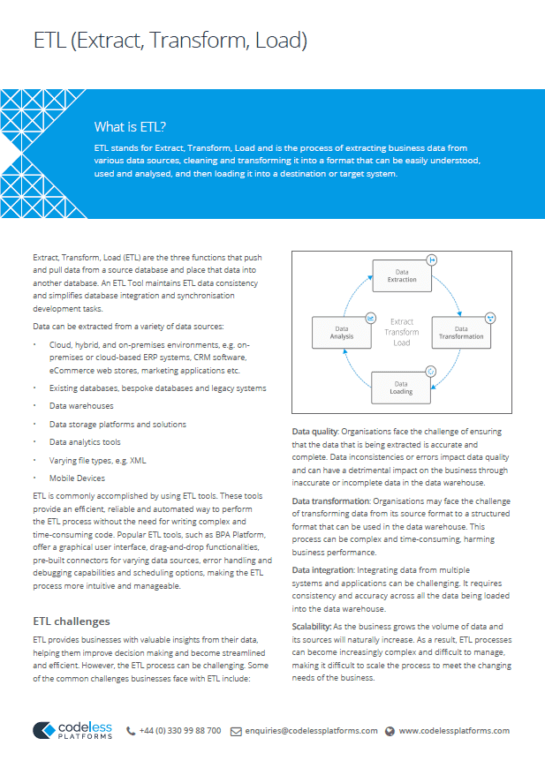
ETL stands for Extract, Transform, and Load and is the process of extracting business data from various data sources, cleaning and transforming it into a format that can be easily understood, used and analysed, and then loading it into a destination or target database.
Extract Transform Load (ETL) are the three functions that push and pull data from a source database and place that data into another database.
ETL is a core process for data migration and data quality management. ETL tools are used to automate data integration, improve data quality for business intelligence, and support big data initiatives. They maintain ETL data consistency and simplify database integration development tasks.
When database integration is necessary, ETL systems synchronise data from one data source to another. For example, when data from a custom-built website database needs to be placed into another database, such as an ERP or CRM system. In essence, an ETL tool inserts rows into a database.
Raw data can be extracted from a variety of data sources, such as:
- Cloud, hybrid and on-premises environments, e.g. on-premises or cloud-based ERP systems, CRM software, eCommerce web stores, marketing applications etc.
- Existing databases, bespoke databases and legacy systems
- On-Premises data warehouse / Cloud data warehouse
- Data storage platforms and solutions
- Data analytics tools
- Varying file types, e.g. XML
- Mobile Devices
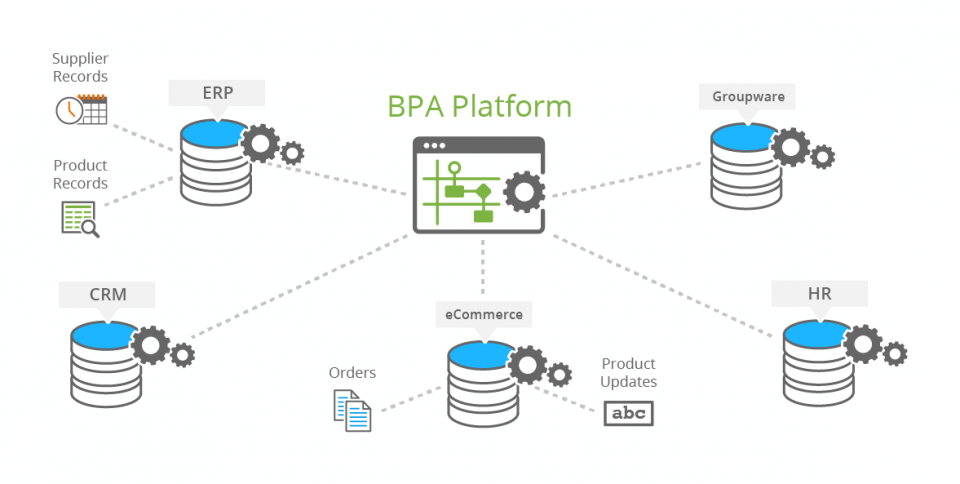
ETL Data Sources: Data can be held in multiple databases. An ETL Tool can dramatically reduce or eliminate the need for complex integration development.
What are the three steps in ETL processing?
The Extract phase pulls raw data from various sources such as databases, APIs, or files, setting the stage for data integration. During Transform, data is cleaned and standardised, ensuring compatibility with the target data warehouse or analytics platform. Finally, Load places the prepared data into its destination, ready for business intelligence and reporting.
ETL processes are a key component of any robust data pipeline, facilitating the seamless flow of information from source systems to analytics ready datasets. This information integration is foundational for successful data warehousing and business intelligence.
Without ETL, organisations struggle to consolidate data from various sources, leading to inconsistent reporting and missed insights.
Understanding the Three-Step Process of ETL: Extract, Transform, and Load
The three individual stages that combine to formulate an ETL process are:
Extract: The first step in the ETL process is data extraction. This involves gathering raw data from various data sources, such as databases, flat files or web-scraping.
The data obtained can be structured, semi-structured or unstructured, and it can come from a range of sources such as an ERP or CRM system, a website or eCommerce web store, a marketing solution or an Excel spreadsheet.
Data can be collated from the same source or multiple sources with the data extraction step being essential for ETL as it provides the raw material and critical data for later stages of the process.
The extracted data is then temporarily stored during the data processing pipeline into a staging area for the transformation process.
Transform: After data is extracted from the source(s), it is typically held in staging tables while the transformation process takes place. The next step in the ETL process is data transformation. This step is critical because it ensures that all data is cleaned, standardised, and properly formatted to match the requirements of the target system and its database structure.
To become compatible with the target system or database, the data transformation function uses the data that has been extracted from the initial data source and dynamically converts this data into the necessary format or database structure.
Data may need to be transformed for a variety of reasons, such as to remove duplicates or anomalies, standardise data formats, aggregate data or apply specific calculations. Data transformation ensures that the data is consistent, accurate and free from error before it is loaded into the target business system database.
Load: Once the data has been validated and properly formatted in the staging area, the data loading process can transfer it into the target database or application location.
Systems may include a data warehouse, data lake, or even a simple Excel spreadsheet. During the data load process, data should be structured in a format that is easy to access, query and analyse.
The target database should be optimised for the varying types of data that will be stored and for the end-use cases that the data will be used. This may involve the creation of a specific data model, partitioning data, or creating indexes.
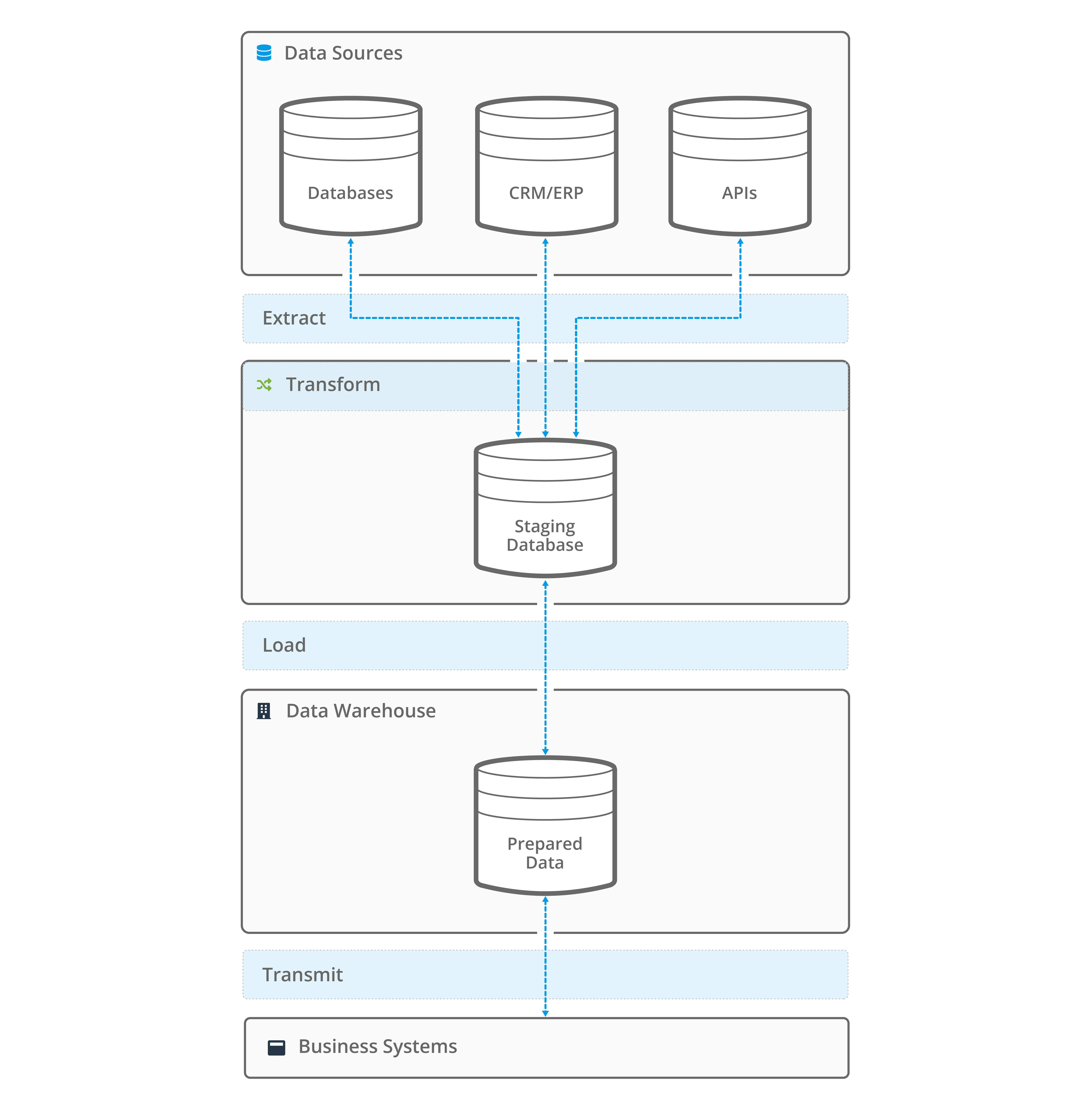
Image: ETL Process Example
ETL is a critical process for both large and small organisations looking to collect and manage data from various sources. It enables businesses to extract data from various sources, transform it into a format that can be understood and analysed, and then load it into a target system for storage and later use.
ETL is used in a variety of industries, such as retail, finance, manufacturing and wholesale distribution, healthcare, and more. ETL is an important process in data warehousing and business intelligence, as it enables organisations of all sizes to make informed business decisions based on accurate, up-to-date, and relevant data.
ETL is accomplished by using ETL tools. These tools provide an efficient, reliable and automated way to perform the ETL process without the need of writing complex and time-consuming code.
The best ETL tools, such as BPA Platform, offer a graphical user interface, drag-and-drop functionalities, pre-built connectors for varying data sources, error handling and debugging capabilities and scheduling options, making the ETL process more intuitive and manageable.
What are ETL tools?
ETL tools are specialised software applications designed to automate the Extract, Transform, and Load (ETL) process. They streamline the movement, cleansing, and preparation of data from diverse sources, making it ready for analysis. By simplifying the extraction of data from databases, files, or web services, transforming it into a consistent format, and loading it into a data warehouse or another target system, ETL tools help organisations efficiently manage their data integration needs.
Key Features of ETL Tools
- Data Extraction: Pull data from multiple sources including databases, flat files, APIs, and cloud applications.
- Data Transformation: Clean, standardise, and enrich data to ensure quality and consistency.
- Data Loading: Efficiently move processed data into data warehouses, data lakes, or analytics platforms.
- Automation & Scheduling: Automate repetitive tasks and schedule jobs to run at optimal times.
- Error Handling & Monitoring: Detect and resolve errors, with logging and alerting for smooth operations.
- Scalability: Handle growing data volumes and complex integration scenarios.
Popular Use Cases for ETL Tools
| Use Case | Description | ETL Tool Example |
|---|---|---|
| Data Warehousing | Consolidate data from multiple sources for reporting and analytics. | BPA Platform |
| Business Intelligence | Prepare clean, reliable data for dashboards and insights. | BPA Platform |
| Cloud Migration | Move and transform data to cloud-based data warehouses. | BPA Platform |
| Data Migration | Transfer data between systems during upgrades or mergers. | BPA Platform |
Why are ETL Tools important for Data Integration?
- Efficiency: Automate manual data processes, saving time and reducing errors.
- Data Quality: Ensure data is accurate, consistent, and ready for analysis.
- Scalability: Support growing data volumes and complex integration scenarios.
- Compliance: Help organisations meet data governance and regulatory requirements.
- Analytics Readiness: Provide clean, well-structured data for business intelligence and AI applications.
Comparing ETL and ELT Tools
| Feature | ETL Tools | ELT Tools |
|---|---|---|
| Transformation Location | Before loading (in the tool) | After loading (in the target system) |
| Best For | Complex transformations, strict data quality | Large datasets, cloud data warehouses |
Why use an ETL tool for data integration?
ETL processes are most effective when they are not treated as stand-alone utilities, but as part of a broader integration-led roadmap that aligns data movement and orchestration with business outcomes and governance structures.
ETL (Extract, Transform, Load) tools automate and simplify the integration of data from multiple sources, transforming it into a unified, accessible format suitable for analysis and business intelligence.
These solutions deliver key benefits such as enhanced efficiency, greater accuracy, scalable performance, and improved data quality, empowering organisations to make better decisions and automate critical business processes.
ETL Data Integration: The advantages of ETL automation for business processes and improved data quality
Businesses deploy a variety of systems and applications, which means that data is held in multiple databases. This in turn results in poor visibility and presentation of critical information.
An ETL tool provides a structured methodology and capability to achieve data integration between disparate systems and databases. As a result, the cohesiveness of critical business data is improved, and the need for unstructured and convoluted bespoke approaches is reduced.
ETL solutions provide organisations of any size with a powerful, efficient and cost-effective way for them to integrate business-critical data from various data sources. ETL is a key component of many data warehousing and business intelligence projects due to its ability to automate the process of data integration, improve data quality.
ETL has the added ability to scale to accommodate the growing data needs required throughout the business. ETL software can be seen as a valuable tool for organisations looking to take full advantage of their data and gain a competitive advantage.
There are several reasons why organisations choose to use ETL software for data integration :
- Efficiency: An ETL Tool provides the ability to automate the process of extracting, transforming and loading business-critical data. It ensures that the ETL process is faster and more efficient than manually performing these heavy administration tasks. In turn, this can save your organisation a significant amount of time and resources.
- Data Accuracy and Consistency: ETL solutions facilitate data validation, error handling and correction. This ensures that business data is accurate and consistent before it is loaded into the target database. A common example is when an eCommerce business is performing a batch CSV upload of products that have been incorrectly categorised or contain a formatting error.
- Scalability: ETL systems can handle large volumes of data and can easily scale to accommodate increasing data requirements set by an organisation. This means that ETL is important for organisations that are looking to process and analyse large amounts of data regularly or on a scheduled basis, such as performing inventory control tasks.
- Flexibility: ETL software provides the ability to extract data from various data sources, such as databases, flat files or web scraping. This data can then be loaded into a range of target systems, such as data warehouses, data lakes or spreadsheets. Having this added flexibility allows organisations to easily integrate data from multiple sources and use it for different purposes, such as when minimal or irregular updates are required for an application’s data or when an import routine exists for a specific dataset.
- Automation: ETL software caters for the dynamic scheduling and automation of data integration tasks. This means that data can be automatically extracted, transformed and loaded at a specific time or, if required in real-time, without manual intervention. This can save your organisation processing and data collation time, thus reducing employee resources and costs. It is especially useful in cases where data needs to be updated frequently.
- Improved Data Quality: ETL applications offer various techniques to validate, clean and standardise data during the transformation step, which leads to better data quality and data governance. This is important for organisations that are looking to improve their data analytics capabilities or for the initial synchronisation or one-off import of a large volume of data.
ETL vs. ELT: Key Differences
The main distinction between ETL and ELT centres on when data transformation occurs. In ETL (Extract, Transform, Load), data is transformed prior to being loaded into a data warehouse. In contrast, ELT (Extract, Load, Transform) loads the data first and then applies transformations directly within the warehouse. This shift in sequence greatly influences data architecture, especially as cloud technology and the handling of large-scale datasets have become more prevalent.
While ETL remains a cornerstone of data warehousing, the rise of cloud-based data warehouses has popularised ELT (Extract, Load, Transform), where transformations occur after loading. Both approaches are vital for data integration, but each offers unique advantages depending on your data volume, latency requirements, and infrastructure.
ETL (Extract, Transform, Load) and ELT (Extract, Load, Transform) are both widely used data integration approaches, but they differ mainly in how and where data transformation happens.
With ETL, data is transformed before being loaded into the target system, whereas ELT loads raw data directly into the destination, typically a data warehouse, and performs transformations inside that system.
What is the difference between ETL and ELT?
Here’s a more detailed look at the differences between ETL and ELT:
ELT (Extract, Load, Transform) and ETL (Extract, Transform, Load) are both methods used to move and transform data from one place to another. The primary difference between the two is the order in which the processes occur.
ETL tools are traditionally focused on data from on-premises systems, whilst ELT in an iPaaS form can cater for cloud, hybrid and on-premises systems.
For ease of use, BPA Platform can be deployed in either cloud, hybrid or on-premises environments allowing you to choose the ETL or ELT variation that most suits your requirements.
In ETL, data is first extracted from its primary source system, then transformed to fit the format and structure of the destination system, and finally loaded into that system. This process typically occurs in a separate, dedicated system called a data warehouse.
ELT is a variation of ETL in which the extraction and loading steps happen in the same order, but the transformation step is performed after the data is loaded into the destination system. In other words, ELT is a form of ETL that does the heavy lifting in the destination data warehouse system.
This approach allows for additional flexibility and scalability, as the data warehouse or data lake can handle large volumes of data and complex transformations more efficiently. ELT can simplify the overall data architecture and can take advantage of database-specific features, such as stored procedures, to perform the transformations.
ETL vs ELT Comparison Table: The difference between ETL and ELT
| Aspect | ETL (Extract, Transform, Load) | ELT (Extract, Load, Transform) |
|---|---|---|
| Process Order | Extract → Transform → Load | Extract → Load → Transform |
| Where Transformation Occurs | Before loading into target (often in a separate system) | After loading into target (inside data warehouse or data lake) |
| Typical Use Cases | On-premises systems, pre-defined data structures | Cloud, hybrid, or on-premises systems, flexible data needs |
| Flexibility | Less flexible, as transformation is done before loading | More flexible, as transformation happens after loading |
| Scalability | Limited by transformation system capacity | High, leverages data warehouse/lake processing power |
| Architecture | Traditional, may require dedicated ETL servers | Modern, simplifies architecture, uses target system features |
| Best For | Data needing transformation before loading (e.g., legacy systems) | Large/complex data, cloud/hybrid environments, real-time needs |
Summary of Key Differences
ETL transforms data before loading it into the destination, typically used with on-premises systems and when data must be standardised before storage.
ELT loads raw data first and performs transformations inside the destination system, offering greater flexibility and scalability, especially in cloud or hybrid environments.
Overall, the choice between ETL and ELT depends on the specific needs of the business and the nature of the data being moved. ETL is a good choice when the data needs to be transformed before it is loaded into the destination system such as when using on-premises systems. ELT, on the other hand, is a good choice when the destination system can perform the transformations efficiently when having all your business systems in a cloud or hybrid environment.
ETL vs ELT: which is better for cloud?
When evaluating data integration methods for cloud environments, the choice between ETL (Extract, Transform, Load) and ELT (Extract, Load, Transform) depends on your organisation’s specific needs, data volume, and transformation requirements. However, for most modern cloud-based data workloads, ELT is increasingly recognised as providing faster loading times and scalability with large unstructured datasets.
Why ELT Excels in the Cloud
ELT is designed to leverage the scalability, flexibility, and processing power of cloud data platforms. Unlike ETL, which transforms data before loading it into the destination system, ELT loads raw data directly into the cloud data warehouse or data lake, where transformations are performed as needed. This approach offers several advantages:
- Immediate Data Availability: Raw data is accessible as soon as it’s loaded, enabling faster insights and real-time analytics.
- Scalability: Cloud data warehouses can handle massive volumes of data and parallel processing, making ELT highly scalable.
- Cost Optimisation: By using the computational power of the cloud, ELT eliminates the need for separate transformation servers, reducing infrastructure costs.
- Flexibility: Teams can modify transformations without reloading data from source systems, supporting agile analytics and evolving business requirements.
- Simplified Maintenance: Fewer components in the data pipeline mean less maintenance and fewer points of failure.
When ETL still has a place
ETL remains valuable for organisations with strict data governance, compliance, or quality requirements, particularly when dealing with sensitive or highly regulated data. ETLs pre-load transformation stage allows for data cleansing, masking, and validation before data enters the cloud, which can be important for regulatory compliance.
However, ETL can be slower and less scalable than ELT, especially as data volumes grow. It is typically better suited for on-premises or hybrid environments where transformation complexity outweighs the need for speed and flexibility.
BPA Platform: Cloud, Hybrid or On-Premises
BPA Platform is both ETL and ELT: BPA Platform can be deployed in either cloud, hybrid or on-premises environments allowing you to choose the ETL or ELT variation that most suits your requirements.
Comparison Table: ETL vs ELT for Cloud
| Aspect | ETL (Extract, Transform, Load) | ELT (Extract, Load, Transform) |
|---|---|---|
| Transformation Location | Before loading (on separate server or staging area) | After loading (inside cloud data warehouse or data lake) |
| Data Compatibility | Structured data only | Structured, semi-structured, and unstructured data |
| Speed | Slower due to pre-load transformation | Faster, with parallel processing in the cloud |
| Scalability | Limited by transformation server capacity | Highly scalable, leveraging cloud resources |
| Cost Efficiency | Higher due to additional infrastructure | Lower, with fewer systems and optimized resource usage |
| Flexibility | Less flexible, requires predefined transformations | More flexible, allows ad-hoc and on-demand transformations |
| Maintenance | Higher, due to complex pipeline components | Lower, with simpler architecture and fewer points of failure |
| Security & Compliance | Pre-load transformation enables data masking and validation | Requires robust cloud security, but modern platforms offer strong controls |
| Best For | Smaller datasets, strict compliance, legacy on-premises or hybrid environments | Large datasets, real-time analytics, cloud-native environments |
For most cloud-based data integration scenarios, ELT is the preferred approach due to its speed, scalability, cost efficiency, and flexibility. ETL remains relevant for organisations with strict compliance or data quality requirements, but for modern cloud data platforms, ELT’s advantages make it the better choice in the majority of cases.
How to choose the best ETL vendor
When selecting the best ETL vendor, carefully evaluate their capabilities across essential areas such as support for a wide range of data sources and destinations, robust data transformation and integration features, strong data quality and governance, efficient loading and delivery, scalability and performance, and overall cost-effectiveness. Match vendor features to your unique requirements, thoroughly review their offerings, and compare pricing models. Always ensure that security and compliance measures meet your standards, especially when handling sensitive data.
Selecting the right ETL (Extract, Transform, Load) vendor is critical for businesses aiming to streamline data integration, enhance data quality, and support enterprise analytics. The following features and capabilities are essential for robust ETL solutions and should be prioritsed during vendor evaluation.
The ETL process can be extremely complex. If it has been poorly designed, the business may suffer from noticeable operational issues.
An ETL tool needs to be easy to use, be able to communicate with a variety of relational databases and read various file formats. Database integration through ETL software has never been more fundamental to the success of today’s business.
To ensure data mapping and manipulation is robust, reliable and repeatable, leading ETL tools that follow ETL best practices should provide containment and a highly structured approach. This ensures that data is consistent and any maintenance going forward is minimal.
When identifying the right ETL software vendor and data integration tools, it’s best to ensure that they provide easy-to-use functional building blocks that quickly and simply bridge the data gap between disparate systems and applications.
The functional building blocks within an ETL solution provide a highly visual set of tools and functions which helps developers to avoid lengthy and expensive coding.
Well-built ETL tools can also provide extensive data transformation capabilities regardless of database structures. This means that they can convert a variety of either structured or flat files to formats that are compatible with a relational database or other object-based targets.
Key ETL tool features
When evaluating an ETL vendor and its ETL tools, there are several key ETL features and capabilities to look for:
- Data Connectivity: An essential feature and capability of an ETL tool is having the ability to connect to various data sources, such as databases, flat files and APIs, to enable the end user to easily extract data from multiple sources and prepare it for transformation and loading.
- Data Transformation: When evaluating the right ETL solution for your organisation, look for an ETL tool that supports a wide range of data transformation capabilities. Transformation capabilities, such as filtering, sorting and standardising data, with a user-friendly interface for performing these tasks, should come as standard.
- Data Loading: Having the ability to load data into various target systems, such as data warehouses, data lakes and spreadsheets, is another important feature of ETL tools. Ensure that your chosen ETL solution offers flexible and customisable options for loading data and can handle large volumes of data for a variety of use cases.
- Data Governance: Data Governance is important for many organisations. Look for an ETL tool that can help on maintaining data quality and consistency. These features could include data validation, error handling and data lineage.
- Scalability: Scalability is another essential feature when evaluating ETL software. As data volume grows and business systems change, companies will need an ETL tool that can scale to accommodate this growth. Look for tools that can handle large volumes of data and that can be easily scaled to meet the future needs of the business.
- Automation: Many organisations use ETL tools to automate data integration tasks. For added customisation, scalability and flexibility look for an ETL tool that supports scheduling, event-based triggers and real-time data integration capabilities.
- User-friendly interface: An easy-to-use graphical interface is important to ensure that ETL tasks can be designed and built efficiently to mirror exact business processes. Look for an ETL tool with an intuitive GUI and drag-and-drop functionality to make it easy to map and build tasks and processes to execute ETL jobs.
- Technical support: When evaluating an ETL vendor it is important to consider the technical support provided. Businesses will want to ensure that they have access to the support they need to troubleshoot and resolve any issues that may arise. Look for an ETL solution provider that offers a range of support options, such as online documentation, whitepapers and knowledgebase articles, video tutorials and training webinars, and dedicated support teams.
- Cost: Finally, the cost of ETL software is a major consideration for organisations of all sizes. Businesses should compare the cost of different ETL tools, considering both the upfront and ongoing costs. They should also evaluate the potential benefits and ROI of using an ETL tool in their organisation.
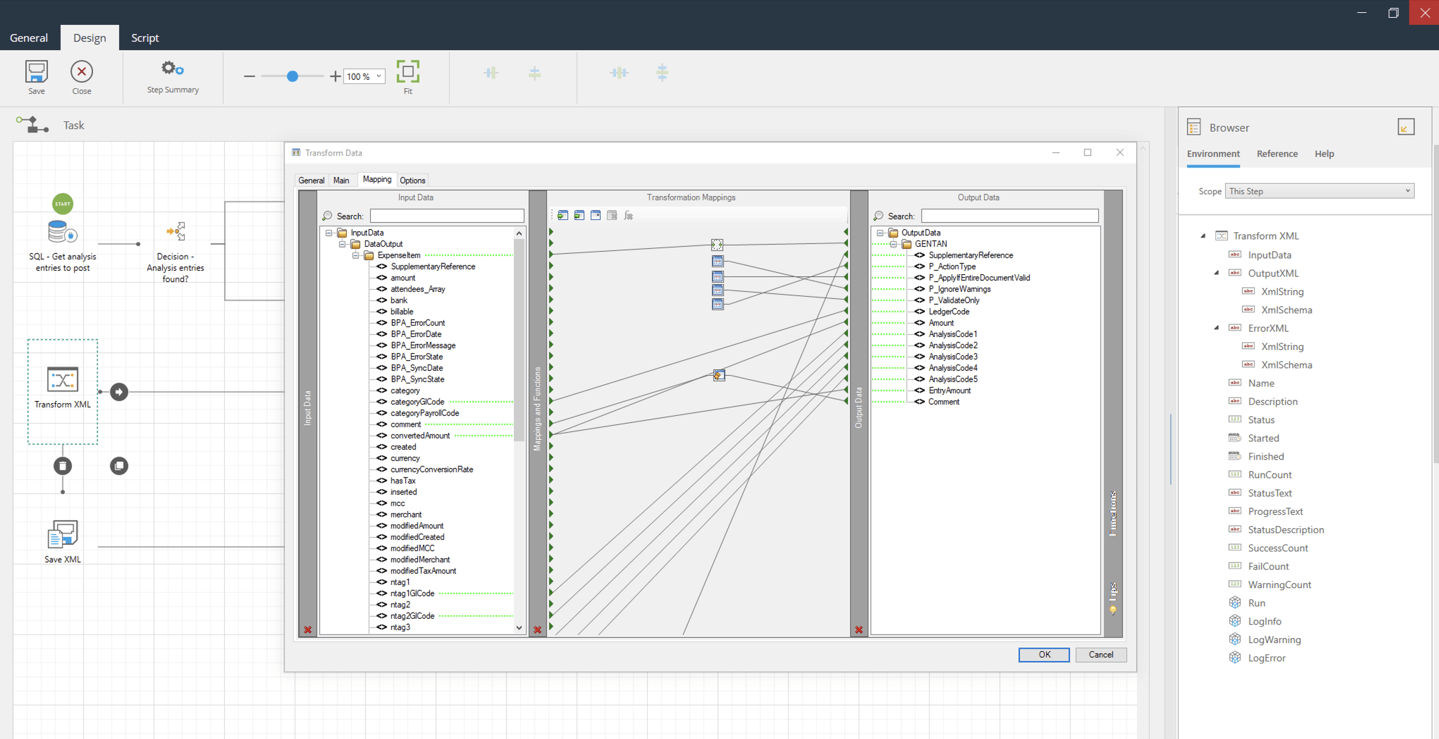
Image: ETL GUI: BPA Platform’s Intuitive User Interface
When evaluating ETL tools, businesses should look for tools that offer a wide range of data connectivity, transformation, loading options, scalability, automation and data governance features. Additionally, a user-friendly interface, technical support and cost are also important factors to consider.
By evaluating and selecting the right ETL tool, organisations can improve the efficiency and accuracy of their data integration processes, and gain more insights and value from their data.
Many ETL applications provide the ability to integrate multiple databases and synchronise their distinct data sets, but not all can match any database structure. Market-leading ETL Tools can be configured to achieve compatibility with almost any database structure.
In addition to achieving database compatibility, an essential technological feature is an ability to extend general ETL functions. Pioneering ETL systems will offer a bridge to automate further business processes.
For example, a procurement process will provide the ability to dynamically create and distribute Purchase Order (PO) requisitions with an external supplier. Within a logistics environment, it can facilitate the automatic placement of an order for fulfilment with a courier service provider.
An ETL Tool offers the ability to expose and consume information and can be used in almost limitless combinations and sequences. This ensures that any ETL implementation can be easily scaled up or down when business needs dictate.
Irrespective of business process complexity, an ETL solution with a well-designed building block approach will provide any capable software developer or engineer who has a reasonable understanding of their business systems with the ability to make extensive data processing and automation improvements to an organisation.
ETL Tool Features: A Quick Breakdown
| Feature/Capability | Description |
|---|---|
| Data Connectivity | Ability to connect to various data sources (databases, flat files, APIs) for easy extraction from multiple sources. |
| Data Transformation | Supports a wide range of transformation capabilities (filtering, sorting, standardising) with a user-friendly interface. |
| Data Loading | Can load data into various target systems (data warehouses, data lakes, spreadsheets) with flexible, customisable options for large data volumes. |
| Data Governance | Helps maintain data quality and consistency with features like data validation, error handling, and data lineage. |
| Scalability | Can handle large and growing data volumes, easily scaled to meet future business needs. |
| Automation | Supports scheduling, event-based triggers, and real-time data integration for customisation and flexibility. |
| User-Friendly Interface | Intuitive GUI and drag-and-drop functionality for efficient task design and execution. |
| Technical Support | Provides access to technical assistance, online documentation, knowledgebase, video tutorials, training webinars, and dedicated support teams. |
| Cost | Affordable pricing structure with consideration of upfront and ongoing costs, and evaluation of potential ROI. |
Summary
When selecting an ETL vendor, it’s important to assess a range of features and capabilities, including robust data connectivity, powerful transformation and loading options, strong data governance, scalability, automation, a user-friendly interface, comprehensive technical support, and a cost structure that aligns with your organisation’s needs and budget.
Real-World ETL Examples and Case Studies
What is an ETL process example?
Organisations use ETL tools to streamline data integration from multiple sources, ensuring data quality and consistency before loading into a data warehouse. This process is crucial for enabling accurate analytics and supporting data-driven decision-making.
In this section, we outline three different extract transform load use case examples and case studies, including loading data from a retail database into a data warehouse; transforming and mapping CSV files when commissioning a new eCommerce system to synchronise data with an ERP system; and a video demonstration of how to import a flat file into SQL Server using stored procedure.
ETL Process Example: Extracting, Transforming, and Loading Data from a Retail Database to a Data Warehouse
A use case example of an ETL process would be a retail company that is looking to improve data management and analyse sales data from various store locations.
The data could be collated to provide a complete overview of the company’s operations, enabling them to reallocate resources to expand the business. In this scenario, the ETL process would involve the following:
- Data Extraction: The retail company would extract sales data from various store databases and flat files, such as point-of-sale systems and inventory management systems.
- Data Transformation: Next within the ETL process, the extracted data is cleaned and transformed to standardise the data format and remove any errors or duplicates. This may include removing unnecessary data, converting data into a consistent format, or creating calculated fields for analysis.
- Data Loading: The next step within the ETL process includes loading the transformed data into a data warehouse for storage and later use. With the data warehouse being optimised for the multiple types of data and the use cases that the data that would be used.
- Data Analysis: After loading the data, the retail company would be able to perform a variety of data analyses, such as determining which products are selling well in which store locations; which days and times are the busiest; and which promotions have been the most successful. This could help the company make more informed business decisions.
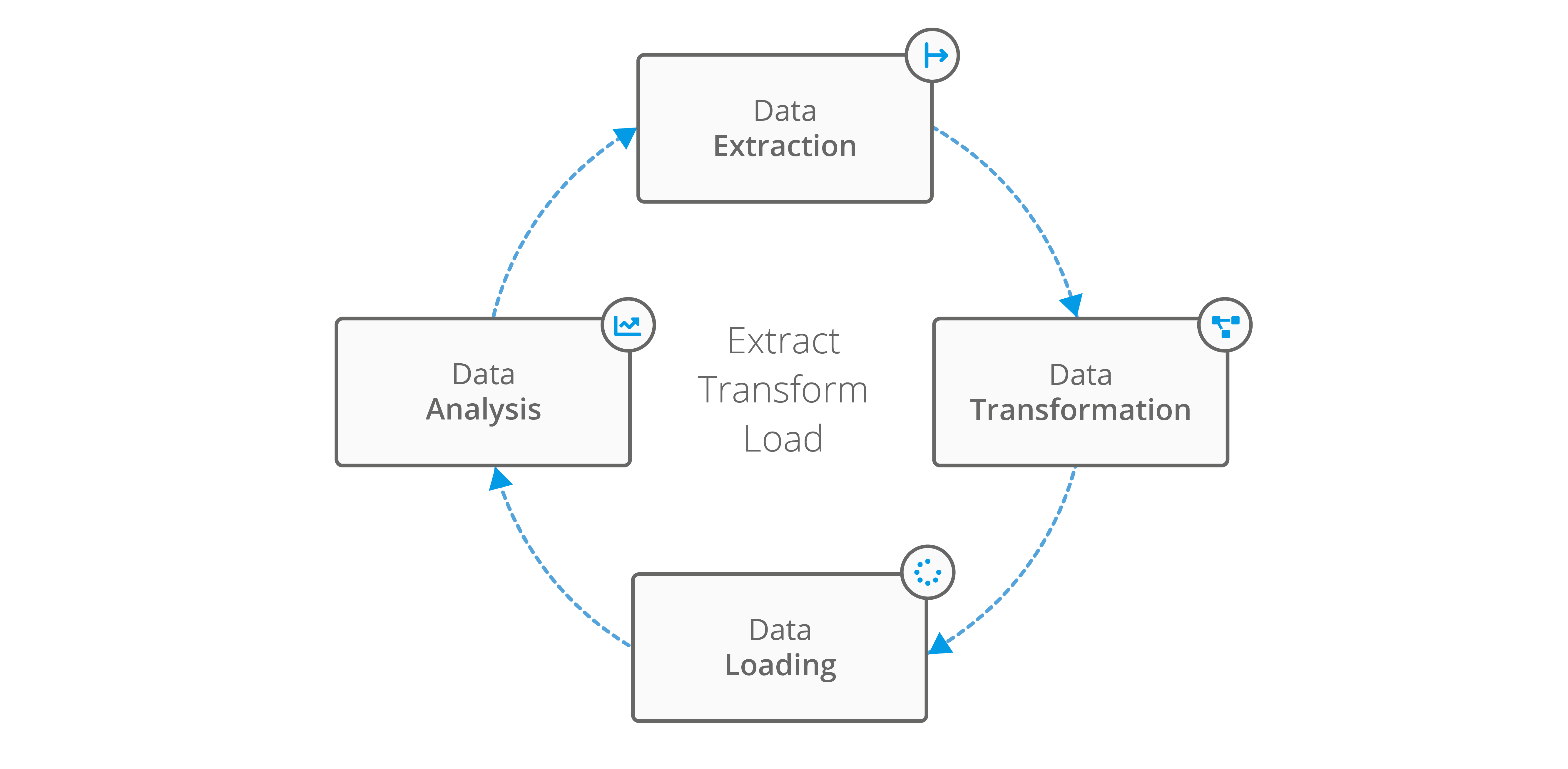
Image: Extract Transform Load Process
Real-World ETL Example: Retail Data Integration
A global retailer used Codeless Platforms’ BPA Platform to integrate data from over 50 SAP and EPOS systems. This automation reduced manual errors, improved data quality, and saved hundreds of staff hours each month. Read the full case study here .
The data integration enabled the organisation to achieve a complete overview of company operations, including sales, stock and inventory, as well as for automatic data checking. This entailed automatically scraping out anomalies in the data and checking for any pricing errors, whilst triggering email and system alerts when required to ensure that data is not duplicated between systems.
Graff Diamonds Case Study
“The flexibility of BPA Platform is remarkable. The things that you can do with it are out of this world. It never ceases to amaze me. It’s an incredibly efficient and powerful tool. I always equate BPA Platform to being a staff member that never sleeps.
It’s like an incredibly efficient person, or team of people, checking data, that never stops. The main benefit is time – the hours saved generating and manipulating reports. The sheer hourly numbers of staff time that’s been saved is incredible”
Graff Diamonds use BPA Platform to integrate over 50 instances of SAP Business One, EPOS and SAP Concur
ETL Tool example: Transforming and mapping CSV Files
Another common ETL example when using an ETL tool is when a business is looking to achieve a standard import routine, such as importing data in bulk with or without data transformation, or when a flat file import routine does not exist.
Unlike an API that calls back and forth between applications, flat files, such as plain text or CSV (delimited or fixed width), do not. This makes using extract transform load solutions with flat files appropriate for:
- When minimal or irregular updates are required for your application’s data or when an import routine exists for a specific dataset.
- The initial synchronisation or one-off import of a large volume of data.
Consider the scenario of commissioning a new eCommerce web store to synchronise data with an ERP system. Prone to manual processing errors, bulk product uploads are usually initiated using CSV files and the eCommerce platforms’ import routine – particularly if 10,000+ products need to be uploaded. Without an ETL Tool in place, it could be an expensive manual process.
For example, on the initial synchronisation of bulk uploads, errors can occur. This could be due to double commas or commas in the wrong place, or the CSV file may be rejected due to missing entries in a required field.
Without having ETL software in place, an employee would have to manually trace the CSV file, edit the document with the correct information and re-import the CSV file, whilst hoping that the file does not lose its formatting in the process.
An ETL Tool removes the risk of errors and import failures. It will dynamically extract the data from the CSV file, transform this information so that it is compatible with the target system or database and load the data to the database location. In the long term, this will save a business time and money.
Discover more ETL case study examples here.
ETL SQL Server Example
SQL, which stands for Structured Query Language, is a programming language used for managing and manipulating relational databases.
In the context of ETL, SQL is often used for extracting and transforming data from various sources, as well as for loading the transformed data into a target system.
In the following ETL SQL Server example we will use BPA Platforms’ Flat File Import Tool to import a flat file into SQL Server using a stored procedure.
The Import Flat File Tool is valuable to many Business Process Automation scenarios.
Where data is held as a CSV, spreadsheet or as a more complex flat file database, this tool can extract data to be used as part of wider business processes, such as eCommerce or Data warehousing.
Used as part of a process with other BPA Platform Tools, it can be used to transform and map data to eCommerce and ERP systems and is particularly useful for the initial synchronisation of large volumes of data, such as product and manufacturing data sheets.
The Import Flat File Tool imports delimited or fixed-width files, extracting the file content and file properties and outputting it as either a recordset or XML. The columns in a recordset, or nodes and nested elements in an XML file, can be inferred from an imported example or created manually. Data validation can also be applied to only import required data.
In the following example, we will use the flat file import tool to extract example product data in CSV format, use a decision step to verify files exist, use the Transform Data Tool to loop and map the data, convert the XML to a recordset, send the data to the SQL staging database with the stored procedure tool and finally use the file management tool to move the processed file from the awaiting processing to products processed folder.
Chapter Title: Prerequisites
To complete this example, you will need a Staging Database and a configured connection.
You will also need BPA Platform with the following tools: import flat file, decision tool, run VBScript tool, convert XML to recordset, call stored procedure and the file management tool.
Chapter Title: Setting up the file location
On the desktop let’s set up two folders. Name the first awaiting processing and the second products processed. We need to drag our products list CSV to the awaiting processing folder. Notice the products and structure in the file. (Open the CSV to show an example).
The products’ Processed folder is where the file will be automatically moved to when the Task is run.
Chapter Title: The Import flat file tool
Open BPA platform, navigate to your task folder and then create a new task. Name it “CSV ETL”. Click Design tab.
Select Import flat file and drag the tool onto the design area.
In the general tab, in Path, click browse and select the awaiting processing folder. In the file, name type select the file or type “products” and add a wildcard (“*”) so it can pick up any incremented or dated versions. Add “.CSV” at the end.
In the main /file Tab, ensure XML is selected as this is required for the next step in the task. In root node name type “root”.
Select header row in file and then click browse, we are going to use an example CSV file which BPA Platform will use to configure the output structure. Locate our product CSV file and click open.
The file we are using is Comma delimited with a standard carriage return line feed end marker. Ensure these options are selected.
In the elements/columns tab, we can see the data structure. This can be used to change the values of each node and element. Let’s change the new node to Products. Within here you can specify the type of data and other element properties.
Click preview output. Then click ok.
Next, in the options tab, we will set all options to continue, to allow for the processing of all available files.
Ok to close this step.
Chapter Title: Transform Data
We will now transform the data so that the CSV input matches the expected output.
Drag in a transform data step from the browser… and in the general tab, in data source select use a recordset or XML from another step and select OutputXML from import flat file.
In the main tab, click replicate structure from input data source. we can see the output structure of the XML, lets change the output name of CSV_SKU_Code to ERP_SKU_Code.
OK, let’s go to the mapping tab. Expand the trees on both sides and here we can see the input XML on the left and Output XML on the right. Let’s drag the products node to products. BPA Platform will offer to automatically map child nodes at this point, click yes.
Notice the simple loop icon that appears between the two, this will ensure the step loops through all the products in the CSV file.
The CSV_SKU_Code will need to be manually mapped to ERP_SKU_CODE, as we wanted to remap the input and output on this.
Now let’s Click OK.
Chapter Title: The Decision Step
As part of good practice and to reduce unnecessary processing we will drag in a decision step. We will set this up to terminate the task if no files are found by proceeding to an empty run VB script step.
Let’s drag in a Run VB script step and name it END Task and click ok, then link these steps together.
Open the decision step and click on the transform data branch and click edit, name it “File exists”.
Click the script Tab and delete the word true. In the browser environment tab with scope set to Task turn down the import flat file tree and drag SuccessCount into the script window.
At the end, then type “> 0”. This sets the logic to take this route if a file exists. Now click Save and close.
Now click the End branch and click edit. Name it “No File” and in the script tab select else.
Now click Save and close for the branch and save and close for the step.
Chapter Title: Convert XML to recordset
Let’s drag in a convert XML to recordset step to align the output with the required format.
We can go straight to the main tab and ensure the data source is set to Task Step and in the drop-down click output XML from transform data.
In the output recordset configuration click all in select fields, then click ok, and then click yes to the warning dialogue as our requirements are within safe limits.
Chapter Title: Sending Data to the Staging Database with Stored Procedure step
We now need to pass the data to the staging database.
Ok let’s drag in a stored procedure OLEDB step.
In the general tab let’s name it send to staging DB.
Then, ensure use a recordset is selected, in the dropdown ensure results from convert XML to recordset are selected.
In the main tab, set your database connection to your pre-configured connection, browse to your required procedure and we are going to select SP product upsert. Then Click OK.
On the left you will see the parameters within the staging database and we will assign the fields we want to transfer by dragging the record sources from the browser.
Let’s drag in some fields to populate the database.
In addition to your chosen fields, you will need to set TC_SyncStatus with a value of ready by typing this manually.
And Allow _Insert with a value of 1. Click ok to close the step.
Chapter Title: The File Management Tool
The final step moves the processed CSV file from the Awaiting Processing Folder to the Products Processed folder.
Let’s drag in a file management step. In the general tab name it move processed files.
Browse to the file source path of the CSV file, which is the Awaiting Processing folder we made previously.
In the file, name browse for the file or type in the name of the CSV and add a wildcard to the filename in case it will be incremented or dated. And add .csv at the end.
In the Main tab, we can use this tool to Copy, rename delete or upload,
for our purposes ensure the move option is selected.
Set the destination path by browsing to the Products Processed folder we made earlier, and we will leave the other settings at their default values.
Click ok and save and close the task.
Chapter Title: ETL Testing the Task
Let’s link the remaining steps. Then click save and close.
In a real-world scenario, this file could be added by File Transfer Protocol (FTP) or via a network for example.
Our task could be set up with a scheduled step that runs at regular intervals, but for demonstration purposes, let’s run it by right-clicking and selecting queue now.
When the Task has been completed, let’s look at the folders on the desktop and we can see that the file has been moved to the Products Processed folder.
In Microsoft SQL Server management studio, in the Products Table, we can see that the contents of the CSV file have been transferred.
This example introduces the concepts and techniques of BPA Platform and its ETL capabilities. For full production examples, training and more please contact your account manager or visit www.codeless platforms.com.
Thanks for watching.
What are the challenges in ETL?
ETL (Extract, Transform, Load) workflows encounter a range of challenges, such as managing data quality, executing complex transformations, processing large datasets, and integrating information from multiple sources.
Additional hurdles include performance bottlenecks, tightly coupled pipeline components, and the requirement for comprehensive testing to ensure reliable data integration.
ETL challenges in more detail
ETL provides businesses with valuable insights from their data, helping them improve decision making and become streamlined and efficient, but the ETL process can be challenging. Some of the common challenges businesses face with ETL include:
- Data quality: Organisations face the challenge of ensuring that the data that is being extracted is accurate and complete. Data inconsistencies or errors impact data quality and can have a detrimental impact on the business through inaccurate or incomplete data in the data warehouse.
- Data transformation: Organisations may face the challenge of transforming data from its source format to a structured format that can be used in the data warehouse. This process can be complex and time-consuming, harming business performance.
- Data integration: Integrating data from multiple systems and applications can be challenging. It requires consistency and accuracy across all the data being loaded into the data warehouse.
- Scalability: As the business grows the volume of data and its sources will naturally increase. As a result, ETL processes can become increasingly complex and difficult to manage, making it difficult to scale the process to meet the changing needs of the business.
- Data privacy and security: Ensuring that sensitive data is protected during the ETL process can be difficult, especially if the data is being transferred over the internet or between different systems.
- Latency: An ETL process may take longer to finish as the data volume increases, impacting real-time data analysis or decision-making processes.
ETL tools can help organisations overcome these challenges as they are designed to automate and simplify the ETL process.
What are the benefits of ETL?
ETL (Extract, Transform, Load) workflows provide significant advantages for organisations managing large datasets. By automating the extraction, transformation, and loading of data from diverse sources into a centralised system, ETL helps improve data quality, boost operational efficiency, and empower more informed business decisions.
Implementing extract transform and load software into your business systems has numerous benefits. Organisations often cite an immediate return on investment (ROI) when they deploy an ETL platform, even from automating the most basic of tasks.
The features and capabilities of ETL make it a powerful tool for any data integration project or process automation requirement.
The advantages of ETL tools include:
- Automates data extraction, transformation, and loading from multiple sources
- Improves data quality and business decision-making
- Delivers fast ROI by automating even basic tasks
- Visualizes data flow for easy developer understanding
- Integrates data seamlessly across different systems
- Enables reliable, repeatable data mapping and manipulation
- Transforms data to fit specific business needs
- Cleanses and standardises data for more accurate analysis
- Easy to maintain, configure, and adapt as requirements change
- Supports multiple data types and sources for comprehensive integration
- Enhances company capabilities with specialised ETL tools

Image: The advantages of ETL tools
One of the key benefits of using ETL applications is the ability to achieve a visual flow of a data processing structure.
This makes it easy for software developers to easily understand business data regardless of process complexity, even if it comes from multiple systems and data sources.
Another major benefit that organisations using ETL will see is the ability to provide developers with structured, compatible data between different sources.
This allows for the seamless integration of data from different systems whilst ensuring that critical business data can be easily analysed.
In addition to providing your developers with well-structured data, ETL applications can ensure that business data is more valuable and useful. It provides you with an environment for robust, reliable, and repeatable data mapping and manipulation.
This means that businesses can easily transform specific data sets which can be mapped to fit exact business requirements.
Another benefit of ETL is its data cleansing and transformation capabilities. Utilising data cleansing and transformation functionality ensures that business data is consistent and free from error, making data more valuable and useful for analysis.
ETL is also easy to maintain, configure, and adapt when needed, this makes it a very versatile and flexible business solution and ensures that a business can easily update its ETL processes as its needs change over time.
Additionally, ETL applications can read multiple database types, files, and web services, and bring the information together in a cohesive manner.
This allows companies to integrate data from various sources, systems and applications, making it much more valuable and useful for analysis and decision making.
As highlighted above, there are many benefits of ETL, and using specific tools for data integration can further enhance company expectations.
Here’s a detailed breakdown of the advantages of using ETL for business automation:
- Improved data quality: ETL ensures that business data is accurate, consistent and free from error. This is achieved through a series of validation checks and data cleansing operations that are applied to the raw data as it is extracted from the initial source. These operations can include removing duplicates, filling in missing values, and standardising data formats.
- Increased efficiency: ETL improves efficiency throughout the organisation by automating the process of collecting, cleaning and integrating data. This removes the need for manual data entry and reduces the risk of errors. Additionally, ETL can run in real-time or on a scheduled basis, ensuring that data is always up to date and available for analysis.
- Improved decision making: ETL can improve decision making by helping management teams access and analyse large and diverse data sets from a variety of sources at any moment in time. This can help uncover insights and trends that might otherwise go unnoticed, aiding informed business decisions and supporting business intelligence.
- Data warehousing: ETL allows a business to load data from various sources into a Data warehouse where data can be stored in a centralised database location. This makes data analysis, reporting and decision making more efficient as data is consolidated and standardised.
- Increased Data Governance: ETL helps businesses to establish standard procedures for how data is extracted, transformed and loaded. This helps to ensure data consistency across departments whilst making it easier to identify and rectify data errors.
- Increased scalability: As data sources and data volume grow, ETL can be used to scale up data integration and management processes accordingly, providing a sustainable solution for growing data needs and changing business requirements.
- Improved database performance: By cleaning, aggregating and transforming business data before it is loaded, ETL can improve database performance. The cleansing of data can reduce the size of the database, which in turn can provide faster query performance and reduced hardware costs.
Planning your ETL Strategy
An effective ETL strategy defines how an organisation systematically extracts data from multiple sources, transforms it according to business rules, and loads it into a target system for analysis and informed decision-making. This strategy covers the overall methodology, selection of ETL tools, and the processes involved in data extraction, transformation, and loading.
Critical components and best practice of an ETL strategy include identifying relevant data sources, establishing precise transformation rules, choosing the right ETL platform, and maintaining data quality, security, and compliance throughout the workflow.
ETL provides a powerful way to collect, clean and integrate data from various sources. It can play a critical role in helping companies improve data quality, increase efficiency and make more informed business decisions.
Core Components of an ETL Strategy
An effective ETL strategy is essential for seamless data integration and business intelligence. Below, we have highlighted the key components:
Data Source Identification
Identifying all relevant data sources such as databases, applications, and files and analysing their structure and format is the first step in any ETL strategy.
Transformation Logic
Establishing rules and processes for cleaning, aggregating, and structuring data ensures it meets the requirements of the target system. This stage includes data cleansing, type conversion, validation, and other critical operations.
Target System Definition
Specifying the destination for the transformed data such as a data warehouse, data lake, or operational system is crucial for effective data management and analysis.
ETL Tool Selection
Selecting the right tools and commercial ETL suites, cloud-based services, or custom-built solutions is vital for efficient extraction, transformation, and loading of data.
Data Quality Assurance
Implementing measures to maintain data accuracy, completeness, and consistency throughout the ETL process is essential. This includes data profiling, validation, and robust error handling.
Automation and Scheduling
Automating and scheduling ETL workflows ensures regular, efficient data integration and reduces manual intervention.
Monitoring and Maintenance
Setting up monitoring mechanisms helps track ETL performance, quickly identify and resolve issues, and maintain the ongoing health and reliability of the data pipeline.

Image: The core components of planning an ETL strategy
Key Considerations for Designing an ETL Strategy
Designing a robust ETL strategy requires careful planning and attention to several critical factors:
Business Requirements
Align your ETL strategy with your organisation’s unique objectives, whether supporting advanced reporting, analytics, or operational efficiency. This ensures the solution delivers measurable business value.
Scalability
Build an ETL process that is capable of scaling to accommodate growing data volumes and increasing complexity as your business evolves.
Performance
Optimise ETL workflows to maximise speed and minimise resource usage, reducing execution time and operational overhead.
Security
Incorporate robust security protocols to safeguard sensitive information throughout the extraction, transformation, and loading phases.
Cost
Evaluate the total cost of ownership, including expenses for tools, infrastructure, and personnel needed to implement and maintain your ETL strategy efficiently.
What are the benefits of a well-defined ETL Strategy?
A well planned ETL strategy delivers significant advantages for organisations leveraging enterprise portals, ERP integration, CRM services, and business process automation solutions. The benefits of structured ETL project planning include:
Improved Data Quality
Ensures that data is accurate, consistent, and reliable, forming a trustworthy basis for analysis and business decision-making.
Enhanced Data Accessibility
Allows users to easily access and work with data from diverse sources, all available within a centralised, unified location.
Increased Efficiency
Automates the data integration process, minimising manual intervention and boosting overall productivity.
Better Business Intelligence
Creates a robust foundation for generating actionable data-driven insights and enables more informed strategic decisions.
By carefully planning and implementing an ETL strategy, organisations can maximise the value of their data assets and secure a competitive advantage in their industry.
ETL Integration Services
ETL integration services enable organisations to extract data from multiple sources, transform it into a consistent format, and load it efficiently into a target system such as a data warehouse or database. These services are essential for businesses seeking to consolidate information from various platforms including ETL tools like Codeless Platforms’ BPA Platform to achieve a unified data view for improved analysis and decision-making.
Codeless Platforms brings over 25 years of expert experience in delivering integration and ETL for automation projects, with a strong focus on ETL capabilities through its BPA Platform.
The low-code/no-code business process automation solution excels in simplifying complex data extraction, transformation, and loading tasks, enabling organisations to seamlessly integrate diverse systems and data sources.
BPA Platform’s scalable, flexible architecture supports cloud, hybrid, and on-premises deployments, empowering businesses to automate workflows, improve data quality, and accelerate decision-making. This felxibility allows you to choose the ETL or ELT variation that is best suited to your exact business requirements.
With a proven track record of over 7,500 successful implementations worldwide, Codeless Platforms combines deep technical expertise with a user-friendly drag-and-drop interface, making it a trusted choice for enterprises seeking efficient, secure, and cost-effective ETL tools and integration solutions.
Codeless Platforms’ ETL integration services provide organisations with the opportunity to achieve data integration between disparate systems and databases whilst reducing bespoke development times and costs. We will help you plan your ETL strategy, and implement ETL tools to match your operational processes.
Market-leading ETL software like BPA Platform follow ETL best practices to provide a visual flow of a data processing structure and can read multiple database types, files and web services to bring the information together.
They ensure that data is consistent, well-structured and can be mapped and manipulated reliably and repeatedly, whilst being easy to maintain, configure and adapt as and when required.
Whether your extract, transform, load project requires cloud, hybrid or on-premises deployment, Codeless Platforms has a proven track record in deploying cost-effective ETL integration services, delivering system integration best practices, and streamlining business processes that enable organisations of all sizes to achieve successful ETL implementation.
Our highly skilled and knowledgeable workforce offers consultancy, professional services and technical support to end users and its partner channel, providing them with the knowledge and freedom to achieve end-to-end digtial transformation efficiency.
Planning an ETL strategy can be a challenge which requires people, processes and technology to adapt to changing business requirements and customer expectations.
Codeless Platforms’ digital transformation blueprint has been established through customer requirements and insights with examples of ETL projects that span a wide variety of departments, processes, systems and industry specialisms.
To learn more about how BPA Platforms’ drag-and-drop ETL tool facilitates database integration and eliminates the need for complex and bespoke development, download the brochure below or call +44 (0)330 99 88 700.