
iPaaS architecture for modern enterprise IT strategies
As organisations adopt more applications, cloud services, APIs, and digital technologies, managing the flow of data between systems becomes increasingly complex.
This can create a headache for organisations, as information needs to be exchanged quickly, accurately, and securely in order to maintain operational efficiency, enhance customer experience, and have the ability to respond to changing business requirements.
So how is this issue alleviated?
The answer lies with iPaaS architecture, which has become a critical component of modern enterprise IT strategies.
iPaaS architecture provides a cloud-based framework for connecting systems, orchestrating workflows, automating business processes, and managing data flows across cloud, hybrid, and on-premises environments.
This is achieved by utilising pre-built connectors that integrate applications and business systems, whether SaaS or on-premises, with the iPaaS platform. At the heart of the architecture is the cloud-based integration engine which receives the data from the connectors. Visual drag-and-drop interfaces then enable users to map and transform the data, as well as automate workflows.
Without this scalable integration framework, businesses often face data silos, manual processes, duplicate data, and growing maintenance challenges caused by point-to-point integrations.
Article Summary
This article explores what iPaaS architecture is and why it has become a critical component of modern enterprise integration strategies. It includes:
- Understand how iPaaS platforms connect ERP systems, CRM applications, eCommerce platforms, databases, APIs, and other business-critical systems through a central integration layer.
- Explore the core components of iPaaS architecture, including connectivity, workflow orchestration, data transformation, monitoring, governance, and security.
- Discover how a scalable iPaaS architecture reduces integration complexity, eliminates data silos, and supports business process automation.
- See how organisations use iPaaS to support ERP integration, eCommerce automation, EDI processing, CRM synchronisation, and supply chain operations.
- Learn the differences between cloud, hybrid, and on-premises iPaaS deployment models and how to choose the right approach for your business.
- Understand why flexible integration architecture is essential for digital transformation, operational efficiency, and future business growth.
- Explore how BPA Platform enables organisations to build scalable integration and automation frameworks across cloud, hybrid, and on-premises environments.
What is iPaaS architecture?
iPaaS architecture refers to the technical framework that enables an integration platform to connect applications, systems, data sources, and business processes through a centralised integration layer.
Instead of building and maintaining hundreds of point-to-point integrations, organisations use an iPaaS platform as a hub that manages connectivity, data transformation, orchestration, monitoring, and automation.
Unlike traditional middleware (such as legacy Enterprise Service Bus or ESB systems), a modern iPaaS architecture decouples the integration logic from the underlying applications. This creates a centralised hub that handles data transformation, protocol mediation, API management, and workflow orchestration.
The architecture typically includes:
- Application connectors
- API integration capabilities
- Data transformation engines
- Workflow orchestration tools
- Security and governance controls
- Monitoring and alerting services
- Deployment infrastructure
The goal is to create a scalable, reusable integration framework that supports both current and future business requirements.
Why businesses use iPaaS architecture
Historically, organisations connected systems using point-to-point integrations. While effective for a small number of applications, this model becomes increasingly difficult to manage as more systems are added.
Common challenges include:
- Manual data entry between systems
- Data silos across departments
- Inconsistent reporting
- Delayed order processing
- Inventory inaccuracies
- Duplicate customer records
- High maintenance costs
- Integration failures that are difficult to troubleshoot
For example, a manufacturer might need to connect its ERP system to an eCommerce platform, warehouse management system, shipping provider, CRM platform, supplier portal, and business intelligence solution. If each application is connected directly to every other system, the number of integrations grows rapidly, increasing maintenance requirements and creating additional points of failure.
iPaaS architecture addresses this challenge by introducing a central integration layer that manages connectivity, data transformation, workflow automation, and monitoring from a single platform. Instead of maintaining dozens of separate integrations, organisations can manage integrations through a consistent and scalable framework.
The result is greater flexibility, improved visibility, and a significantly lower administrative burden for IT and operations teams.
Speak to an integration architect
How iPaaS architecture works
At its core, iPaaS architecture acts as an intermediary between systems
When data is created, updated, or triggered within one application, the platform can automatically process that information and distribute it to the systems that require it. Along the way, the platform can apply business rules, transform data formats, automate workflows, validate information, and monitor activity.
For example, when a customer places an order online, the integration platform can automatically:
- Create the order within the ERP system/li>
- Update inventory levels/li>
- Trigger warehouse fulfilment processes/li>
- Generate shipping information/li>
- Synchronise financial records/li>
- Update customer-facing systems
Rather than relying on manual intervention or multiple disconnected integrations, all activity is managed through a central architecture designed to support end-to-end business processes.
The role of iPaaS in modern enterprise integration
Modern organisations rarely operate exclusively in the cloud or entirely on-premises. Most businesses manage a combination of legacy applications, cloud software, databases, APIs, and partner systems.
As businesses add new applications, acquisitions, cloud services, and customer-facing platforms, integration complexity increases rapidly.
Common challenges include:
- Manual data entry between systems
- Data silos across departments
- Inconsistent reporting
- Delayed order processing
- Inventory inaccuracies
- Duplicate customer records
- High maintenance costs
- Integration failures that are difficult to troubleshoot
As a result, modern iPaaS architecture must support a wide range of deployment scenarios, including cloud, hybrid, and on-premises environments.
This flexibility allows businesses to modernise their integration strategy without replacing existing systems. Instead, organisations can connect new technologies to their existing infrastructure while maintaining control over critical business processes and data.
Solutions such as BPA Platform are designed around this principle. By providing a centralised integration and automation framework that supports cloud, hybrid, and on-premises deployments, BPA Platform enables organisations to build a scalable integration architecture that evolves alongside their business requirements.
iPaaS architecture as a foundation for automation
While integration is often the primary driver for adopting an iPaaS, the architecture also provides the foundation for broader business process automation initiatives.
Once systems are connected through a central platform, organisations can automate workflows that previously relied on manual effort. This might include synchronising customer records between CRM and ERP systems, automating EDI transactions with suppliers, updating inventory across multiple sales channels, or streamlining order-to-cash processes.
This is why iPaaS architecture is increasingly viewed not simply as an integration strategy, but as a core component of digital transformation. By connecting systems, automating processes, and improving data flow across the organisation, it enables businesses to operate more efficiently while supporting future growth.
Core components of iPaaS architecture
While iPaaS platforms differ in their capabilities, most modern architectures are built around several core components that enable applications, data, and business processes to work together seamlessly.
The purpose of these components is not simply to move data between systems. A well-designed iPaaS architecture creates a central integration layer that reduces complexity, improves visibility, and enables organisations to automate critical business processes across their technology estate.
Connectivity layer
At the heart of any iPaaS architecture is the connectivity layer. This is responsible for establishing communication between the various applications and systems used throughout the business.
It provides connectors and APIs that allow communication between systems such as:
- ERP systems
- CRM platforms
- eCommerce applications
- Accounting software
- Databases
- Legacy applications
- Cloud services
- EDI networks
An iPaaS solution such as BPA Platform provides a central integration hub that connects these systems through pre-built connectors, APIs, web services, database connections, and file-based integrations. This architectural approach significantly reduces the need for custom point-to-point development while making it easier to onboard new applications as business requirements evolve.
Integration and workflow engine
Connecting systems is only one part of the integration challenge. Organisations also need a way to coordinate the business processes that depend on those systems.
This is where workflow orchestration becomes a critical architectural component.
Modern iPaaS platforms manage the flow of information between applications and automate the actions that should occur when specific business events take place.
This layer controls:
- Process automation
- Business rules
- Event-driven workflows
- Scheduled integrations
- Exception handling
For example, when a customer places an order through an eCommerce platform, the workflow engine can automatically:
- Create a sales order in the ERP system
- Validate inventory availability
- Trigger warehouse fulfilment
- Generate shipping information
- Update the customer portal
- Notify finance systems
Rather than treating integrations as isolated transactions, BPA Platform enables organisations to automate complete business processes that span multiple departments and systems. This reduces manual intervention, eliminates duplicate data entry, and helps ensure operational consistency across the organisation.
Data transformation layer
One of the biggest obstacles in enterprise integration is that different systems often store and structure information differently.
An ERP system may use different field names, formats, or business rules than a CRM platform, eCommerce application, or supplier portal. Without a mechanism to standardise and transform data, organisations risk creating inconsistencies that lead to reporting errors, operational delays, and poor customer experiences.
The data transformation layer converts data between systems by:
- Mapping fields
- Standardising formats
- Validating information
- Enriching records
- Removing duplicates
The data transformation layer within an iPaaS architecture ensures information can be translated, validated, and synchronised as it moves between systems. BPA Platform provides tools for mapping data structures, applying business rules, and automating transformations, helping organisations maintain a single, accurate view of critical business information across multiple applications.
This capability becomes particularly important for manufacturers, distributors, and eCommerce businesses that process large volumes of transactions and depend on accurate, real-time data.
For example, customer information from an online store may require transformation before being imported into an ERP system.
This ensures data consistency across the organisation.
Monitoring and management
As integration environments become more sophisticated, maintaining visibility across processes becomes increasingly important.
Without central monitoring, integration failures can remain undetected until they begin affecting customers, suppliers, or internal operations. Missing orders, delayed shipments, and inaccurate inventory updates are often symptoms of poor integration visibility rather than problems within the applications themselves.
A key component of iPaaS architecture is therefore the ability to monitor, manage, and govern integrations from a central location.
Monitoring tools provide insight into:
- Integration performance
- Transaction volumes
- Failed processes
- Processing bottlenecks
- System availability
BPA Platform provides operational visibility into workflows, transactions, and system activity, enabling IT teams to identify issues quickly, track performance, and maintain service reliability.
This centralised management capability is particularly valuable for organisations operating hybrid environments, where cloud applications, on-premises systems, and external trading partners must all work together as part of a single business process.
Security and governance
Security and scalability underpin every layer of a modern iPaaS architecture.
As organisations add new applications, expand into new markets, or increase transaction volumes, the integration platform must be able to scale without requiring significant redevelopment. At the same time, sensitive business data must be protected.
Key architectural elements include:
- Authentication
- Authorisation
- Encryption
- Audit trails
- Role-based access control
- Compliance management
BPA Platform supports cloud, hybrid, and on-premises deployment models, allowing organisations to build an integration architecture that aligns with their operational, compliance, and security requirements. This flexibility enables businesses to modernise at their own pace while maintaining control over critical systems and data.
Together, these architectural components create a foundation that enables organisations to connect systems more effectively, automate complex processes, and support long-term digital transformation initiatives without increasing integration complexity.
Request a guided demo of BPA Platform
Common iPaaS deployment models
One of the most important architectural decisions is where the platform is hosted and runs. This is not merely a hosting preference, it affects data residency, latency, security, and the nature of your vendor relationship.
Cloud-hosted iPaaS architecture
The vendor manages all infrastructure. Configuration, connectors, and workflows run in the vendor’s cloud environment. This model reduces operational overhead and is well-suited to organisations whose systems are predominantly SaaS-based.
Benefits include:
- Rapid deployment
- Elastic scalability
- Reduced infrastructure management
- Lower upfront costs
The limitation is control. Data passes through vendor infrastructure, which creates questions around residency, sovereignty, and the ability to meet specific compliance requirements.
This model is particularly attractive for organisations with cloud-first strategies.
Hybrid iPaaS architecture
Many businesses still operate critical on-premises systems alongside cloud applications.
Hybrid architecture splits the control plane from the execution layer. The platform is managed and configured centrally (often via a cloud-hosted design environment), but runtime agents can be deployed on your premises, in your private cloud, or across multiple locations.
Hybrid architecture enables secure communication between:
- On-premises ERP systems
- Cloud CRM platforms
- SaaS applications
- Legacy databases
This model is particularly relevant for manufacturers, distributors, and ERP-led businesses that need to integrate on-premises ERP systems, warehouse management platforms, or production control systems with cloud-based applications — without routing sensitive operational data through external infrastructure.
BPA Platform supports cloud, hybrid, and fully on-premises deployments, which is why it is used by organisations with strict data governance requirements alongside those running entirely in the cloud.
This approach supports gradual digital transformation without requiring organisations to replace existing investments.
On-premises iPaaS architecture
Certain industries require complete control over infrastructure and data.
An on-premises deployment allows organisations to maintain integrations within their own environment while benefiting from centralised integration management and automation capabilities.
This is often important in manufacturing, distribution, regulated industries, and organisations with strict compliance requirements.
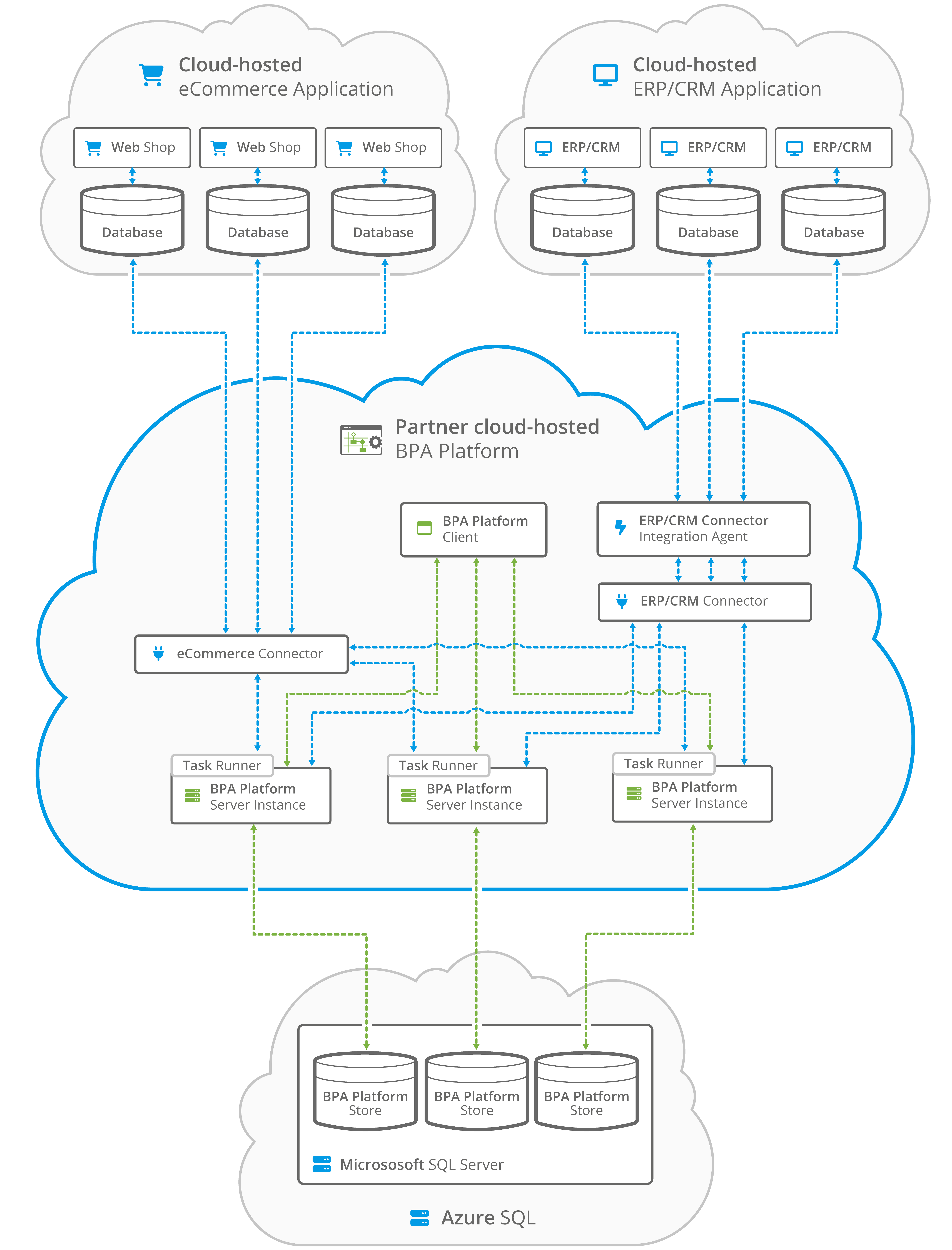
Image: iPaaS deployment in a partner cloud-hosted deployment
Enterprise integration patterns supported by iPaaS
For IT architects evaluating iPaaS platforms, it is worth considering which enterprise integration patterns the architecture natively supports.
Request/reply
A calling system sends a message and waits for a synchronous response. Common in API-driven workflows, order confirmation scenarios, and real-time stock availability lookups.
Publish/subscribe
One system publishes an event — a new order, a price change, a stock update — and multiple downstream systems receive and act on it. This pattern underpins real-time data distribution across large application estates.
Message queue and asynchronous processing
High-volume workflows benefit from queuing, where messages are held and processed in sequence or in batch, decoupling the sender from the receiver. This is particularly relevant in ecommerce and distribution environments during peak trading periods.
Content-based routing
Incoming data is routed to different systems or processes based on its content. An order for a specific product range routes to one warehouse; a high-value order triggers an additional approval step. This kind of conditional logic is essential in complex operational environments.
Data aggregation and splitting
Multiple records are combined into a single transmission, or a single message is split into child transactions for parallel processing. Common in EDI-to-ERP workflows.
How iPaaS architecture supports ERP integration
ERP systems are the centre of gravity for most integration architectures. Almost every integration scenario, from order management to financial reporting, either originates in or terminates at the ERP.
They must exchange data with:
- eCommerce platforms
- CRM systems
- Supplier portals
- Warehouse systems
- Shipping providers
- Finance applications
- Business intelligence tools
The architectural challenge is that ERPs are complex. They have their own data models, transaction logic, and update mechanisms. A good iPaaS integration is not simply moving data to and from an ERP, it is engaging with the business logic embedded in that system.
For ERP partners and resellers, this is a particularly relevant distinction. Clients expect integrations that reflect how the ERP actually works: respecting posting rules, handling errors in a way that makes sense within the ERP context, and giving visibility into what has happened and why.
BPA Platform has deep integration capability with major ERP platforms including SAP, Microsoft Dynamics 365, Sage 200, Sage 1000, NetSuite, and others.
This goes beyond surface-level API calls. It supports the operational workflows that ERP-led businesses depend on, including order-to-cash, procure-to-pay, and inventory management automation.
Integration architecture examples
CRM and ERP synchronisation
One of the most common integration challenges businesses face is maintaining consistency between CRM and ERP systems.
Sales teams often work within the CRM platform while finance, operations, and fulfilment teams rely on ERP data. When information is not synchronised effectively, duplicate records, reporting discrepancies, and customer service issues can arise.
An iPaaS architecture provides a central framework for synchronising customer, product, pricing, and transaction data between these systems.
With BPA Platform, organisations can automate the movement of information in both directions, ensuring that teams are always working from accurate and up-to-date records.
Typical workflow
- A new customer record is created in the CRM system.
- BPA Platform validates the information and creates the account in the ERP system.
- Customer credit status and account details are synchronised automatically.
- Sales orders entered in the CRM are transferred to the ERP for processing.
- Invoice and payment information is returned to the CRM.
- Customer-facing teams gain visibility into order and account status without leaving the CRM.
This creates a more connected customer journey while improving collaboration between sales, finance, and operations teams.
“BPA Platform is an essential part of our business. Without BPA Platform we cannot bring orders in, so it is the critical linchpin in the middle. For example, we import all data into NetSuite, such as deposit creations, order updates, dispatches, credit memos, returns, payments, etc., from the various sources so that we can manage everything from one location. That information can then be exported back to Shopify or into Salesforce. The Salesforce connector is also automating the transfer of customer information (new and updated), assets, metadata, sales orders from the various sources, serial numbers etc.”
Blaise Lester, Group Business Systems Development Manager, Cloud Nine
eCommerce integration architecture
Consider an online retailer selling through multiple channels, including its own website, online marketplaces, and B2B customer portals.
The business relies on several systems to manage operations, including:
- ERP software
- Shopify or Magento
- Amazon Marketplace
- Warehouse management software
- Shipping and fulfilment systems
- Customer service applications
Without a structured integration architecture, data often becomes fragmented across these systems. Orders may need to be processed manually, inventory updates can be delayed, and customer information may become inconsistent across platforms.
Using BPA Platform as the central integration layer, organisations can automate the flow of information between each application and the ERP system.
Typical workflow
When a customer places an order online:
- BPA Platform captures the order from the eCommerce platform.
- The order is automatically created within the ERP system.
- Inventory levels are validated and updated.
- Warehouse fulfilment processes are triggered.
- Shipping information is generated and communicated to the carrier.
- Tracking details are sent back to the customer.
- Financial and reporting systems are updated automatically.
This architecture provides real-time visibility across the order lifecycle while reducing manual administration and improving customer experience.
“We don’t have to think about the order processing at all. It comes in, from whichever channel it might be, and it’s processed through Sage 200 by BPA Platform. The pushing of all the data into our Sage 200 account system is hugely important. BPA Platform books it, banks it, invoices it – everything really. We don’t get involved at all. We’re looking at using Codeless Platforms’ dedicated Amazon and eBay tools in the next few weeks, as it is a more cost-effective solution.”
Chris Booth, Managing Director, Graphics Direct
Manufacturing and distribution integration
Manufacturers and distributors often operate complex environments involving multiple operational systems, suppliers, and trading partners.
These environments commonly include:
- ERP systems
- Manufacturing execution systems (MES)
- Warehouse management systems (WMS)
- Supplier portals
- EDI platforms
- Logistics providers
Without an effective integration architecture, critical information can become delayed as it moves between departments and external partners.
BPA Platform enables manufacturers and distributors to connect these systems through a centralised integration framework, ensuring that information flows automatically between production, inventory, purchasing, and fulfilment processes.
Typical workflow
When stock levels fall below a predefined threshold:
- The ERP system generates a purchase requisition.
- BPA Platform automatically converts the transaction into the required format.
- The purchase order is sent to the supplier through an EDI connection or supplier portal.
- Supplier acknowledgements are received and processed automatically.
- Inventory forecasts are updated within the ERP.
- Operations teams receive real-time visibility into order status and expected delivery dates.
This helps reduce procurement delays, improve supply chain responsiveness, and minimise manual intervention.
“The orders we receive via EDI generates an XML file. BPA Platform processes and validates that file and loads it into Epicor. We also use it to upload our delivery runs to a proof of delivery system. Installing BPA Platform has enabled us to move the business forward without having to worry about the upgrades and data continuity. It’s quite visual and it’s easy to go back into it, pick up the thread and understand the processes.”
Mark Yates, ERP Specialist, Grant Westfield
EDI integration and trading partner automation
Many organisations still rely on Electronic Data Interchange (EDI) to exchange business documents with customers, suppliers, retailers, and logistics providers.
However, managing EDI manually often creates bottlenecks, particularly when transaction volumes increase.
An iPaaS architecture enables EDI processes to become part of a broader integration strategy rather than operating as a standalone function.
Using BPA Platform, businesses can automate the exchange of documents such as:
- Purchase orders
- Order acknowledgements
- Advance shipping notices
- Invoices
- Inventory updates
Typical workflow
- A customer submits an EDI purchase order.
- BPA Platform validates and translates the document.
- The order is automatically created within the ERP system.
- Inventory and pricing are verified.
- Order confirmations are generated and returned to the customer.
- Shipping notifications and invoices are automatically transmitted as fulfilment progresses.
This eliminates manual processing, reduces data-entry errors, and improves trading partner compliance.
“Our IT partner used BPA Platform as the solution to automatically receive our EDI messages from Amazon and then purge them into Syspro. They also added a couple of rules specific to our business, to split the orders in the way we wanted. BPA Platform now automates all of the EDI messages from Amazon including the creation of new sales orders, shipments, advanced shipping notifications, and invoices.”
Nicolas Wendling, Director of Operations, ATTITUDE
Key benefits of modern iPaaS architecture
iPaaS architecture provides several key business benefits, including:
Scalability
New applications can be connected without redesigning the entire integration environment.
Reusability
Integration components can be reused across multiple projects.
Faster deployment
Pre-built connectors and templates accelerate implementation.
Reduced complexity
A central integration hub replaces numerous point-to-point connections.
Improved data quality
Transformation and validation capabilities improve consistency.
Enhanced agility
Businesses can respond more quickly to changing operational requirements.
Better governance
Centralised monitoring and management improve control over integration activities.
Common integration challenges iPaaS architecture solves
The case for investing in a well-designed iPaaS architecture becomes clearest when you look at the specific pain points it addresses.
Fragmented data across systems
When an ERP, eCommerce platform, WMS, and CRM all hold different versions of customer or product data, business decisions are made on incomplete information. iPaaS creates a controlled data flow between systems, ensuring that the record in each application reflects a consistent, authoritative source.
For example: a distributor running Microsoft Dynamics 365 as its ERP and Magento as its eCommerce platform needs product availability, pricing, and order status to synchronise accurately and in near real-time. Without a managed integration layer, this typically means manual exports, spreadsheet reconciliation, or brittle point-to-point connections maintained by a single developer.
“We’re using BPA Platform to integrate Magento with Microsoft Dynamics Business Central to give us live stock information and all of our attributes. We’ve also used BPA Platform for automating stock feeds, to generate stock information for our retailers. Furthermore, we’re starting to use BPA Platform to integrate Dynamics Business Central with all the marketplaces, such as Amazon and eBay. We upload product descriptions, stock etc, and then the orders flow back into our ERP system.”
Richard Mantell, CEO, Specialist Sports
Manual processing and re-keying
Operations teams in manufacturing and distribution environments often describe spending hours each day moving data between systems manually — exporting from one platform, reformatting, and importing into another. iPaaS eliminates this by automating the flow end-to-end, reducing error rates and freeing staff for higher-value work.
Inability to scale integration during peak demand
An eCommerce business processing 200 orders a day behaves differently at peak season when volume reaches 2,000. If integration processes are manual or running on fragile bespoke scripts, that scaling challenge becomes an operational crisis. iPaaS architecture supports elastic scaling, queueing, and retry logic that allows integration capacity to grow with demand.
Slow time-to-integration for new systems
When the business wants to add a new selling channel, a third-party logistics provider, or a new payment gateway, IT teams are often the bottleneck, not because the work is complex, but because integration capability is delivered as a project rather than a platform. A mature iPaaS architecture reduces new integration time from months to days or weeks.
EDI complexity
For businesses trading with large retailers, 3PLs, or global suppliers, EDI (Electronic Data Interchange) remains a significant integration challenge. iPaaS platforms with native EDI support remove the need for separate EDI translation software and bring EDI workflows into the same governed environment as all other integrations.
Best practices for designing iPaaS architecture
Prioritise reusable integrations
Build integration services that can support multiple processes rather than creating one-off solutions.
Standardise data models
Consistent data structures improve integration quality and simplify maintenance.
Design for hybrid environments
Most organisations operate both cloud and on-premises systems. Architectures should support both environments seamlessly.
Implement central monitoring
Operational teams need visibility into all integration activities from a single interface.
Establish governance policies
Clear standards for security, data handling, and change management reduce long-term risk.
Support future growth
Choose an architecture capable of accommodating new applications, acquisitions, and business requirements.
Choosing the right architecture: Why BPA Platform?
The integration layer is not a peripheral concern for IT-led businesses. It is infrastructure. The choices made when selecting and implementing iPaaS architecture shape how quickly the organisation can respond to change, how reliably operations run, and how exposed the business is to the cost and fragility of maintaining integrations that were never built to last.
Organisations that treat integration as a series of one-off projects often find themselves with a tangled estate of bespoke connections, poor visibility into data flows, and IT teams spending more time firefighting than delivering new capability.
A well-designed iPaaS architecture, with the right mix of deployment flexibility, connector depth, transformation capability, and governance, becomes an operational asset: one that absorbs new systems and new requirements without requiring the business to start again.
Codeless Platforms’ BPA Platform provides an enterprise-grade iPaaS architecture tailored for businesses looking to eliminate manual processes and custom-coding dependencies.
With its flexible deployment capabilities (cloud, hybrid, or on-premises), an intuitive drag-and-drop workflow designer, and an extensive library of pre-built connectors for leading ERPs, CRMs, and eCommerce platforms, BPA Platform empowers IT teams and ERP partners to build robust integration networks that scale with business growth.
In summary
iPaaS architecture is the framework that enables organisations to connect applications, automate workflows, and manage data flows through a central integration platform. By replacing complex point-to-point integrations with a scalable and governed integration layer, businesses can reduce complexity, improve operational efficiency, and create a foundation for long-term digital transformation.
For organisations looking to connect ERP systems, eCommerce platforms, CRM applications, supply chain solutions, and other business-critical technologies, a modern iPaaS architecture provides the structure needed to support growth, agility, and automation at scale.
Key takeaways on iPaaS architecture
- iPaaS architecture provides a managed integration layer for connecting cloud, hybrid, and on-premises systems without the overhead of traditional middleware.
- Core components include an integration runtime, connectors, a data transformation engine, workflow orchestration, API management, and monitoring.
- Deployment model choice (cloud, hybrid, on-premises) is a strategic decision affecting data governance, security, and long-term flexibility.
- Enterprise integration patterns such as pub/sub, message queuing, and content-based routing are native capabilities in mature iPaaS platforms.
- ERP integration depth matters — surface-level API connections are not sufficient for complex operational workflows.
- For eCommerce, manufacturing, and distribution businesses, iPaaS automates the high-volume, multi-system data flows that operations depend on
- Security, auditability, and role-based governance are architectural requirements, not optional extras.
Ready to streamline your enterprise integration strategy? Discover how BPA Platform can transform your operational efficiency or contact our team to discuss your specific architectural requirements.