
CRM Integration Challenges and Solutions
CRM integrations are rarely “plug and play”. Projects often run into unexpected CRM integration challenges such as sync failures, CRM integration errors, API limits, authentication problems and other CRM integration issues that impact sales, finance and customer experience.
In this article, we break down the most common CRM integration problems, explain why they happen, and provide practical solutions so you can troubleshoot errors quickly and keep your systems in sync.
CRM integration challenges usually show up as sync errors, missing or duplicate data, throttling from CRM API limits, or automations that don’t fire as expected. In this guide you’ll learn how to:
- Identify and troubleshoot common CRM integration errors and failure patterns
- Deal with CRM API limits, authentication issues and schema changes without breaking live integrations
- Stabilise integrations using best practices for monitoring, testing and error handling in BPA Platform
- Reduce CRM integration failures by following structured troubleshooting and monitoring steps
While crucial for business efficiency, CRM integration faces several key challenges including data quality, security, scalability, technical complexity and user adoption. Understanding integration challenges and implementing targeted solutions using BPA Platform is essential for successful CRM integration projects.
CRM systems are a vital element for enhancing customer experiences. However, integrating these systems with an existing technology stack often presents significant obstacles that can limit their potential benefits.
As businesses increasingly rely on data-driven decision-making, the seamless flow of information between CRM platforms and other critical systems is paramount. Yet, many organisations struggle with CRM integration challenges that can compromise the effectiveness of their CRM initiatives.
We will use our 25 years of experience in building system integration and business process automation solutions by examining these challenges and demonstrating how innovative solutions like BPA Platform can address them. We aim to provide valuable insights for businesses at any stage of their CRM integration journey, helping them unlock the full potential of their CRM investment.
What is CRM integration?
CRM integration connects a business’s Customer Relationship Management (CRM) system with other business software applications and tools. Cross-platform integration simplifies data synchronisation and business process optimisation between multiple systems and departments to streamline and automate business processes.
CRM integration allows for the automatic flow of data including:
- Customer data
- Sales orders and quotes
- Leads and opportunities
- Invoices
- Other relevant business information such as products, stock, pricing, customer service queries
By integrating CRM with other business systems like ERP and eCommerce or customer service applications, organisations will be able to remove repetitive bi-directional data entry tasks from employee workloads, significantly reducing administration errors and improving overall efficiency. Many of the most common CRM integration challenges arise at this stage, especially when businesses first begin spotting CRM integration problems caused by data mismatches, validation rules or hidden configuration conflicts.
For a broader overview of integration concepts and patterns, see The Ultimate Guide to CRM Integration.
How important is CRM integration in business?
CRM integration plays a pivotal role in improving operational efficiency, employee productivity, and customer satisfaction. Here are ten examples as to why it is so important for organisations to integration their CRM system with their other business systems and applications:
- Data consistency: CRM integration ensures that all departments work with the same up-to-date customer information, reducing errors and miscommunication.
- Time savings: By automating data transfer between systems, employees spend less time on manual data entry and more on value-adding activities.
- Improved decision making: With comprehensive, real-time data, senior management can me informed decisions quickly.
- Enhanced customer experience management: CRM integration allows for a 360-degree view of customer interactions, assisting in providing a personalised service across all touchpoints.
- Increased productivity: Automated workflows and reduced data silos provide streamlined operations and increased team productivity.
- Improved reporting: Integrated CRM systems provide comprehensive and accurate reporting, offering deeper insights into business performance.
- Scalability: As businesses grow, integrated CRM systems can adapt quickly to increasing data volumes and complexity.
- Competitive advantage: Efficient, data-driven operations enabled by CRM integration can provide businesses with a competitive advantage.
- Cost reduction: After the initial investment, significant operational costs can be achieved through reducing manual administration tasks and errors.
- Compliance: Cross-platform integration can maintain data consistency across multiple systems and applications, assisting regulatory compliance efforts.
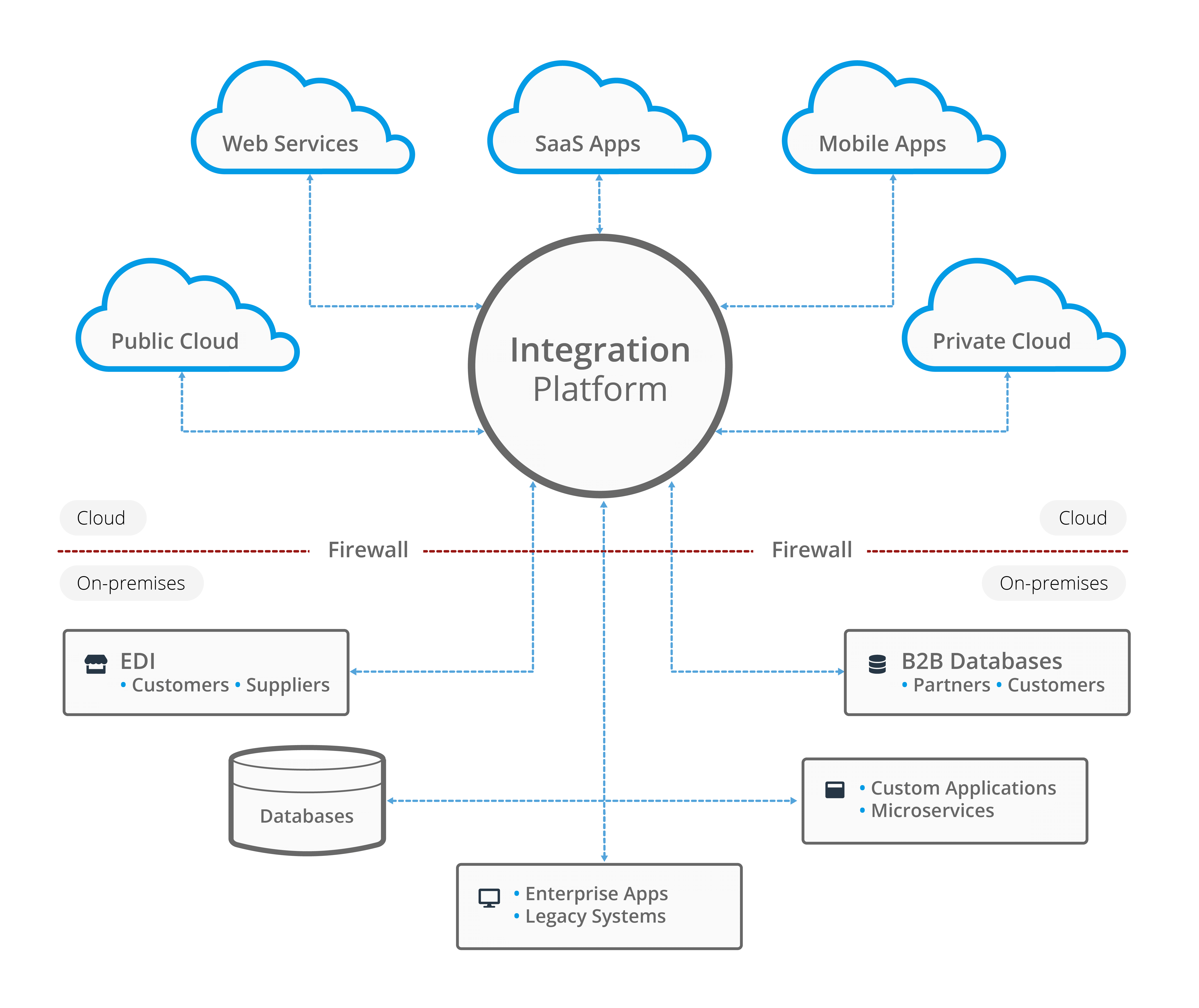
Image: System integration enables organisations to integrate a wide range of business systems, databases and applications together
To understand the wider role of integration platforms in this landscape, explore what an integration platform is and how it works.
For a deeper look at the commercial impact, see the long-term benefits of CRM integration.
The challenges of CRM integration
Businesses typically face several recurring CRM integration challenges, ranging from data quality issues and CRM API limits to authentication failures and workflow breakdowns across connected systems.
These challenges often surface first in CRM to ERP order to cash integrations, where exceptions like credit holds, partial shipments, and disputes are common.
1. Data Quality and Consistency
Challenge: In CRM integration, ensuring data quality and consistency across multiple systems can be difficult. Customer data in CRM systems may conflict with information in other business applications, leading to inconsistencies and errors. These discrepancies can ripple through the business, causing operational bottlenecks and reducing customer trust.
Poor data quality can exist in multiple ways such as duplicate records, outdated contact information, inconsistent data formatting, and incomplete customer histories. Using inaccurate data can cause administration mistakes. For example, a salesperson missing a follow-up call or contacting churned customers, or marketing teams sending misaligned communications that may damage customer relationships.
Solution: Establishing a ‘single source of truth’ is crucial for CRM integration. This ensures that all integrated systems reference an authoritative data source to reduce confusion over data and reducing errors. For example, when a customer’s contact information is updated in the CRM system, automated data synchronisation ensures all connected systems reflect these changes immediately.
Automated data cleansing for CRM integration can significantly improve data accuracy. ETL tools incorporated into BPA Platform enable you to extract, transform and load data to standardise data formats, remove duplicates, and validate information in real-time. Following CRM data governance best practices, such as establishing clear data ownership, implementing validation rules, and regularly auditing data quality, will help maintain consistency across all integrated systems.
The key to successful CRM integration lies in proactive data management. Regular data quality assessments, combined with automated validation processes, will ensure that CRM integration provides your business with reliable and actionable insights. Proactive validation also reduces long-term CRM integration troubleshooting by preventing bad data from reaching downstream systems.
2. Data Security and Compliance
Challenge: CRM systems contain sensitive customer information. Integrating CRM with other systems increases the risk of data breaches and may complicate compliance with regulations like GDPR or CCPA. This expanded risk requires robust CRM data protection strategies to safeguard customer information while maintaining system functionality.
International data transfer regulations may present another layer of complexity. Businesses must carefully navigate requirements such as EU-US data transfer mechanisms and local data residency laws. This often means implementing sophisticated data routing and storage solutions that maintain compliance while enabling seamless integration between systems.
Solution: To ensure CPPA and GDPR compliant CRM integration processes, implement robust security measures in your CRM integration strategy, such as encryption for data in transit and at rest.
Multi-factor authentication (MFA) serves as a crucial first line of defence in integrated CRM environments. By utilising multiple forms of verification, businesses can ensure that only authorised personnel access sensitive customer data, even when systems are interconnected. Role-based access control (RBAC) further enhances security by limiting user permissions based on job functions, preventing unnecessary exposure of sensitive data across integrated platforms.
Compliance risk mitigation in CRM integration requires a comprehensive approach, including:
- Regular security audits of all integration points
- Encrypted data transmission between systems
- Automated compliance monitoring and reporting
- Clear data retention and deletion policies
- Detailed audit trails for all data access and modifications
Success in this area requires a careful balance between security and functionality. While robust security measures are essential, they must be implemented in ways that don’t impede the efficiency gains that CRM integration promises to deliver.
For a full guide to securing CRM integrations covering authentication, API protection, token management, encryption, audit logging and compliance best practices, see our dedicated article CRM integration security.
3. Scalability and Performance
Challenge: As businesses grow, the volume of customer data in CRM systems increases. To improve customer data management, integration solutions need to handle this growing data load without compromising performance. This challenge becomes particularly acute when organisations experience rapid growth or seasonal spikes in customer interactions, requiring flexible and robust CRM integration architectures.
Solution: BPA Platform offers scalable CRM integration solutions for growing businesses that can handle increasing data volumes. Consider cloud-based integration solutions for CRM that can easily scale resources and implement efficient data synchronisation methods, such as incremental updates, to manage large volumes of CRM data without impacting system performance.
Utilising cloud-based CRM integration for scalability allows organisations to dynamically adjust resources based on demand, ensuring optimal performance during peak periods while managing costs during quieter times. This elasticity is crucial for maintaining consistent system performance as data volumes expand.
A microservices architecture approach to CRM integration provides organisations with enhanced flexibility and scalability. By breaking down integration components into smaller, independently deployable integrations, businesses can:
- Scale specific functionality as needed
- Update individual components without system-wide downtime
- Add new features more efficiently
- Reduce the risk of system-wide failures
Optimising CRM performance during integration requires careful attention to several key factors, these include:
- Efficient data synchronisation patterns
- Smart caching strategies
- Query optimisation
- Load balancing across services
- Asynchronous processing for resource-intensive operations
Future-proofing CRM integrations means designing systems and integrations that can adapt to changing business needs. This includes implementing flexible APIs, maintaining clean data architectures, and choosing integration platforms that support emerging technologies. It is also worth considering the potential impact of future acquisitions, new market entries, or product line expansions on their integration infrastructure.
Regular performance monitoring and proactive capacity planning ensure that integration solutions continue to meet business needs as they evolve. This forward-thinking approach helps to avoid costly system overhauls.
Struggling with scalability or performance issues in your CRM integrations? BPA Platform helps eliminate bottlenecks with real-time synchronisation, error handling and scalable integration frameworks. See how it works in practice with a guided demo.
4. Technical Complexity
Challenge: CRM systems often need to integrate with a wide variety of other business applications, each with its own data structure and APIs. This technical complexity can make CRM integration projects challenging and time-consuming. Successfully overcoming this challenge requires a strategic approach to streamlining CRM integration workflows, whilst maintaining system integrity.
Solution: Utilise integration platforms with pre-built connectors for common CRM and business applications. These can significantly reduce the technical complexity of CRM integration projects. Adopt a phased approach to integration, starting with critical systems and gradually expanding. Consider using BPA Platform iPaaS solutions that can simplify the integration process for CRM and other business systems.
Effective API management is crucial for handling complex integrations. API gateways are typically employed to:
If API limits, schema changes, or authentication failures are recurring issues, it’s often because different API styles behave differently under load and change (REST vs SOAP vs GraphQL), see CRM API integration (REST vs SOAP vs GraphQL) for a practical comparison and governance implications.
- Standardise communication between different systems
- Manage API versions and dependencies
- Monitor API performance and usage
- Implement security policies consistently
- Handle error conditions gracefully
As integrations scale, CRM API limits and throttling become a frequent source of hidden integration challenges. Monitoring API usage, applying controlled retry and backoff patterns, and scheduling non-urgent jobs outside peak hours can reduce errors caused by rate limiting or quota exhaustion.
These issues often come down to the trigger pattern too (polling vs webhooks). For a clear breakdown, see webhook vs API for CRM integration.
Most “mysterious” CRM sync failures are really event-handling problems: bursts, retries, duplicates, out-of-order updates, or missed events that need replay.
For reliability at scale (bursts, retries, duplicate deliveries, replay/backfill), use an event-driven pattern: Event-driven CRM integration.
Many of these issues come down to choosing the right synchronisation model (real-time, near-real-time, batch or hybrid) and designing for resilience. Our real-time vs batch CRM integration guide breaks down the trade-offs and shows when each approach makes the most sense.
Middleware solutions help to reduce technical debt in CRM projects by providing a flexible integration layer. This approach will allow businesses to:
- Transform data formats between systems
- Buffer communications during peak loads
- Implement business rules consistently
- Maintain loose coupling between systems
- Facilitate easier updates and maintenance
If you’re seeing these challenges already, this comparison will help you choose the right architecture next: Point-to-Point Vs Middleware CRM integration.
When overcoming technical complexities, documentation and knowledge transfer are critical success factors in complex integration projects. Comprehensive documentation should include:
- Detailed API specifications
- Integration architecture diagrams
- Data mapping documents
- Error handling procedures
- System dependencies and configurations
Adopting a modular approach to integration development involves breaking down complex integration requirements into manageable components, implementing standardised interfaces, and establishing clear protocols for system interactions. Performing regular code reviews and architectural assessments help ensure that technical decisions align with your long-term business objectives.
Choosing the right tools and frameworks that balance functionality with ease of implementation by using integration platforms that offer pre-built connectors, visual mapping tools, and robust testing capabilities can significantly reduce development time and minimise integration challenges.
Following established CRM integration best practices, including using pre-built connectors and schema-aware tools, reduces errors and improves long-term system stability.
5. User Adoption and Change Management
Challenge: It’s easy to underestimate the impact of integration projects on day-to-day operations and user behaviours. Even the best planned CRM integration project can fail if employees resist new workflows or struggle to adapt to changed processes. This can lead to reduced productivity, data entry errors, and potential workarounds that may devalue the effectiveness of the integration. Successfully managing the transition to an automated business requires a balanced approach that considers both technical implementation and the human factors affecting user adoption.
Solution: Key success in this area lies in implementing a comprehensive change management strategy that prioritises user engagement and support. Establishing a clear communication framework that explains the benefits of the integrated CRM system will help to address user concerns proactively.
Structured training programs will play a pivotal role as employees transition to an automated process. This should include:
- Role-specific training sessions that focus on daily workflows
- Hands-on workshops with real-world scenarios
- Self-service resources and quick reference guides
- Regular refresher sessions to reinforce learning
Implementing a phased rollout will help you to manage the transition effectively by:
- Starting with a pilot group to identify and resolve issues early
- Allowing time for system optimisation based on initial user feedback
- Building confidence through successive small wins
- Preventing organisation-wide disruption
User feedback loops are essential for continuous improvement. Businesses should:
- Establish multiple channels for user feedback, e.g. surveys, focus groups, help desk etc.
- Create a dedicated support team for integration-related issues
- Track and address user concerns promptly
- Share success stories and best practices across teams
It is also worth considering delegating change champions within each department. A change champion can serve as an expert and advocate, providing peer-level support and encouraging adoption among colleagues. This network of champions helps maintain momentum and ensures that the benefits of the integrated CRM system are fully realised across the business.
6. Real-time data synchronisation
Challenge: Traditional batch processing and scheduled updates can create dangerous lag times between systems. When a customer updates their details through an eCommerce platform, delays in synchronising this information to your CRM software can lead to misaligned communications, duplicate entries, and frustrated customers. Similarly, when sales teams can’t access real-time inventory data within their CRM application, they risk making promises they can’t keep.
Solution:
Solution: BPA Platform addresses these challenges through event-driven integration architecture. When a change occurs in any connected business system – whether it’s a new order in your eCommerce platform, an inventory update in your ERP solution, or a support ticket in your customer service application – BPA Platform triggers immediate data synchronisation across all relevant systems. See Event-driven CRM integration for the core building blocks (webhooks, queues, buffering, retries, dedupe and replay).
Key benefits include:
- Instant update of customer information across all channels
- Real-time inventory visibility for sales teams
- Real-time synchronisation of order status and shipping information
- Automated escalation of critical customer issues
Real-time data processing also helps reduce CRM API limits consumption by ensuring systems exchange only the required updates rather than processing full data loads.
This real-time approach ensures that every customer interaction is based on the most current information, significantly improving first-contact resolution rates and customer satisfaction scores. For businesses, this means fewer errors, reduced manual intervention, and more efficient operations across all departments.
7. Mobile CRM integration
Challenge: Mobile CRM integration presents unique challenges beyond traditional desk-top based systems. Field sales and service teams require reliable access to customer data regardless of their internet connectivity. Additionally, mobile devices present security vulnerabilities, with sensitive customer data potentially exposed across numerous personal and company owned-devices.
Solution: Ensure your CRM system has caching capability. CRM systems like Salesforce and SugarCRM can enable offline capabilities with the mobile app to allow users to cache records, buffer changes and synchronise changes when reconnected to a network.
Smart synchronisation provides:
- Intelligent offline caching to prioritise essential data for field operations
- Automatic conflict resolution when multiple users update the same CRM record
- Bandwidth efficient synchronisation that only transfers changed data
- Background data synchronisation when network conditions allow
Enhanced security measures for mobile CRM integration include:
- End-to-end encryption for data in transit and at rest
- Remote wipe capabilities for lost or compromised devices
- Device-specific authentication protocols
- Granular permission controls for mobile access
This mobile CRM integration strategy will help you to improve customer service delivery by providing you with the ability to extend CRM capabilities to mobile teams, without reducing functionality and security.
Many of these challenges become clearer when reviewing real-world CRM integration use cases that highlight common scenarios and solutions.
If these CRM integration challenges look familiar, BPA Platform can help. Organisations use it to stabilise integrations, reduce errors and eliminate manual fixes.
Request a guided demo of BPA Platform
Troubleshooting CRM Integration Errors
Even well-planned projects will eventually encounter CRM integration errors and CRM integration failures in production environments.
Common symptoms include failed sync jobs, partial updates, timeout errors, duplicate records or CRM API limit warnings. The key to resolving these issues quickly is to work through a repeatable troubleshooting process.
1. Start with the error message and logs
- Check BPA Platform and CRM logs for specific error codes, messages and timestamps.
- Identify whether the issue is a connection failure, authentication problem, data validation error or an API limit being hit.
- Compare failing runs with successful runs to see what changed (data, schema, credentials, volume).
2. Isolate the failing step or connector
- Run the integration in a test environment with a minimal data set.
- Disable non-essential steps and re-run to see which task, connector or API call is causing the CRM integration error.
- Use BPA Platform’s logging and step-by-step execution to pinpoint the failing action.
3. Check data quality and validation rules
- Confirm that required fields are populated and in the expected format in the source system.
- Review CRM validation rules, duplicate detection rules and picklist values for recent changes.
- Look for malformed emails, dates, currencies or reference IDs that could be rejected by the CRM API.
4. Review authentication, permissions and API limits
- Verify that OAuth tokens, API keys or service accounts used by the integration are still valid and have the right scope.
- Check CRM API limit dashboards for evidence of throttling, rate limiting or daily quota exhaustion.
- Stagger high-volume jobs, add back-off logic or break large batches into smaller chunks to stay within API limits.
5. Re-test in a safe environment before going live
- Re-run the fixed integration in a sandbox or test environment with realistic volumes.
- Validate that error rates have dropped and data is landing correctly in the CRM.
- Only then re-enable the production job and monitor closely after deployment.
This structured approach helps you turn vague CRM integration challenges into specific, diagnosable issues that can be resolved methodically rather than via trial-and-error.
A disciplined approach turns recurring CRM integration challenges into predictable, repeatable CRM integration troubleshooting steps that prevent issues escalating into outages.
Integration Testing and Quality Assurance
Identify issues before they become a problem
To avoid additional challenges, a successful CRM integration requires rigorous testing to ensure reliability and data accuracy. A comprehensive testing strategy helps identify potential issues before they impact business operations, reducing costly fixes and minimising disruption to customer service.
Silent failures, where CRM integration jobs appear to complete but data doesn’t update as expected, are often caused by validation errors, permission issues or API limits being hit mid-run. Ensuring robust error handling and alerting in BPA Platform prevents these issues from going unnoticed.
When implementing your CRM integration, employ a multi-layered testing approach that includes:
- Unit testing of individual integration points
- Integration testing across connected systems
- End-to-end testing of complete business processes
- Performance testing under various data loads
- User acceptance testing with real-world scenarios
Key testing focus areas include:
- Data transformation accuracy
- Error handling and recovery
- System response times
- Security controls
- Business rule validation
Automated testing tools play a crucial role in maintaining quality assurance throughout the integration lifecycle. These tools help simulate various scenarios, validate CRM data mapping, and ensure consistent performance across all integrated systems.
Regular regression testing is essential, particularly when updating or adding new systems to the integration landscape. This helps maintain system stability and prevents unintended consequences from new changes.
By implementing thorough testing protocols, you will be able to confidently deploy CRM integrations that meet business requirements while maintaining data integrity and system performance.
ROI and Performance Metrics
The true value of your CRM integration project lies in the measurable impact on business operations and revenue. We’ve broken down the essential metrics through improved employee efficiency, data accuracy, and performance. Key Performance Indicators (KPIs) to track can include:
1. Data Quality Metrics
- Data accuracy rate: Compare pre/post integration error rates
- Duplicate record reproduction percentage
- Data completeness scores across integrated systems
2. Operational Efficiency
- Time saved per employee on manual data entry
- Reduction in process time
- Number of automated workflows implemented
3. User Adoption and Productivity
- Daily active users across integrated systems
- Task completion rates
- Support ticket volume related to integration issues
ROI Calculation Method
Tracking the number of CRM integration errors resolved, reduction in failed syncs and improved stability after addressing key challenges also provides a clear ROI signal for your integration investment.
The ROI calculation method typically involves comparing the costs of integration against the benefits gained. This can be calculated using the following formula:
ROI = ((Financial Benefits – Integration Costs) / Integration Costs) x 100
We can break this down further to include:
1. Financial Benefits:
- Time and costs saved from manual administration tasks and data entry
- Reduced data entry errors
- Increased revenue from improved sales processes
- Improved customer retention value
- Revenue increase from improved lead conversion
2. Integration Costs:
- Implementation costs, e.g. consulting, customisation, data migration, implementation etc.
- Training costs
- Software licensing fees
- Ongoing support and maintenance costs
If you’re evaluating the financial impact of resolving these issues, our guide to the CRM integration ROI explains how to quantify the returns from improved data quality, automation and system reliability.
Tip: Track both short term metrics (30-90 days) and long term benefits (12-36 months) to get a complete picture of integration success.
CRM integration services
With 25 years of experience in system integration and business process automation, Codeless Platforms has established itself as a specialist in providing robust CRM integration services. Our flagship product, BPA Platform, offers a comprehensive solution for businesses looking to streamline their day-to-day operations and enhance customer relationships through seamless CRM integration.
We pride ourselves on working closely with channel partners to deliver successful integrations and exceptional customer service. With over 450 partners globally, this collaborative approach ensures that each solution is tailored to meet the unique needs of our clients, maximising the value of their CRM and ERP investments.
Through collaboration with ISVs and leading channel VARs, specialist features have been built into BPA Platform to provide you with an end-to-end automated business. This provides organisations with the ability to create a solution that is completely personalised to their internal applications and business operations.
Automating business processes requires a solid understanding of data and a comprehensive knowledge of source or target applications. Codeless Platforms has a proven track record in deploying CRM integration solutions, and has accredited partner status with well-known ISVs, such as SAP, Microsoft and Sage, along with industry-specific applications and systems in many economic regions.
Codeless Platforms’ professional services team can help you to plan your CRM integration project and execute solutions that are a 100% fit every time. Our Professional Services team provides direct implementation and expert services essential to getting solutions up and running quickly and correctly so that you can achieve additional value from your business systems as soon as possible.
BPA Platform offers cloud-based iPaaS (Integration Platform as a Service), hybrid or on-premises deployment options, providing flexibility to suit different business environments. Our platform excels in data integration, offering robust tools for data cleansing, transformation and synchronisation across multiple systems.
Key features of our CRM integration services include:
- Bi-directional data synchronisation
- Automated workflow and approval processes
- Automated alerts and notifications
- Drag and drop functionality to build automated processes and integrations
- Data transformation functions to change data between input and output
- Access to hundreds of data connectors via an easy-to-use platform
- Scalable solutions to scale integrations and automations up or down depending on business needs
- Business process automation tools as standard
- Comprehensive security and compliance measures
Whether you are a CRM user, a CRM development agency or CRM reseller, when using Codeless Platforms’ BPA Platform for CRM integration you will achieve significant cost savings and productivity gains throughout your business.
By leveraging our 25 years of expertise and the powerful capabilities of BPA Platform, businesses can unlock the full potential of their CRM systems, creating a unified, data-driven environment that fosters growth and customer satisfaction.
By addressing CRM integration problems early and following structured CRM integration best practices, organisations can ensure their data pipelines remain accurate, resilient and audit-ready.
If you want a full enterprise-grade playbook (architecture, governance, security, monitoring/SLOs, and change control),
see: enterprise CRM integration best practices.
Ready to eliminate your CRM integration challenges for good? Arrange a personalised walkthrough of BPA Platform and see how our secure, scalable integrations, error handling and automation tools work in real-world scenarios.
Request a guided demo of BPA Platform