Point-to-Point vs Middleware CRM Integration: Introduction
Organisations now rely on multiple systems; ERP, finance, eCommerce, marketing automation, customer service platforms, subscription billing tools, and bespoke applications, all of which depend on a consistent and accurate flow of CRM data.
But the huge strategic question remains:
Should you integrate systems using simple point-to-point connections, or should you adopt a middleware/iPaaS platform as the central integration layer?
This decision isn’t just about getting data from A to B. It shapes long-term scalability, system resilience, maintenance overhead, compliance posture, and ultimately the total cost of ownership of your CRM ecosystem over the next 2-5 years.
If you want the full architectural layer (methods, patterns, and how integration platforms are structured), see CRM integration architecture and methods.
This article breaks down both approaches from a technical, architectural and business perspective, then gives you a practical framework to choose the model that best suits your organisation today and in the future.
Article Summary:
• Point-to-point can be fine for one or two simple, low-change integrations.
• Middleware/iPaaS becomes the safer default once you have multiple systems, frequent change, or governance requirements.
• If your CRM ecosystem will grow, middleware reduces fragility, improves visibility, and lowers long-term maintenance risk.
New to the topic? Start with our guide on what CRM integration is, then come back to compare point-to-point vs middleware architecture.
If you’re planning integrations as a programme (not a one-off project), use a structured CRM integration strategy to define priorities, governance, and the right architecture for your roadmap.
Decision checklist (use this before you commit)
Use the checklist below to quickly determine which approach is the better architectural fit. If you hit 3 or more of the ‘middleware’ signals, point-to-point usually turns into technical debt faster than expected.
Choose point-to-point if most of these are true:
- You have 1-2 integrations total, and they’re genuinely simple (e.g. one-way sync)
- The data model is stable and changes are rare
- You don’t need central monitoring beyond basic logs
- Downtime or delayed sync is non-critical and doesn’t impact revenue/ops significantly
- There’s no near-term roadmap to integrate additional systems
Choose middleware/iPaaS if any of these are true:
- Your CRM connects to 3+ systems (or will within 12-18 months)
- You need a mix of real-time triggers and batch/scheduled jobs
- You expect schema changes (new fields, new objects, auth changes, API versioning)
- You need central monitoring, retries, alerting, or audit trails
- You have compliance/governance requirements (GDPR, ISO, SOC2 alignment, internal audit)
- Multiple teams need to build or maintain integrations (not just one developer)
- Integration failures are business-critical (order processing, revenue ops, customer service SLAs)
Related decision guides:
• Choosing triggers for real-time workflows? → Webhook vs API for CRM integration
• Choosing sync cadence by volume/latency? → Real-time vs batch CRM integration
Rule of thumb: If your integration roadmap isn’t ‘done’ after the first connection, you’re not deciding between two build options, you’re choosing an architecture.
1. What Is Point-to-Point CRM Integration?
Point-to-point (P2P) integration is the most basic integration model. One system connects directly to another, usually via APIs, with custom logic written specifically for that pair of systems.
Because point-to-point connections typically rely on direct API calls, the API style you’re working with (REST, SOAP, or GraphQL) affects rate limits, error handling, and long-term maintainability, see CRM API integration approaches (REST vs SOAP vs GraphQL).
How point-to-point CRM integration typically works:
- System A calls System B’s API directly
- Mapping and transformation are coded manually
- Logic lives inside the script, plugin, or connector
- There is no central layer for routing, validation or monitoring
Direct API calls are common in point-to-point integrations. If you’re deciding between webhooks and APIs for CRM triggers and data movement, see: Webhook vs API for CRM integration.
This method is common because it is:
- Fast to build
- Cheap initially
- Easy for single, simple use cases
Technical characteristics
Point-to-point integrations are:
- Tightly coupled: If one system changes, all connections break
- Hard-coded: Transformations, error handling, credentials, and endpoints live inside the script
- Distributed: Each integration exists separately, often maintained by different teams
- Difficult to govern: No central visibility of data flow, performance or failures
Over time, the architecture begins to resemble a spider web of fragile connections.
2. Benefits of Point-to-Point CRM Integration (Short-Term)
To maintain a balanced comparison, point-to-point does have legitimate benefits:
Fast Implementation
A developer can create a direct API connection quickly, especially for small jobs.
Low Upfront Cost
No need to purchase middleware or a platform.
Good for Simple, One-Off Use Cases
Especially when data volume is small and transformation is minimal.
Low Initial Architectural Overhead
No need for orchestrators, schedulers, queues or central governance.
These points are why P2P is often chosen early in a CRM deployment.
But the moment integrations multiply, everything changes.
3. The Hidden Risks of Point-to-Point Integrations
As soon as your organisation needs more than two or three integrations, point-to-point becomes unsustainable. This is where the long-term technical and operational risks begin to surface.
Risk 1: Exponential Complexity (‘Integration Spaghetti’)
With point-to-point integration, each new system often needs connections to several existing systems. So the number of integrations quickly grows as your tech stack expands, turning a manageable setup into ‘integration spaghetti’. Each connection:
- Must be maintained
- Breaks when a field changes
- Requires manual error handling
- Needs ongoing development and testing
The architecture becomes exponentially more fragile as it grows.
To see the alternative pattern (hub-and-spoke) in context, read CRM integration architecture and methods.
Risk 2: High Maintenance Cost (Technical Debt)
Each integration is bespoke code. So every change to the CRM or any dependent system requires updates to every connection.
Examples:
- Add a new required CRM field → integrations break
- Modify API authentication → rewrites required
- Update business logic → patch every connection
Your development backlog grows. Maintenance costs rise. Downtime increases.
Risk 3: No Central Monitoring or Logging
If anything fails in point-to-point architecture:
- Developers must dig through logs on multiple systems
- Failures often go unnoticed until users complain
- There is no single place to monitor data flow
- Investigations take longer, recovery is slower
This becomes a serious compliance and SLA issue.
Many of these issues show up as common CRM integration challenges, especially once integrations grow beyond a couple of systems.
Risk 4: Poor Error Handling and Retries
Most point-to-point scripts do not include:
- Dead-letter queues
- Automatic retries
- High-granularity failure reporting
- Transaction tracking
- Idempotent processing
This means data frequently goes missing, creating long-term CRM data quality issues.
These reliability patterns are central to event-driven integration (queues, buffering, replay/backfill). See Event-driven CRM integration.
Risk 5: Security and Governance Gaps
Security is inconsistent in point-to-point design because each integration must manage independently:
- API credentials
- Secret storage
- Access control
- IP allowlists
- Encryption
- Auditing logs
Compliance teams often identify P2P as a red-flag architecture.
Security is often where point-to-point architectures fail first. For a deeper look at credentials, least privilege, audit trails, and governance controls, see our guide to CRM integration security and governance.
Risk 6: Vendor Lock-In
Because everything is tightly coupled and custom-coded, replacing a system becomes expensive and disruptive.
Risk 7: Point-to-Point Does Not Scale
The final, and biggest risk: Point-to-point works for today, but not for tomorrow. Any organisation that expects to grow its digital ecosystem will eventually hit a breaking point.
Ready to reduce integration risk?
If you’re already dealing with broken synchronisations, manual firefighting, or limited visibility, a governed integration layer can make change predictable and failures visible.
Request a guided demo of BPA Platform
4. What Is Middleware CRM Integration?
Middleware (also known as iPaaS, automation platform, or integration hub) provides a central integration layer that connects all systems through a single governance and orchestration point.
Instead of connecting systems directly, systems connect through a structured hub.
This architecture transforms integration from ‘fragile scripts’ to ‘managed, scalable workflows’.
Key capabilities
Middleware typically offers:
- Connectors for major CRM/ERP/finance/eCommerce systems
- Drag and drop workflow design
- Mapping and transformation tools
- Error handling
- Logging and observability
- Real-time triggers
- Batch and scheduled jobs
- Reusable logic
- Security and credential management
- API orchestration
Architecture benefits
Middleware changes your integration landscape from chaos → clarity.
This is one of several common CRM integration architectures; the right choice depends on system count, change frequency, and governance requirements.
5. Benefits of Middleware CRM Integration (Long-Term)
This is where middleware truly shines.
Benefit 1: Scalable ‘Hub-and-Spoke’ Architecture
All systems connect through one central layer. No exponential complexity. No tangled web of endpoints.
5 systems = 5 connections
10 systems = 10 connections
15 systems = 15 connections
Scalability becomes linear, predictable, and manageable.
Benefit 2: Centralised Monitoring and Error Management
One place to see:
- All integrations
- All workflows
- All failures
- All logs
- All retries
No more chasing issues across multiple systems.
Benefit 3: Reusable Logic and Transformations
Transformations written once can power multiple integrations. Mapping logic can be shared across workflows. Business rules become standardised, not duplicated.
In practice, mapping and transformation effort is where many integrations become complex. Here’s a deeper guide to CRM data mapping and transformation (and how to reduce the ongoing change burden).
Benefit 4: Stronger Security and Compliance
Middleware provides central governance for:
- Credentials
- API secrets
- Access control
- Encryption
- Auditing
- IAM policies
- Compliance alignment (ISO, GDPR, SOC2)
This avoids the security sprawl of point-to-point connections.
Benefit 5: Supports Both Real-Time and Batch
Middleware allows you to design:
- Webhook-driven workflows
- API-triggered flows
- Bulk ETL jobs
- Scheduled synchronisation
- Event-driven CRM integration (queues, retries and replay)
- Hybrid models
Point-to-point often supports only one pattern effectively.
Choosing the right synchronisation pattern is as important as the platform itself, see real-time vs batch CRM integration for guidance on latency, volume, failure handling, and where each approach fits.
Benefit 6: Lower Total Cost of Ownership
Even though middleware may have licensing costs, long-term cost is far lower due to reductions in:
- Development time
- Manual maintenance
- Downtime
- Failure recovery
- Technical debt
- API overages
- Rework during system upgrades
This is often the #1 reason enterprises adopt middleware after years of point-to-point pain.
Architecture is the ‘how’. If you’re building the business case, here are the broader CRM integration benefits teams typically target (data quality, speed, customer experience, and operational efficiency).
6. When Point-to-Point Makes Sense
P2P can be the right choice when:
- You only have one integration
- The integration is simple (e.g. a basic contact sync)
- The project is temporary
- You have low data volume
- CRM usage is minimal
- There is no long-term roadmap for system expansion
7. When Middleware Is the Better Choice
Middleware is the stronger choice when:
- Your CRM connects to multiple systems
- You expect your ecosystem to grow
- You require both real-time and batch processes
- You have compliance or governance requirements
- You need central monitoring
- Data transformation is significant
- You want to reduce reliance on developers
- You want scalable, future-proof architecture
- You’ve already experienced point-to-point failures
If you’re mapping your roadmap, these common CRM integration use cases can help you prioritise workflows and choose the right pattern (point-to-point vs middleware) for each.
8. Cost Comparison: Short term vs long term
Note on cost: Integration costs vary massively by system count, data volume, change frequency, and governance needs. Instead of using potentially misleading averages, the comparison below focuses on the cost drivers that determine total cost over time.
Mini comparison (cost + risk over time)
Need to justify the decision commercially? Here’s how teams typically model CRM integration ROI when comparing short-term build cost vs long-term operating cost and risk.
In practice, middleware often wins on ROI when the cost of change, incident recovery, and duplicated maintenance exceeds platform licensing.
What actually drives long-term integration cost
- Number of systems (and ecosystem growth over time)
- Number of workflows/integration use cases (and whether logic is reusable)
- Frequency of change (new fields, API versions, auth updates, business rules)
- Monitoring effort and incident recovery time (detection, triage, replay/backfill)
- Governance and compliance requirements (audit trails, access reviews, logging)
- Retry/replay requirements and data quality expectations
Lightweight TCO estimation worksheet
If you want a quick, defensible sense of which model will be cheaper over 2–3 years, answer these five questions:
Interpretation
- If you’re mostly in the left-hand column, point-to-point can be fine.
- If you’re consistently mid/right, middleware/iPaaS is usually the lower-risk and lower-effort choice long term.
9. How Middleware Fits into CRM Integration Architecture
Middleware becomes the ‘integration brain’ between:
- CRM
- ERP and finance
- eCommerce
- Customer service platforms
- Data warehouse/lake
- Marketing automation
- Custom line-of-business systems
- Databases
This removes the typical integration chaos.
One of the most common high-impact patterns is integrating CRM and ERP, where governance, validation, and auditability matter most.
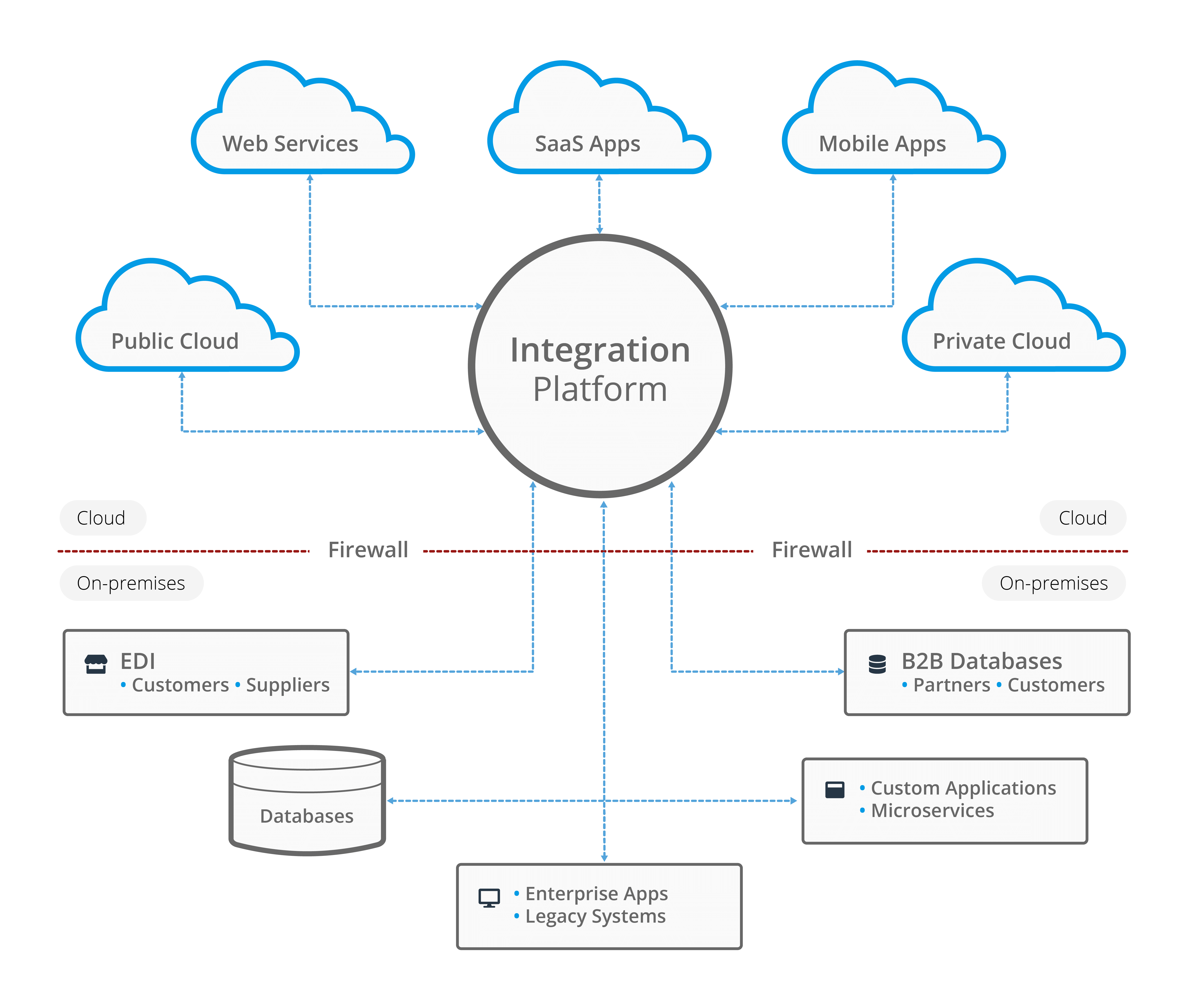
Diagram: How an integration platform fits into an organisation’s CRM ecosystem.
10. Why BPA Platform Is a Smarter Alternative
Middleware and iPaaS platforms solve the ‘how do systems talk to each other?’ problem. In many CRM environments, the next challenge is just as important: how do integrated processes run end-to-end, with visibility, exception handling, and governance when something goes wrong.
That’s where BPA Platform fits as a smarter long-term option. It aligns with the core benefits of middleware (central integration, monitoring, reuse, security), but is designed to support integration and orchestration, so CRM data flows don’t stop at synchronisation, they drive complete business processes.
Example (typical scenario)
A mid-sized organisation connecting CRM with ERP, marketing automation, and customer service often starts with point-to-point synchronisations. As workflows expand (orders, billing status, case enrichment), failures become harder to detect and changes require updating multiple scripts.
By moving to a governed BPA Platform approach, teams typically centralise monitoring, standardise mappings, introduce consistent retry/exception handling, and reduce the operational overhead of keeping CRM data accurate across systems.
What BPA Platform gives you (beyond ‘just connections’)
BPA Platform provides:
- Drag and drop integration tools
- API orchestration
- Real-time triggers and batch processing
- Reusable workflows and mapping logic
- Connectors to CRM/ERP/eCommerce/finance/WMS platforms and more
- Central monitoring and logging
- Audit trails for compliance
- Reduced technical debt
- Faster delivery of new integrations
- Long-term scalability and lower maintenance cost
Practical CRM integration workflows BPA Platform supports
Example 1: CRM → ERP account creation with validation + approvals
When a new customer is created (or a deal reaches a specific stage), the workflow can:
- Validate mandatory fields and data quality rules
- Enrich records (e.g. company details, tax/VAT status, credit terms)
- Route exceptions to the right owner for approval (human-in-the-loop)
- Create/Update the customer in ERP/finance
- Write back the ERP identifiers and status into CRM
- Track the full transaction end-to-end with audit logs
Outcome: Fewer downstream failures, consistent customer master data, and a controlled, auditable path from CRM to finance.
Example 2: Order-to-cash sync (eCommerce/ERP/CRM) with retries and replay/backfill
For order/invoice flows, the workflow can:
- Trigger in real time (webhook) or on a schedule (batch)
- Transform and map order lines, tax, discounts, shipping, and customer references
- Handle rate limits and transient API failures with automatic retries
- Route hard failures into an exception queue with alerts and diagnostics
- Replay failed transactions and backfill missed records safely
Outcome: Fewer ‘silent’ data loss incidents, faster recovery, and predictable order/invoice synchronisation without constant developer firefighting.
Order-to-Cash processes often involve CRM, ERP, billing, payments, and finance systems, making middleware essential for scalable O2C automation. See CRM to ERP integration for Order to Cash automation.
Example 3: Customer service case enrichment and routing with SLA visibility
When a case is created in the service platform, the workflow can:
- Pull context from CRM (customer tier, ARR/value, account owner, open opportunities)
- Pull context from ERP/finance (billing status, overdue invoices, contract dates)
- Apply routing rules (priority, team assignment, escalation thresholds)
- Update CRM and service records consistently
- Maintain an audit trail of what was changed, when, and why
Outcome: Improved first-response quality, faster resolution, and a measurable SLA process that doesn’t depend on individual knowledge.
What you get on day one (practical outcomes)
- End-to-end visibility: See what ran, what failed, and why, without chasing logs across systems.
- Controlled change: Update mappings and rules once, then reuse across workflows as systems evolve.
- Fewer broken synchronisations: Consistent retries and exception handling reduce silent failures and data gaps.
- Audit-ready traceability: Clear logs and history for governance, troubleshooting and compliance reviews.
If your integration roadmap is heading toward ‘CRM as part of an operational backbone’, the long-term win isn’t just implementing connections, it’s ensuring integrations remain observable, governable, and change-friendly as your systems evolve.
Before vs after: point-to-point vs BPA-driven integration
- Before: scattered scripts, inconsistent logging, manual recovery, duplicated mappings.
- After: central monitoring, reusable workflows, governed credentials, exception queues, and approvals.
11. Conclusion
Point-to-point CRM integrations are often the quickest route to early wins, but they’re also the fastest way to accumulate fragile dependencies. As soon as integrations multiply or business logic evolves, direct connections tend to create a growing maintenance burden, inconsistent error handling, limited visibility, and security/governance sprawl.
Middleware/iPaaS shifts integration from ‘bespoke scripts’ to a governed integration layer with shared monitoring, retries, transformation, security controls, and reusable logic. That’s why organisations with multi-system environments typically move to middleware/iPaaS once reliability, scale, compliance, or time-to-change becomes a priority.
If your CRM is becoming the operational backbone of your organisation, the smartest long-term approach is the one that makes change predictable, failures visible, and growth manageable.
Next step:
Request a guided demo of BPA Platform
Explore: CRM integration architectures or real-time vs batch CRM integration.