CRM integration has become a mission-critical priority for organisations that rely on customer data to fuel sales, marketing, service and operations. Most businesses now understand why systems need to talk to their CRM. What’s less clear is how modern CRM integrations actually work at an architectural level.
This guide explains CRM integration architecture and the main integration methods used today, from APIs and middleware to event-driven synchronisation. It also shows how platforms such as BPA Platform enable drag-and-drop automation between CRMs like Salesforce, Microsoft Dynamics 365 CRM, HubSpot CRM, SugarCRM, Infor CRM, Sage CRM and other major systems.
Whether you’re a CRM administrator, IT manager, operations lead or digital transformation specialist, this article provides a practical overview of how CRM integration is structured, which methods you can use, and how to design stable, scalable architectures.
If you need a full overview before diving into the architectural layer, see our guide to CRM integration fundamentals.
What CRM Integration Architecture Is
CRM integration architecture describes the overall design, components and decision logic that connect your CRM with other business systems. It defines how data moves, where logic runs, and which technologies are used to synchronise information, trigger events and automate workflows.
Event-driven CRM integration is increasingly used within this architecture to improve responsiveness and resilience; we break down the core event patterns in our event-driven CRM integration overview.
A typical CRM integration architecture includes:
- Source and target systems: CRM, ERP, accounting, eCommerce, service desk, data warehouse, and other applications.
- Integration methods: The technical mechanisms used to connect systems (APIs, middleware/iPaaS, files, databases, events).
- Integration patterns: The data flow models (one-way, two-way, hub-and-spoke, event-driven, orchestration, choreography).
- Architecture layers: Connectors, mapping/transformation, orchestration, security, and monitoring.
- Operational controls: Error handling, retries, alerts, audit trails, and performance monitoring.

Image: High-level diagram showing a CRM connected into an integration platform, which orchestrates data flows with ERP.
In simple terms, it’s the blueprint for how systems “talk” to your CRM in a controlled, secure and repeatable way.
An integration-led digital transformation roadmap ensures CRM data and connected business processes scale without introducing technical debt.
Typical Layers in a CRM Integration Architecture
- Connectivity layer: Connectors, adapters, drivers, and API clients that talk to each system.
- Integration layer: Where data mapping, transformation and routing occurs.
- Orchestration layer: Where workflows, business rules, approvals, and error handling are defined.
- Data and storage layer: Operational databases, staging tables, data lakes, and warehouses.
- Security and governance layer: Authentication, authorisation, encryption, audit, and compliance controls.
- Observability layer: Logging, monitoring, dashboards, and alerting.
For a comprehensive guide to securing CRM integrations including authentication, API protection, token management, encryption, audit logging and compliance best practices, see our dedicated article on CRM integration security.
Different organisations implement these layers using different methods and platforms, but the architectural principles stay broadly consistent.
Core CRM Integration Methods (The 5 Modern Approaches)
Most organisations use a combination of integration methods. Understanding each approach helps you design the right architecture, choose the right tools, and avoid common pitfalls.
1. API-Based CRM Integration
Nearly all modern CRMs expose APIs that allow other systems to read and write data programmatically.
Common API styles:
- REST APIs: The most widely used style, typically using JSON payloads over HTTPS.
- SOAP APIs: XML-based, still common in older ERP or back-office systems.
- GraphQL APIs: More flexible querying, common in newer SaaS platforms.
Authentication and Security
- OAuth 2.0 access tokens
- API keys or shared secrets
- SSO and SAML for identity and access
- Short-lived tokens and refresh flows
Typical CRM API Endpoints
CRMs expose endpoints for the main entities:
/contacts/accounts/leads/opportunities/activities/casesor/tickets
API Limitations
Market-leading CRM platforms often enforce:
- Rate limits (requests per minute/day).
- Record limits per call or batch.
- API versioning rules (older versions deprecated over time).
- Payload size limits for bulk operations.
API-based integration is powerful and flexible, but it usually requires developer skills, careful optimisation, and ongoing maintenance when APIs evolve.
For a practical breakdown of how CRM integrations behave across REST, SOAP, and GraphQL (and where they fail in production), see REST vs SOAP vs GraphQL for CRM API integration.
2. Middleware / iPaaS (Integration Platforms)
Middleware tools, often delivered as Integration Platform as a Service (iPaaS), simplify CRM integration by providing a central platform to connect systems, transform data and orchestrate workflows without building everything from scratch.
Platforms such as BPA Platform typically provide:
- Prebuilt CRM, ERP, finance, and eCommerce connectors.
- Drag-and-drop workflow designers.
- Bi-directional synchronisation between systems.
- Mapping and transformation engines.
- Configurable business rules and branching logic.
- Retry, error-handling, and alerting mechanisms.
- Logging, audit trails, and operational dashboards.
This enables organisations to integrate combinations such as:
- Salesforce ↔ ERP/finance systems
- Dynamics 365 CRM ↔ accounting and supply chain systems
- HubSpot CRM ↔ marketing automation and eCommerce platforms
- SugarCRM ↔ customer service tools or ITSM systems
- Sage CRM ↔ on-premises SQL, legacy ERP, and file-based processes
- Creatio CRM ↔ online stores and subscription billing platforms
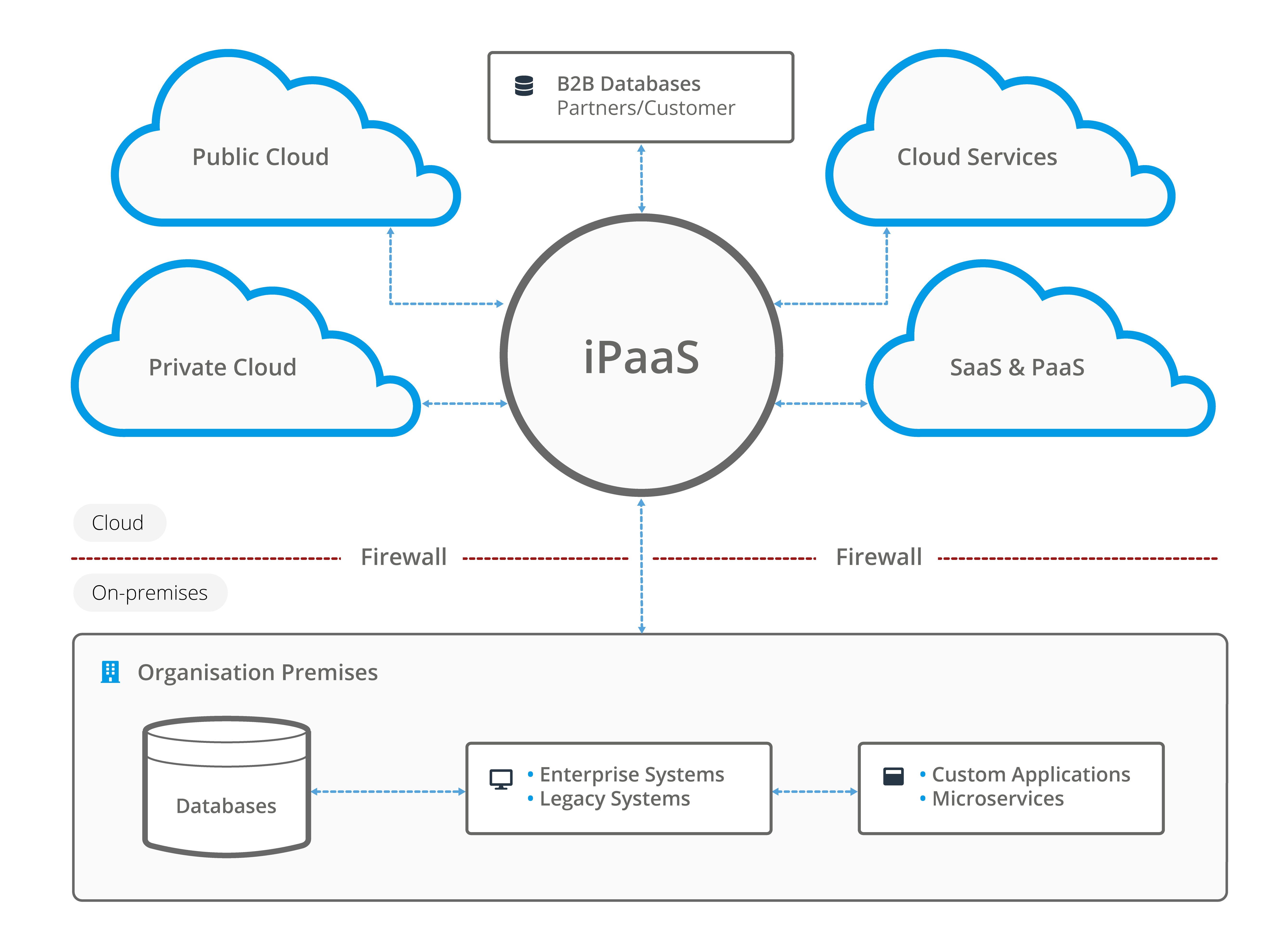
Image: A typical iPaaS architecture to integrate on-premises with cloud-based applications and services.
Middleware/iPaaS solutions have become the dominant pattern for mid-market and enterprise CRM integration because it reduces custom code, centralises control, and supports both cloud and on-premises systems.
3. Direct Database Integration
Direct database integration reads from or writes to a CRM’s underlying database, typically using SQL queries or stored procedures. This is more common in older on-premises CRM deployments and less so in modern cloud CRMs. Legacy systems often require hybrid or on-premises integration approaches.
Pros:
- Very high performance for bulk operations.
- Useful for large data migrations and one-time loads.
Cons:
- Bypasses CRM business logic, validation rules, and permissions.
- Can introduce data corruption if not carefully managed.
- Typically unsupported for SaaS CRMs which hide the database.
- High risk during upgrades or schema changes.
Direct database access is gradually fading as an integration method, but it still appears in legacy on-premises environments.
4. File-Based Integration (CSV, XML, JSON)
File-based integration still plays a crucial role in integration architectures, especially where systems are older, highly regulated or not API-driven.
Common use cases:
- Nightly CSV exports for CRM ↔ ERP synchronisation.
- SFTP batch transfers between internal and external systems.
- XML or EDI messaging for trading partners and government systems.
- JSON flat files for data lakes or staging environments.
- ETL/ELT jobs feeding data warehouses and reporting platforms.
Middleware platforms can automate file ingestion, validation, transformation, and loading into CRMs, reducing manual file handling and error risk.
5. Webhooks and Event-Driven Integration
Webhooks and event-driven architectures let systems react to changes as they happen rather than polling for updates.
For a practical decision guide on when to use webhooks vs API polling (and when to combine both), see webhook vs API for CRM integration.
For a deeper architectural comparison covering delivery guarantees, buffering, scale and failure handling, see our guide to event-driven CRM integration using webhooks, message queues and event streams.
Example CRM events:
- A new lead is created in HubSpot CRM.
- An opportunity reaches “closed-won” in Salesforce.
- A support case is resolved in Dynamics 365 CRM.
- A customer record is updated in SugarCRM.
The CRM sends an event (webhook) to a receiver like BPA Platform or an API endpoint, which then triggers a workflow to update other systems.
Benefits of event-driven integration:
- Low latency, near real-time updates.
- Reduced need for constant API polling.
- More efficient processing for high-velocity data (orders, tickets, status changes).
- Better customer experience through timely updates.
Event-driven integration is increasingly central to modern CRM architectures, particularly where responsiveness and customer experience are critical.
Real-Time vs Batch Processing: Which Should You Use?
Modern CRM integration architectures almost always use a mix of real-time and batch processing. The right choice depends on the use case, data volume and business expectations.
For a dedicated, step-by-step decision guide (use cases, webhooks vs polling, near-real-time and cost trade-offs), see: Real-time vs Batch CRM integration.
Real-Time Integration
Real-time integration is best when the business needs fresh data immediately.
Common real-time scenarios:
- Sales pipeline updates and opportunity changes.
- Service tickets and case management updates.
- Inventory and pricing checks during quoting.
- Customer lifecycle events (sign-ups, cancellations, upgrades).
Typical technologies used:
- REST APIs and webhook callbacks.
- Event buses and message queues.
- iPaaS or BPA workflows triggered by events.
If you’re deciding how far to take real-time CRM integration, our event-driven CRM integration guide explains when simple webhooks are sufficient and when queues or streams become necessary.
Batch Processing
Batch processing is used when data volume is high, latency is acceptable or systems do not support real-time interaction.
Common batch scenarios:
- End-of-day or end-of-period financial updates.
- Large data imports and migrations.
- Feeding data warehouses and BI tools.
- Legacy system synchronisation via files.
Typical technologies used:
- ETL/ELT pipelines.
- SFTP file exchanges (CSV, XML, JSON).
- Database replication and staging tables.
Most organisations end up with a hybrid model, using real-time updates for operational processes and customer-facing interactions, and batch processing for heavy lifting, analytics and historical data loads.
Batch-driven workflows often rely on ETL pipelines. You can learn more in our ETL explainer.
CRM Integration Patterns (How Data Flows Between Systems)
Where integration methods describe how systems connect technically, integration patterns describe how data flows between them. Choosing the right pattern is just as important as choosing the right method.
1. One-Way (Unidirectional) Sync
Data flows in a single direction, for example:
- ERP → CRM for product and pricing data.
- eCommerce → CRM for new customer and order records.
- CRM → data warehouse for analytical reporting.
This pattern is simple, stable and ideal where there is a clear system of record.
2. Two-Way (Bidirectional) Sync
Data can be updated in both systems, and synchronisation keeps them aligned:
- CRM ↔ ERP customer records.
- CRM ↔ support system contact details.
Two-way synchronisation offers flexibility, but architecture must carefully handle conflicts, master data rules, and deduplication.
3. Hub-and-Spoke Model
In a hub-and-spoke architecture, a central integration platform (the hub) manages all connectivity and workflows. Each system becomes a “spoke” connected to the hub instead of to each other.
Benefits:
- Dramatically fewer point-to-point connections.
- Centralised governance, monitoring, and error handling.
- Easier to onboard new systems without changing existing ones.
Want a practical decision framework for choosing between direct connections and a hub? See: Point-to-Point Vs Middleware CRM integration.

Diagram: Hub-and-spoke CRM integration model, with a central integration hub (BPA Platform) connected to CRM, ERP, accounting, eCommerce, service desk, and analytics.
4. Event-Driven Architecture
In an event-driven pattern, systems publish events such as “LeadCreated” or “OrderShipped” and subscribers react to them.
Benefits:
- Loose coupling between systems.
- Improved scalability and resilience.
- Real-time or near real-time behaviour.
Choosing the right event delivery model matters. Webhooks, message queues and event streams each introduce different trade-offs around reliability, throughput and operational complexity, which we compare in detail in our event-driven CRM integration architecture guide.
5. Orchestration Pattern
In an orchestration pattern, a central engine (often a BPA or workflow platform) controls multi-step business processes across multiple systems.
Example orchestration:
- Opportunity closed in CRM → create order in ERP → generate invoice in finance system → update CRM with invoice number → send confirmation email.
Orchestration is ideal for long-running, cross-department workflows where you need a single place to manage logic, state, and exceptions.
6. Choreography Pattern
In a choreography pattern, no single system is “in charge”. Instead, each system reacts to events according to agreed rules.
Example choreography:
- CRM publishes “OrderCreated”.
- ERP listens and fulfils the order.
- Warehouse system listens and updates stock.
- Marketing automation listens and sends post-purchase emails.
Choreography can be powerful but requires strong event design and governance to avoid unpredictable behaviour.
Choosing the right pattern or combination of patterns prevents sync loops, duplicates, and inconsistent data across your ecosystem.
These architectural methods are frequently applied across various CRM integration use cases, helping organisations design scalable and reliable integration frameworks.
Key Components of a Modern CRM Integration Architecture
Regardless of the chosen methods and patterns, most modern architectures share common building blocks:
- Connectors/adapters: For CRMs, ERPs, finance systems, eCommerce platforms, databases, and file systems.
- Mapping engine: Aligns fields and entities between systems.
- Transformation engine: Handles data type conversions, formatting, value mapping, and normalisation.
- Trigger logic: Defines what starts a workflow (API call, webhook, schedule, file arrival, event).
- Orchestration layer: Executes workflows, approvals, branches, and parallel processing.
- Middleware routing: Directs messages to the right systems and queues.
- Error handling: Retries, rollbacks, compensating actions, and notifications.
- Security layer: OAuth, SSL/TLS, role-based access control, and secrets management.
- Logging and audit: Captures who changed what, where and when.
- Monitoring tools: Dashboards, alerts, and health checks.
Architectural choices around patterns, middleware and security ultimately influence more than just technical quality; they determine how quickly you see value from your CRM investment. If you want to connect architecture decisions with financial outcomes, our guide to CRM integration ROI shows how different integration approaches impact payback periods and long-term return.
CRM Data Mapping and Transformation (The Heart of Integration)
CRM data mapping and transformation sit at the centre of any CRM integration architecture. They ensure that information remains consistent and meaningful as it flows between systems with different schemas and rules.
Key mapping and transformation tasks include:
- Mapping entities (e.g., Lead → Contact → Account relationships between systems).
- Field-level mapping (e.g., CustomerID vs AccountNumber).
- Type conversions (string, integer, Boolean, datetime, currency).
- Normalisation (phone numbers, addresses, country codes, tax codes).
- Deduplication and matching rules.
- Lookups and reference data translations.
- Enrichment workflows (adding missing data from other systems or third-party sources).
Well-designed architectures centralise this mapping logic in a middleware or BPA platform so that changes can be managed in one place rather than across multiple custom scripts.
Field mapping is central to accuracy, see our how data mapping works.
Security and Compliance in CRM Integration
Security is a non-negotiable aspect of CRM integration architecture, particularly when handling personal, financial, or regulated data.
Core security and compliance components:
- Authentication and authorisation: OAuth 2.0, SAML SSO, API keys, and role-based access control (RBAC).
- Encryption: TLS for data in transit and strong encryption for any persistent sensitive data.
- API governance: Throttling, quotas, versioning, and access policies.
- Data minimisation: Only syncing the fields necessary for each workflow.
- PII handling rules: Masking, pseudonymisation, or tokenisation where required.
- Regulatory alignment: GDPR, CCPA, and sector-specific frameworks.
- Audit logs and reporting: Full visibility of integration activity for compliance and troubleshooting.
Choosing the Right CRM Integration Method (Comparison Table)
The best architecture typically combines several methods. The table below summarises where each method fits.
| Method | Best For | Pros | Cons |
|---|---|---|---|
| API-based integration | Modern cloud CRMs and SaaS systems | Real-time, flexible, standards-based | Requires coding, careful optimisation and maintenance |
| Middleware / iPaaS | Most mid-market and enterprise organisations | Low-code, scalable, centralised orchestration | Requires platform licensing and configuration |
| Direct database | Legacy on-premises CRMs | High performance bulk operations | Bypasses CRM logic; high upgrade risk |
| File-based | Legacy and large-batch exchanges | Universal, works even with older systems | Not real-time; can be operationally heavy if manual |
| Webhooks / events | Real-time operational updates | Instant, low-latency, efficient | Requires event receivers and robust error handling |
This is why many modern architectures standardise on a combination of APIs, middleware and event-driven workflows, with file-based and batch processes supporting legacy and analytical requirements.
These architecture decisions become especially important in CRM to ERP Order to Cash automation, where reliability, exception handling, and multi-system orchestration directly affect billing accuracy and cash flow.
To understand how these technical choices fit into a wider architecture and governance roadmap, see our CRM integration strategy guide.
How BPA Platform Implements CRM Integration Architecture
BPA Platform provides a drag and drop environment for designing and running CRM integration architectures without needing to build and maintain extensive custom code. It supports all major CRM platforms, including:
- Salesforce
- Microsoft Dynamics 365 CRM
- HubSpot CRM
- SugarCRM
- Infor CRM
- Zoho CRM
- Sage CRM
- Pipedrive
- Creatio CRM
- And hundreds of ERP, finance, eCommerce, SQL/ODBC and cloud applications
BPA Platform enables integration without heavy development, making it ideal for IT and operations teams that need rapid deployment, reliability, and scalability.
Key platform capabilities include:
- Prebuilt connectors and templates for leading CRMs and back-office systems.
- Drag-and-drop workflow automation for complex processes.
- Two-way data synchronisation across multiple systems.
- Embedded mapping and transformation engine.
- Robust error handling, retry logic and alerting.
- Schedule-based and event-driven triggers.
- Hybrid cloud and on-premises integration support.
- Secure, auditable processes for compliance and governance.
This allows organisations to automate end-to-end processes such as:
- Lead-to-cash workflows.
- Order processing and fulfilment.
- Case and ticket management across CRM and service tools.
- Inventory and pricing synchronisation.
- Marketing and customer communication workflows.
CRM Integration Architecture Examples
Example 1: Salesforce ↔ ERP (Two-Way Sync)
- Trigger: Opportunity closed-won in Salesforce.
- Workflow: Create sales order in ERP → return order and invoice numbers → update Salesforce account and opportunity.
- Outcome: Accurate order and billing data in both CRM and ERP without manual re-keying.
Real-World Architecture Example: CRM → ERP Order Automation
In this video, BPA Platform listens for closed-won Salesforce opportunities and generates the corresponding sales order in SAP Business One. The integration handles validation, field mapping, error control and updates both systems, illustrating a complete two-way CRM and ERP workflow.
Demonstration: Salesforce Opportunities to SAP Business One Sales Orders
Want to automate this in your own environment? Request a guided demo of BPA Platform.
For a deep dive into operational flows, see our full guide on CRM and ERP integration.
Example 2: HubSpot ↔ Dynamics 365 CRM (Marketing ↔ Sales Alignment)
- Marketing leads captured in HubSpot are synchronised as contacts in Dynamics 365 CRM.
- CRM opportunity stages and revenue are sent back to HubSpot for closed-loop reporting.
- Outcome: Sales and marketing operate from a shared, real-time view of the funnel.
Example 3: SugarCRM ↔ Service Desk (Support Visibility)
- Cases created in SugarCRM automatically open tickets in a service desk platform.
- Status updates and resolutions flow back to SugarCRM.
- Outcome: Account managers can see support issues directly in CRM and manage renewals accordingly.
Example 4: Sage CRM ↔ Finance System (Hybrid File/API Model)
- End-of-day invoices are exported as CSV or via API from the finance system.
- Customer and payment status updates are synchronised back into Sage CRM.
- Outcome: Finance and sales teams share a consistent view of account status, even when using legacy back-office systems.
Common CRM Integration Problems and How to Prevent Them
1. Sync Loops
Bi-directional updates can create loops where systems continuously overwrite each other.
Prevention: Clear master data rules, directionality per field, and orchestration logic that prevents re-triggering on unchanged data.
2. Duplicate Records
Multiple systems creating their own versions of the same customer or contact.
Prevention: Strong deduplication rules, identity keys, and golden record strategies.
3. Schema Drift
Fields added or changed in one system but not updated in mappings.
Prevention: Change control processes, mapping reviews, and alerting when integration jobs fail due to schema changes.
4. API Limits and Timeouts
Large jobs exceeding rate limits or timeouts.
Prevention: Batch processing, back-off strategies, queueing, and careful scheduling.
5. Failed Jobs and Silent Errors
Integrations failing without anyone noticing, causing data divergence.
Prevention: Monitoring dashboards, alerting, retries, and reconciliation reports.
You can explore these in more detail in our article on common CRM integration challenges.
Best Practices for a Successful CRM Integration Architecture
- Define master data ownership: Decide which system owns which entities and fields.
- Use middleware where possible: Reduce complexity and centralise control rather than building many point-to-point links.
- Design for hybrid real-time and batch: Use real-time for operational needs and batch for heavy lifting.
- Invest in mapping and transformation: Treat this as an architectural component, not an afterthought.
- Build in validation and error handling: Expect systems to fail and design for graceful recovery.
- Document workflows and patterns: Keep architecture, mappings, and logic well documented.
- Test thoroughly in sandboxes: Use realistic data volumes and negative testing.
- Monitor and iterate: Treat integration as an ongoing capability, not a one-off project.
Architecture is only half the story at enterprise scale. For a practical framework covering governance, security, monitoring/SLOs, and change management,see: enterprise CRM integration best practices.
For organisations exploring the wider business impact of integration, our guide to the benefits of CRM integration outlines the operational and commercial advantages that modern architectures unlock.
CRM Integration Architecture Summary
CRM integration has evolved from basic CSV imports to sophisticated, layered architectures built around APIs, middleware, and event-driven workflows. By understanding integration methods, data flow patterns and the architectural components involved, organisations can design scalable, secure, and resilient CRM environments.
Platforms such as BPA Platform simplify this complexity with prebuilt connectors, low-code workflow design, robust error handling, and hybrid cloud/on-premises support. This enables IT and operations teams to focus on business outcomes rather than plumbing.
With the right architecture in place, CRM integration becomes a strategic capability that removes manual work, improves data accuracy, and provides a consistent, real-time view of customers across the entire organisation.
Ready to see how BPA Platform simplifies CRM integration architecture?
Request a guided demo of BPA Platform