
A guide to Sage Intacct integration
Sage Intacct is a widely used cloud-based financial management platform, trusted by organisations that need accurate reporting, automation, and scalability. However, Sage Intacct rarely operates in isolation as finance teams often need data flowing smoothly between their CRM, HR, payroll, eCommerce, or other business systems.
That’s where integration comes in. Done right, Sage Intacct integration streamlines operations, eliminates manual entry, and ensures decision-makers always have the right data. Done poorly, it creates errors, duplicate records, and frustrated users.
This article will walk you through what you need to know about integrating Sage Intacct, including the differences between XML and REST APIs, common challenges and solutions, project management considerations, and a practical checklist.
Understanding the differences: XML vs. REST API
When approaching a Sage Intacct integration one of the main considerations is whether you are going to work with the legacy XML API or the newer REST API, which Sage announced the General Availability of in February.
On the surface, both provide ways to move data in and out of Sage Intacct, but the experience of working with them is quite different.
The XML API has been around for years, and because of that longevity, it is both reliable and widely documented. Many third-party vendors and consultants have used it to connect Sage Intacct to everything from CRM platforms to payroll systems. It operates by exchanging structured XML files, which are precise but also rigid.
While this stability is an advantage for organisations that need predictable behaviour, the trade-off is that the XML API can feel slow and cumbersome, especially when dealing with large volumes of data or when real-time updates are required. For example, batch processing large files through XML might be fine for nightly payroll uploads, but it may not work as well when a sales team expects to see a new customer invoice appear within minutes of closing a deal.
The REST API, on the other hand, reflects the shift toward modern integration design. Instead of XML files, it uses JSON, which is lighter and faster for developers to work with. REST is also designed with scalability in mind, making it a better fit for real-time or high-frequency data exchanges.
A finance team that wants transactions updated instantly, or an eCommerce business that requires immediate order syncing, would benefit greatly from REST. However, since it is newer, not every Sage Intacct module or feature is fully covered, meaning there are still scenarios where XML provides more comprehensive access.
XML or REST API? How to decide which to use
That decision really comes down to looking at integration not just as a technical project, but as a business investment.
Business needs
Many companies start by looking at their integration requirements in terms of business priorities rather than technology first. For example, when speed is crucial, such as syncing customer invoices from Salesforce into Sage Intacct as soon as a deal closes, the REST API is often the natural choice. Its lighter payloads and JSON-based structure make real-time or near-real-time transactions much easier to handle, and finance teams benefit from having immediate visibility into revenue.
However, when it comes to modules that are not yet fully covered by REST, or where the integration requires deeper functionality, the XML API remains indispensable. For instance, some areas of project accounting or fixed asset management have better support in XML because those endpoints have been in use for years and are more mature. In those cases, developers may rely on XML to access features or data structures that REST cannot yet handle.
Another scenario where blending occurs is in batch versus real-time processes. REST is often used for the high-frequency, event-driven integrations where latency matters, such as expense reporting tools that push entries into Sage Intacct instantly.
XML, meanwhile, is better suited for scheduled, bulk updates such as payroll imports or monthly data loads from legacy ERP systems. These large transactions don’t need to be instant but do need the reliability and coverage XML provides.
System compatibility
Not every system outside Sage Intacct is equally modern. A new SaaS platform will likely have REST endpoints and work seamlessly with Sage Intacct’s REST API, while an older HR or legacy ERP system may still rely on flat files or SOAP-style XML.
In cases like that, XML can act as a more natural bridge, especially when the integration vendor already has prebuilt connectors that use XML. This is often why hybrid solutions emerge: modern systems sync through REST, while older ones connect more easily through XML.
Long-term scalability
REST is the clear direction for the future. Sage is actively expanding its REST coverage, and JSON is far easier to work with for developers. If you are expecting your business to grow, add more integrations, or move toward real-time financial visibility, REST is usually the safer bet.
However, if your business relies heavily on modules still best supported by XML, it may make sense to stick with XML for now, while planning a phased transition.
At the end of the day, you need to weigh how critical real-time performance is, whether your other systems “speak REST” or not, and where you see your integration architecture going over the next three to five years. The right decision is usually the one that balances today’s operational requirements with tomorrow’s growth plans.
An integration solution can play an important role here, giving you the flexibility to start with XML and then switch to REST later without rewriting the whole integration. We’ll discuss this later.
“We now sell BPA Platform with about 95% of our Sage Intacct deals. It’s just been a win-win for us. Our delivery team like using it, our salespeople understand what they are selling, and the customers are getting what they want quickly. Now when we’re discussing integration projects with a customer, we’ve got the confidence that we know we can deliver, which is extremely important for us.”
Dan Clibbens, Operations Director, Percipient
Common Sage Intacct integration challenges
As well as the issue of XML vs REST API, the process of integration brings its own set of hurdles.
One of the most persistent challenges is data mapping. Financial systems like Sage Intacct have highly structured requirements for fields such as general ledger accounts, customer IDs, and department codes.
External systems often use different field names, formats, or structures, so aligning them requires careful planning. A misaligned mapping could mean that a single transaction posts to the wrong account, causing reconciliation headaches later.
Security is another area where integrations often stumble. Sage Intacct data is highly sensitive, and API credentials become a critical point of vulnerability if they are not handled properly. You must ensure that authentication is configured securely, with practices such as rotating keys and controlling user permissions. Without this, integrations can expose financial data to unnecessary risk.
Error handling is equally important and often underestimated. When transactions fail to sync because of missing fields, network errors, or validation rules within Sage Intacct, it is not enough to simply stop the process. Finance teams need clear logs, retry mechanisms, and alerting systems so that mistakes can be caught and corrected quickly. Otherwise, duplicate records or missing transactions accumulate, forcing teams into manual clean-up work that undermines the very efficiencies integration is supposed to provide.
Performance also poses challenges. While some integrations thrive in real-time, others are better suited to batch processing. Trying to run everything as a real-time sync can overload systems and create bottlenecks, while batching can delay access to critical information. Deciding which approach to use requires balancing speed, reliability, and business needs.
Finally, even if the technical side goes smoothly, change management can make or break a project. Finance and operations teams have established ways of working, and integrating Sage Intacct often means introducing new workflows, dashboards, or responsibilities. Without proper communication and training, users may resist the changes or revert to manual processes, reducing the value of the integration.
Understanding Sage Intacct integration options
The good news is that while Sage Intacct integration can feel complex, the challenges are far from insurmountable when approached with the right strategies. One of the most effective ways you can simplify integrations is by using an integration solution, such as BPA Platform.
An integration and business processs automation solution allows the integration to automatically call REST for some workflows and XML for others, all while presenting a unified interface to the business. This way, finance and IT teams don’t feel the complexity, they just get the data where they need it, when they need it.
The result is a hybrid model: REST where modern speed and developer-friendly design give an advantage, XML where functionality and stability are non-negotiable. This blended approach lets you benefit from the best of both worlds without waiting for REST coverage to catch up entirely.
XML-to-REST object map
To make life a little easier, Sage has provided a comprehensive list of objects, see example below, that enables you to find the REST objects that correspond to the XML objects that you’re familiar with, including Accounts Payable, Accounts Receivable, Cash Management, Company Configuration, Construction, Contracts and Revenue Management, Expenses, Fixed Assets Management, General Ledger, Inventory Control, Order Entry, Project and Resource Management, Purchasing, Tax and Time.
| Object name | XML object | REST object |
|---|---|---|
| Account labels | APACCOUNTLABEL | accounts-payable/account-label |
| Adjustments | APADJUSTMENT | accounts-payable/adjustment |
| Adjustment lines | APADJUSTMENTITEM | accounts-payable/adjustment-line |
| Adjustment summaries | APADJUSTMENTBATCH | accounts-payable/adjustment-summary |
| Adjustment tax entries | No equivalent | accounts-payable/adjustment-tax-entries |
| Bills | APBILL | accounts-payable/bill |
Beyond technology
Technology alone is not enough; the quality of the data itself is equally important. Without clear rules for how information is named, deduplicated, and validated, integrations can quickly become sources of confusion.
Establishing data governance practices ensures that ‘Customer A’ in Salesforce is always the same as ‘Customer A’ in Sage Intacct, preventing mismatched records and the reconciliation headaches that come with them. These rules become the backbone of a reliable integration, allowing finance teams to trust that the numbers they see reflect reality.
Error handling is another area where careful design pays off. Inevitably, some transactions will fail. Perhaps a field is missing, a validation rule is triggered, or the network hiccups. A strong integration anticipates these failures by including detailed logging, automated retries, and real-time alerts to the right people.
Rather than silently failing or duplicating records, a well-designed system makes errors transparent and manageable, ensuring that finance and IT teams can address problems quickly before they cascade into larger issues.
Scalability is also a central consideration. While real-time integration may sound ideal, it is not always practical or necessary, especially when dealing with large volumes of data. For example, importing tens of thousands of payroll transactions all at once could strain both Sage Intacct and the source system if pushed in real time.
A better approach is to use queuing or batch processing, allowing the data to flow steadily in manageable chunks. This not only improves performance but also makes the integration more resilient to spikes in activity as your business grows.
Finally, no integration should ever go live without rigorous testing, and that is where Sage Intacct’s sandbox environments prove invaluable. By experimenting in a safe, non-production environment, you can validate mappings, test error scenarios, and simulate edge cases without risking disruption to critical financial processes. The sandbox serves as a proving ground, ensuring that when the integration is finally deployed in production, it performs reliably from day one.
Together, these approaches – eploying middleware, enforcing strong data governance, building robust error handling, planning for scalability, and testing thoroughly in a sandbox – form a practical toolkit. They allow you to turn integration from a source of stress into a foundation for efficiency and growth.
“We wanted something that we can provide as a complete holistic service to our customers, whether it be to an ERP system or just joining two other systems together. This is why we believe BPA Platform is the perfect solution. We’re working on a project at the moment whereby we are taking information out of HubSpot and pushing that into HaloPSA. That data is then pushed from HaloPSA into Sage Intacct. BPA Platform has provided us with that three-way integration.”
Chris Haddock, Head of Development and SI Practice, Thinc
Real-world Sage Intacct integration use cases
The benefits of Sage Intacct integration become clearer when you look at how organisations apply it in everyday business scenarios. Each use case highlights a common pain point and how integration solves it by reducing manual effort, improving accuracy, and speeding up financial processes.
CRM (e.g., Sage Intacct Salesforce integration)
For many companies, the sales cycle doesn’t end when a deal closes. It ends when the invoice is issued and payment is collected. Without integration, finance teams often rely on manual handoffs from sales to accounting, which creates delays and increases the risk of errors.
Integrating Salesforce with Sage Intacct means that closed opportunities can flow automatically into Intacct as invoices. This eliminates duplicate data entry, ensures that billing happens promptly, and creates a smoother experience for both sales and finance. The result is faster revenue recognition, fewer disputes, and a shorter billing cycle that improves cash flow.
eCommerce (e.g., Sage Intacct Shopify or Magento integration)
eCommerce businesses deal with a high volume of transactions, and keeping financial systems in sync is essential for accurate reporting. An integration between platforms like Shopify or Magento and Sage Intacct makes it possible to import sales orders directly as invoices or revenue entries. Beyond just sales data, integrations can sync inventory levels and cost of goods sold, giving finance teams real-time insight into profitability.
This means a business can see how promotions are affecting margins or how quickly stock is moving without waiting for end-of-month reconciliations. Integration not only saves countless hours of manual reconciliation but also empowers decision-makers with timely data.
Expense Management (e.g., Sage Intacct Expensify or SAP Concur integration)
Managing employee expenses is another area where integration creates measurable efficiencies. Without automation, employees submit reports that finance teams must re-enter into Sage Intacct, often leading to delays, errors, or missed policy violations.
Integrating tools like Expensify or SAP Concur directly with Sage Intacct means that expense reports flow seamlessly into the accounting system. Approvals and reimbursements can also be automated, reducing turnaround time and increasing compliance with company policies. This integration gives finance teams confidence that expenses are captured accurately while freeing employees from the frustration of lengthy reimbursement cycles.
Payment Systems (e.g., Sage Intacct Stripe or PayPal integration)
For companies that process a large volume of customer payments online, reconciling transactions can be a tedious process. Integration with payment gateways like Stripe or PayPal ensures that transactions are recorded automatically in Sage Intacct, matched with invoices, and posted to the correct accounts.
This reduces the time finance teams spend on reconciliation and improves accuracy in reporting cash flow. Beyond efficiency, this type of integration provides better visibility into collections, helping businesses identify trends in payment behaviour and manage receivables more proactively.
Each of these use cases highlights why integration matters: it reduces manual processes, improves accuracy, and enables finance teams to focus on analysis instead of data entry.
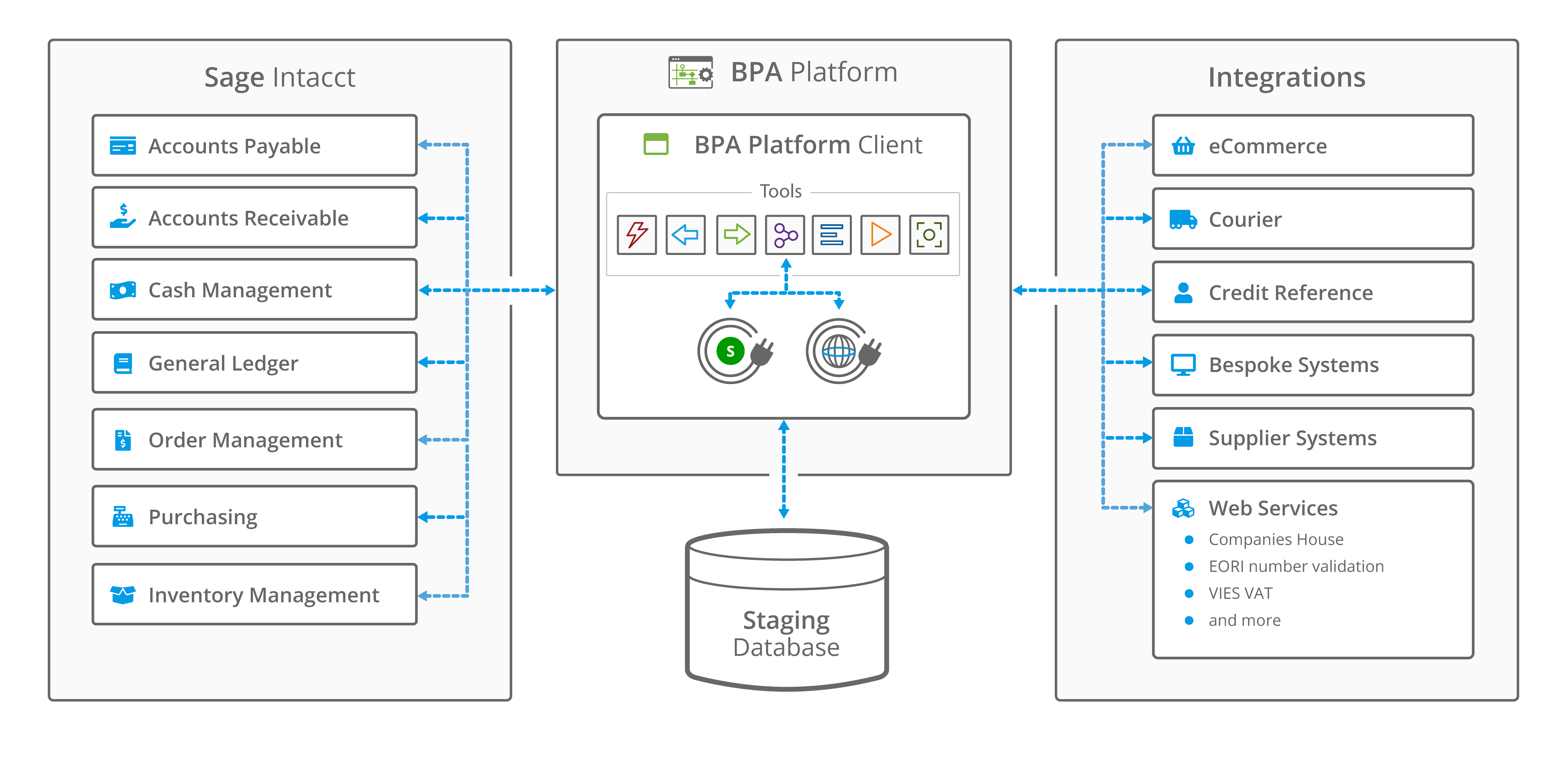
Image: A high-level system architecture overview of Sage Intacct integration with BPA Platform
Project management for a successful integration
Treating a Sage Intacct integration as a structured transformation roadmap rather than a purely technical exercise is one of the best predictors of success.
The process usually begins with discovery and requirements gathering. At this stage, the goal is not simply to identify what can be integrated, but to clearly document which systems need to connect, why they matter to the business, and what value the integration will create.
For example, an organisation might determine that linking its CRM to Sage Intacct will shorten the order-to-cash cycle, or that connecting payroll data will simplify compliance reporting. These insights help establish both the scope and the business case.
Once the requirements are clear, stakeholder alignment becomes essential. Finance, IT, and operations each view the integration differently, and bringing them together early ensures that expectations are realistic and priorities are shared.
Finance may be concerned with accuracy and compliance, while IT is focused on security and scalability, and operations may prioritise usability for frontline staff. When all of these groups are aligned, the integration is far more likely to deliver value across the organisation rather than serving just one department.
With stakeholders on board, attention turns to design and architecture. Here, technical decisions are made about whether to use the XML or REST API, whether middleware should handle the orchestration, or whether a direct API-to-API approach is appropriate.
This is also the stage where security protocols, data mapping strategies, and performance requirements are formalised. Getting the architecture right upfront reduces the risk of costly rework later.
Development and testing follow, and adopting an agile mindset pays dividends. Breaking the integration into sprints allows teams to deliver functionality in smaller increments, gather feedback quickly, and make adjustments without derailing the whole project.
Testing also needs to include running large data sets through the system, as well as checking how errors are logged and resolved. Sandbox environments play a critical role here, offering a safe space to test without impacting production data.
Deployment and rollout should rarely be fulfilled all at once. Instead, a phased deployment helps the organisation adapt gradually. Some companies start with a single workflow, such as syncing invoices, and expand to more complex processes once confidence builds.
Training end-users is just as important as the technical rollout, since finance and operations teams need to understand how the new integration changes their daily work.
Finally, post-go-live support ensures that the integration continues to deliver value after launch. Monitoring tools should be in place to track performance, error resolution procedures must be clear, and the system should be fine-tuned as usage grows. This ongoing attention transforms the integration from a one-off project into a long-term business asset.
Many organisations find that agile or hybrid project management methodologies fit these needs best. Agile provides the flexibility to adapt as new requirements surface, while a hybrid approach balances agility with the discipline required for financial systems.
Either way, treating integration as a structured, collaborative project rather than an ad-hoc IT task is what allows it to deliver sustainable success.
“The implementation lifecycle for a Sage Intacct project has completely changed. We’ve moved from a six-month project to a matter of weeks. Prior to BPA Platform, the development team would discuss the requirements, start building code and then carry out testing. It was a lengthy process, often quite expensive and introduced an element of risk, as they were starting from scratch. However, with BPA Platform, we now have a platform that we know we can rely on and potentially reuse elements. Then there are all the connectors for BPA Platform which enable us to easily connect to third-party systems without the headache of contacting the developers and writing something different each time.”
Dan Clibbens, Operations Director, Percipient
10-point Sage Intacct integration checklist
1. Define business objectives and goals
Clearly state why the integration is needed, whether it’s to eliminate manual entry, speed up month-end close, or improve compliance reporting. This helps align the project with measurable business outcomes.
2. Choose between XML, REST, or a hybrid approach
REST is faster and more modern, ideal for real-time workflows, while XML offers broader coverage and proven stability. Many organisations blend the two depending on requirements.
3. Map source and target fields with precision
Document exactly how data moves between systems, accounting for differences in field names, formats, and structures. Careful mapping prevents reconciliation issues later.
4. Address compliance and security requirements
Protect financial data with encryption, secure authentication, and access controls. Ensure compliance with regulations like GDPR if they apply.
5. Decide on custom build vs. middleware
Custom development offers flexibility but can be resource-intensive. Middleware platforms like BPA Platform provide prebuilt connectors and reduce maintenance overhead.
6. Use a sandbox environment for testing
Test the integration in a safe, isolated space where errors won’t impact live financial data. This allows for experimentation without business disruption.
7. Design robust error handling and logging
Anticipate failures by building in retries, alerts, and detailed logs. Ensure that errors are visible, actionable, and resolved quickly.
8. Test under real-world conditions
Go beyond basic validation by running large data sets, edge cases, and simulated failures. Stress testing helps identify weaknesses before launch.
9. Train finance and IT teams on workflows
Provide clear documentation and hands-on sessions so end-users understand how the integration affects their day-to-day tasks. Training drives adoption and reduces resistance.
10. Establish monitoring after launch
Set up ongoing monitoring to catch errors, track performance, and adapt as connected systems evolve. Treat the integration as a living system that requires continuous care.
Successful Sage Intacct integration
Sage Intacct integration is a strategic investment in how an organisation manages its financial and operational data.
Choosing between XML and REST is an important first step, but it is only part of the picture. True success comes from aligning integration with business objectives, ensuring data integrity, and managing the project with the same accuracy as any other enterprise initiative.
When done well, integration eliminates repetitive manual work, accelerates reporting cycles, and gives finance teams the real-time insights they need to make smarter decisions.
Whether it’s syncing CRM data to speed up billing, automating payroll feeds to reduce errors, or connecting eCommerce platforms for better revenue tracking, the benefits go well beyond efficiency. They create a foundation for scalability and growth.
The organisations that succeed with Sage Intacct integration are the ones that plan carefully, test thoroughly, and treat the project as an ongoing process rather than a one-time implementation.
Middleware platforms (such as BPA Platform), governance frameworks, and strong error-handling strategies all contribute to making the integration resilient over the long term.
Ultimately, integration should serve as an enabler, freeing finance and operations teams from data wrangling so they can focus on analysis, strategy, and driving the business forward. Combining the right technology choices with disciplined project management, means that Sage Intacct can become more than just an accounting platform; it can be the central hub of a connected, intelligent business ecosystem.
For more information on how BPA Platform’s data integration tools can help you integrate Sage Intacct with other business systems, download the brochure below or call us on +44(0) 330 99 88 700.